XC Camera Setup and OSD Guide
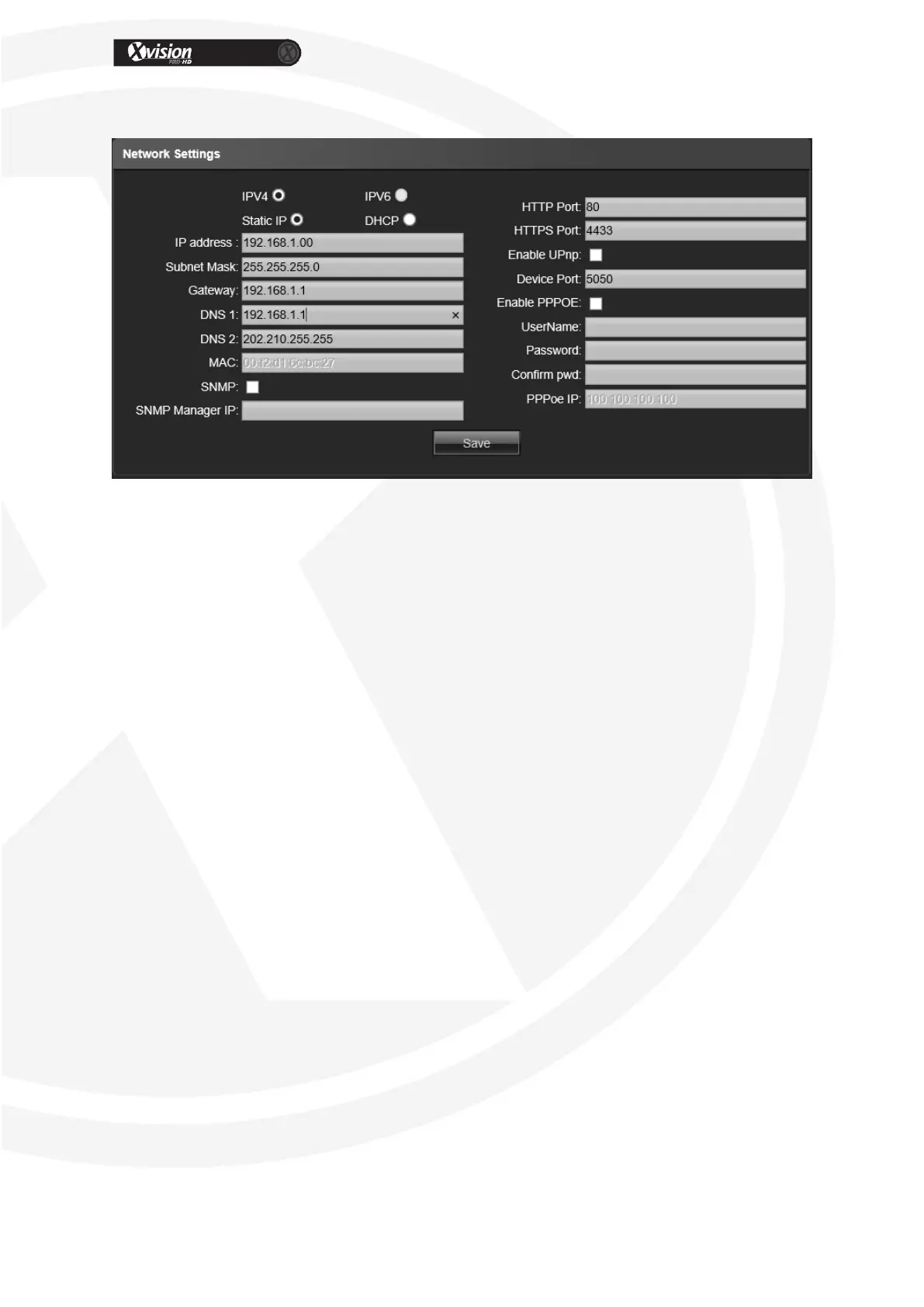
Network Settings
IPV4: IP protocol
IPV6: IP protocol
Static IP: The device IP address is permanent, manual input.
DHCP: When you enable DHCP your router’s DHCP server will get an IP address from
your router automatically
IP address: Manual input required.
Subnet Mask: Input the corresponding IP subnet mask.
Default Gateway: Input the corresponding gateway address, your routers IP address.
DNS 1: DNS server IP address, your routers IP address, if doing manually.
DNS2: DNS server standby IP address, not always required but add your routers IP
Address if doing manually
SNMP: Enable for networking monitoring
SNMP Manager IP: Input the corresponding SNMP manager IP address
HTTP Port: This default value is 80, you can change this.
HTTPS Port: This default value is 4433, you can change this.
Enable PPPOE: Enable if you are using PPPOE for your internet connection.
Device Port: This can be change, the default value is 5050.
Enable PPPOE: Click to enable PPPOE server
PPPOE server: Input the PPPOE server number
Username: Input the username
Password: Input the password
Confirm pwd: Input the password again to confirm it
After all parameter settings are completed, click “Save” these settings will take
immediate effect.


 To Next Page