INTRODUCTION
Yaesu FT-8800R Operating Manual (courtesy of W5JCK) Page 8 of 83
(3) Left and Right SQL Knobs
The SQL (Squelch) control is used to silence background noise on the adjoining receiver.
• Clockwise rotation decreases the squelch level.
• It should be advanced clockwise just to the point where the noise is silenced (and the
indicator on the display turns off), so as to provide the best sensitivity to weak
signals.
(4) Hyper Memory Buttons …
• Press and hold in one of these buttons for 2 seconds to store the current total
configuration of the radio into a special Hyper memory bank.
• Press the appropriate button momentarily to recall the desired Hyper memory.
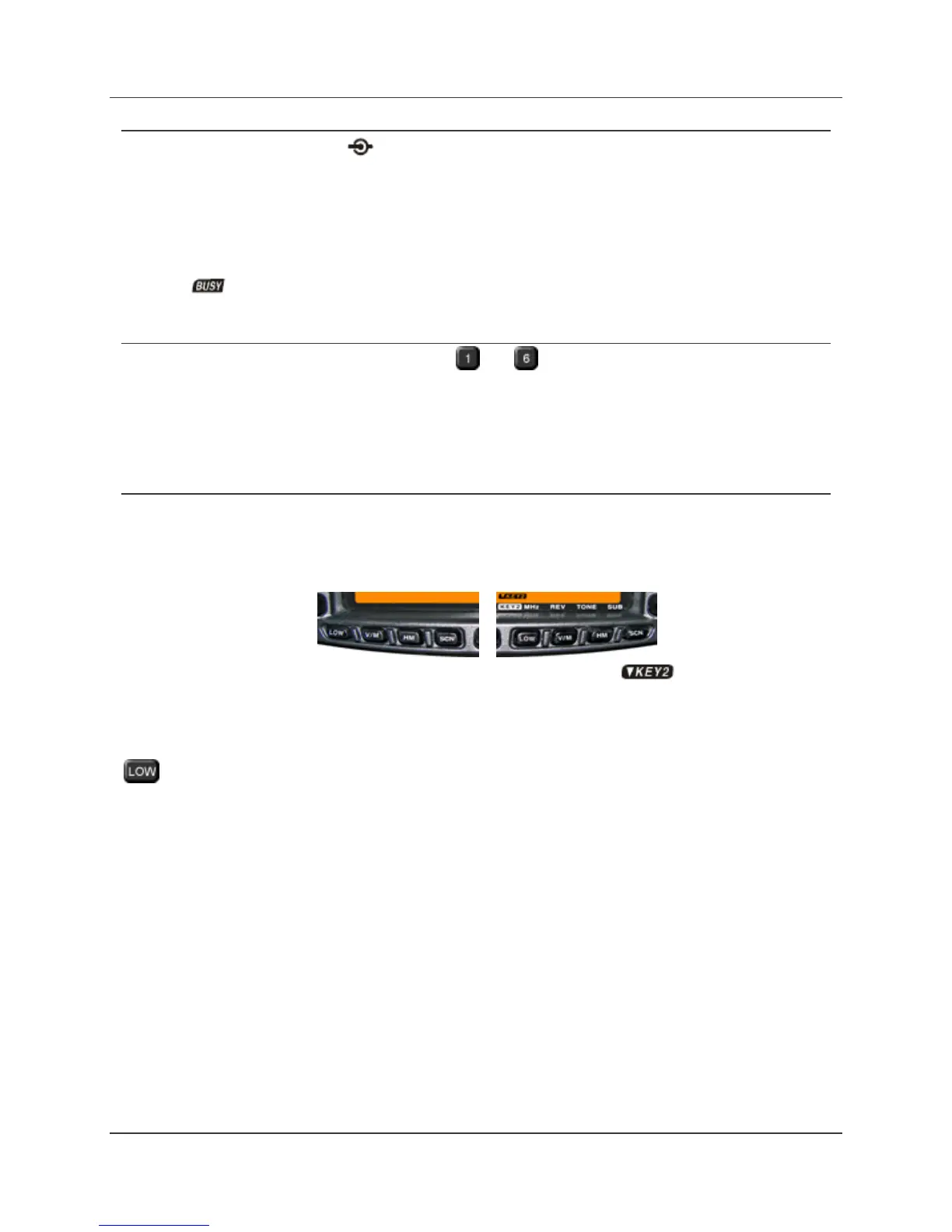
(5) Left and Right Side Key
Left Side Keys Right Side Keys
The left side keys function
as LOW, V/M, HM, and
SCN.
The right side keys may
be set to function as
LOW, V/M, HM, and SCN
(default) or as MHz, REV,
TONE, and SUB ( ).
Left Side Keys (always) and Right Side Keys when in Key Mode 1
Key: (Default)
• Press this key repeatedly to toggle the transmitter power output level of the adjoining
band:
LOW MID2 MID1 HIGH
• When the adjoining band is set to the Memory mode or Home Channel, press and
hold in this key for ½ second to switch the memory channel display between the
Frequency format and the Alpha-numeric Tag format.



 To Next Page
 Loading...







