FT-920 Operating Manual
18
4. CW Key/Paddle and Computer
Keying Interface Suggestions
Features
The FT-920 includes a host of features for the CW
operator, the functions of which will be detailed in the
“Operation” section later. These include:
A built-in electronic keyer with message
memory;
A front-panel KEY jack for connection of a keyer
paddle; and
A rear-panel KEY jack which may be connected
to another keyer paddle
or
a straight key, TNC,
or computer CW keying interface (for use with
contest software, etc.).
Both K
EY jacks on the FT-920 utilize “positive” key-
ing voltage. Key-up voltage is approximately +5V DC,
and key-down current is approximately 0.5 mA. When
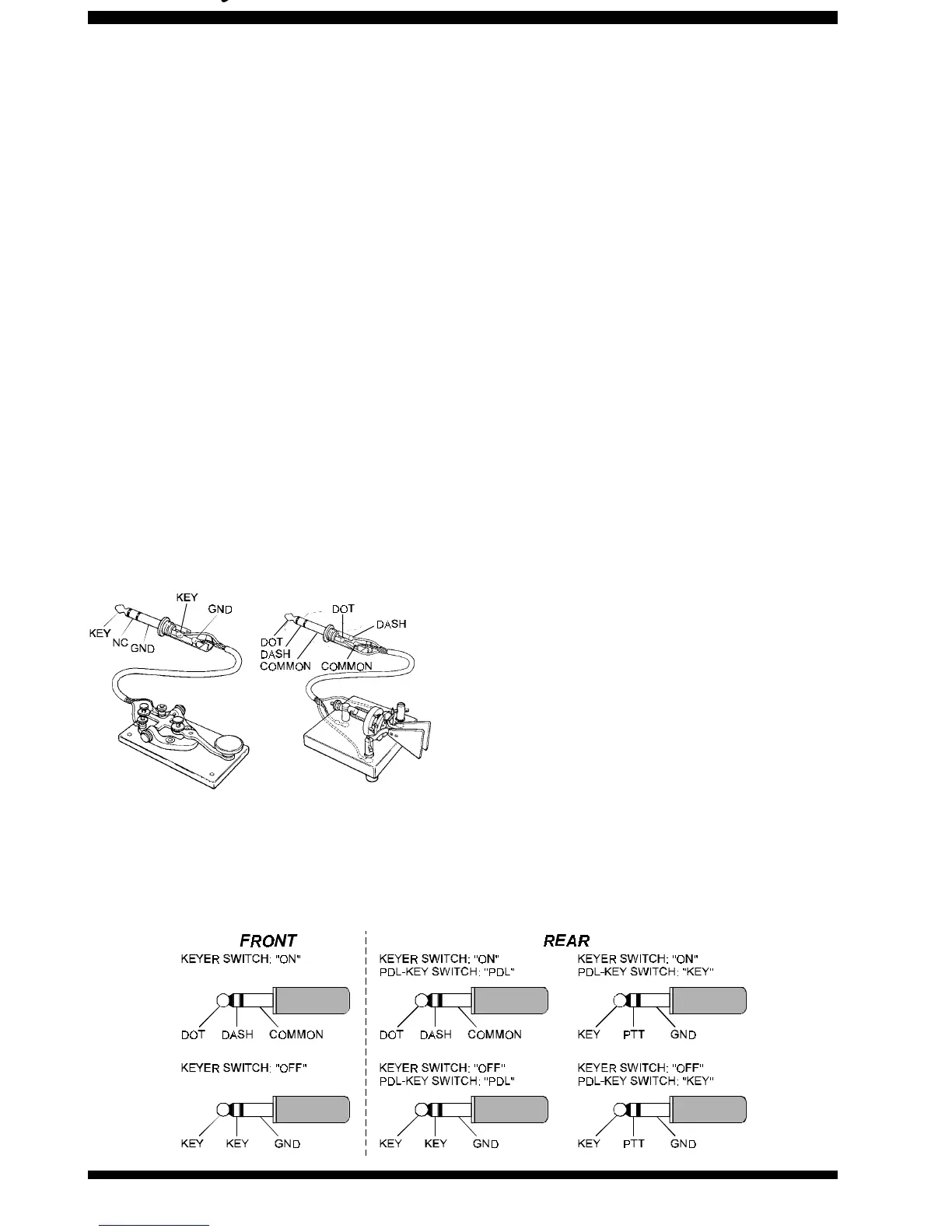
connecting a key or other device to the KEY jacks,
use
only
a 3-pin (“stereo”) ¼” phone plug; a 2-pin
plug will place a short between the ring and
(grounded) shaft of the plug, resulting in a constant
“key-down” condition in some circumstances.
Configuration Suggestions
For everyday operation using the internal elec-
tronic memory keyer, connect your paddle to the
front panel
KEY jack, and activate the front panel
KEYER switch. If you wish to keep the keyer
paddle’s cable out of the way, connect the plug,
instead, to the rear panel KEY jack, and set the
rear-panel PDL-KEY switch to PDL.
If two operators are using the FT-920 simulta-
neously (for a contest, Field Day, etc.), a second
keyer paddle may be connected to the
rear panel
KEY jack. Be sure that the rear panel’s PDL-KEY
switch is set to PDL so that both operators have
access to the internal electronic memory keyer,
and switch the front panel K
EYER switch on.
If two operators are using the FT-920 simulta-
neously, but both wish to use a straight key, “bug,”
or an outboard electronic keyer, the key plugs may
be inserted into the front and rear panel KEY jacks;
now turn the front panel’s KEYER switch off. Irre-
spective of the setting of the PDL-KEY switch, the
tip connections on both Key plugs will serve as
“Straight Key” lines for accommodating this appli-
cation.
If you are using a computer-driven CW keying in-
terface (with contest software), but want to be able
to send occasional “repeat” messages quickly
using the FT-920’s
internal
keyer, connect your
keyer paddle
to the
front panel
KEY jack, and the
keying interface
line (which emulates a straight
key) to the
rear panel
KEY jack. In this configura-
tion, set the rear panel’s PDL-KEY switch to the
KEY position, which re-configures
only
the rear
panel’s KEY jack to accept a “Manual” keying line.
Note that the rear-panel KEY jack carries the capabil-
ity to support an external PTT line, if provided by your
external keyer, TNC, or computer keying interface.






 To Next Page