DTX-MULTI 12
50
Saving a File
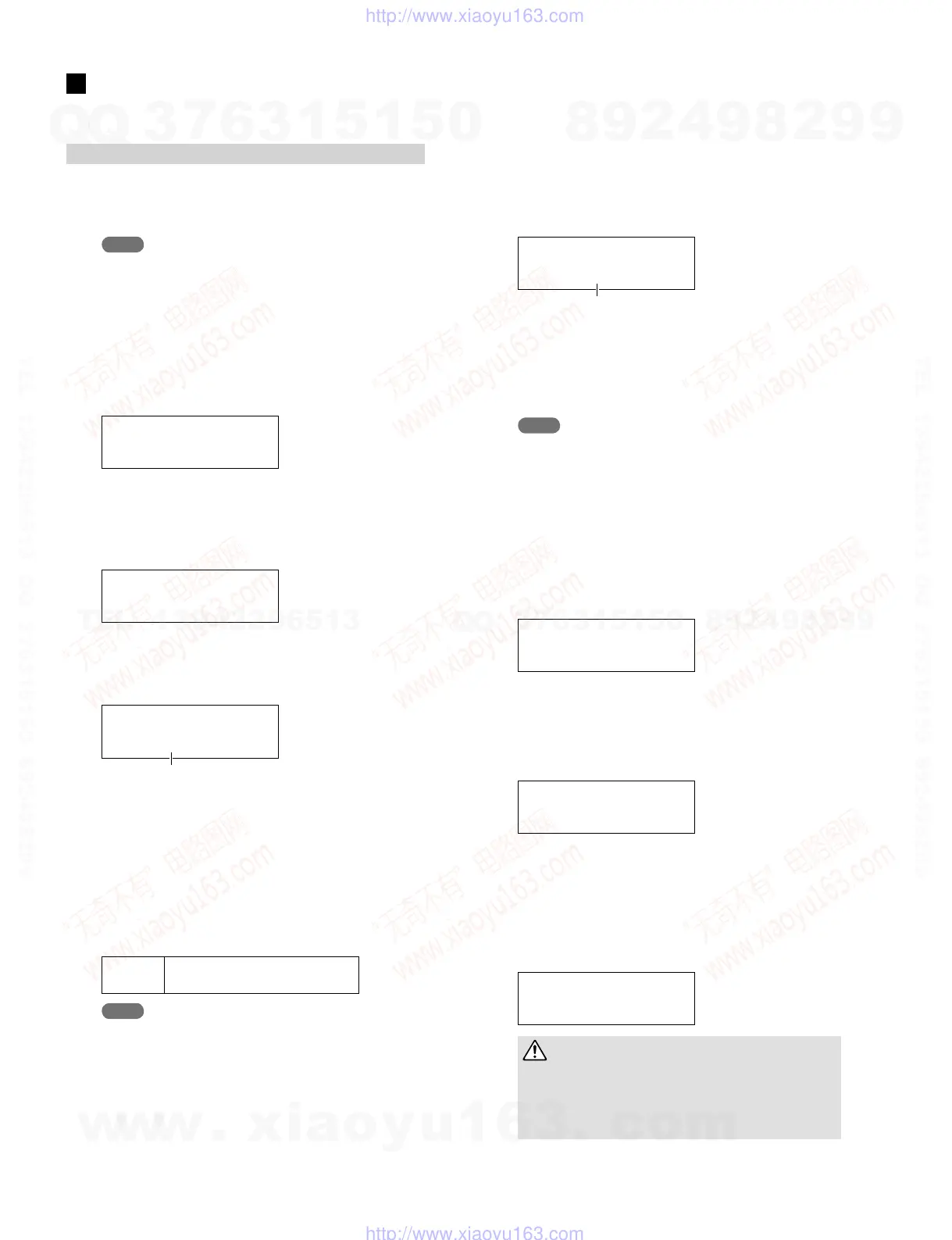
1
PlugaUSBmemorydeviceintotheUSBTODE-
VICEportonthesidepanel.
NOTE
· Certain types of USB memory device cannot be used as they
are. In that case, format the USB memory device before using it.
(Refer to page 58)
2
Pressthe[UTILITY]buttontoaccesstheUTILITY
settingarea,usethe[B]/[C]buttonstonavigate
totheFILEsection(UTIL7),andthenpressthe
[ENTER]button.
UTIL7
FILE
3
NavigatetotheSaveFilepage(UTIL7-1),using
the[<]/[>]buttonsifnecessary,andthenpress
the[ENTER]button.
UTIL7-1 <FILE>
Save File
4
Press the [–/DEC] or [+/INC] button to select the
type of file to be saved.
UTIL7-1-1 <FILE>
Type=All
File type
· All ............... All user data – i.e., all User kits, all waves,
all User patterns, all User triggers, and util-
ity settings.
· AllKit ......... All User-kit data
· AllWave ...... All wave data
· AllPattern ... All User-pattern data
· AllTrigger ... All User-trigger data
· Utility ......... Utility settings
Settings
All, AllKit, AllWave, AllPattern,
AllTrigger, Utility
NOTE
· If you select “AllPattern” despite User patterns having not yet
being created, a “No Data” error message will be displayed and
no data will be saved.
· If you select “AllWave” despite all waves still being empty, a “No
Wave Data” error message will be displayed and no data will be
saved.
5
Specify a file type using the Type parameter, and
press the [ENTER] button.
The Name page (UTIL7-1-2) will open. Set a name for
the fi le to be saved.
UTIL7-1-2 <FILE>
Name=[ALL_DATA]
File name
The [<]/[>] buttons can be used to move the fl ashing cur-
sor, and the [-/DEC] and [+/INC] buttons can be used to
scroll through the available characters. File names can be
up to eight characters long.
NOTE
· Any space characters included in fi le names will be automatically
replaced with “_” (i.e., an underscore).
6
When you have set a file name, press the [EN-
TER] button.
You will be asked to confi rm that the data is to be saved.
To proceed, press the [ENTER] button. Alternatively,
you can press the [EXIT] button to return to Step 5 above
without saving.
Save File
Are you sure?
If a fi le of the same name already exists, you will be
asked to confi rm whether it is to be overwritten as shown
below. If you want to set a different fi le name to avoid
overwriting, press the [EXIT] button to return to the
Name page (UTIL7-1-2).
Save File
Overwrite?
7
Press the [ENTER] button to save the file.
The following message will be displayed as the data is
being saved. If you press the [EXIT] button at this time,
the save process will be aborted and the display will
return to the Name page (UTIL7-1-2).
Now saving...
[EXIT] to cancel
CAUTION
• Do not unplug the USB memory device from the USB TO
DEVICE port or turn off either the memory device or the DTX-
MULTI 12 while data is being saved. Failure to observe this
precaution can lead to the memory device or the DTX-MULTI
12 being permanently damaged.
SAVING and LOADING A FILE
w
w
w
.
x
i
a
o
y
u
1
6
3
.
c
o
m
Q
Q
3
7
6
3
1
5
1
5
0
9
9
2
8
9
4
2
9
8
T
E
L
1
3
9
4
2
2
9
6
5
1
3
9
9
2
8
9
4
2
9
8
0
5
1
5
1
3
6
7
3
Q
Q
TEL 13942296513 QQ 376315150 892498299
TEL 13942296513 QQ 376315150 892498299
http://www.xiaoyu163.com
http://www.xiaoyu163.com



 To Next Page