23
Amp Multi (Chorus)
Multi effect consisting of Comp + Amp Simulator + Chorus + Delay + Reverb. Mainly used for direct connection to
power amp. Speaker simulator allows direct recording.
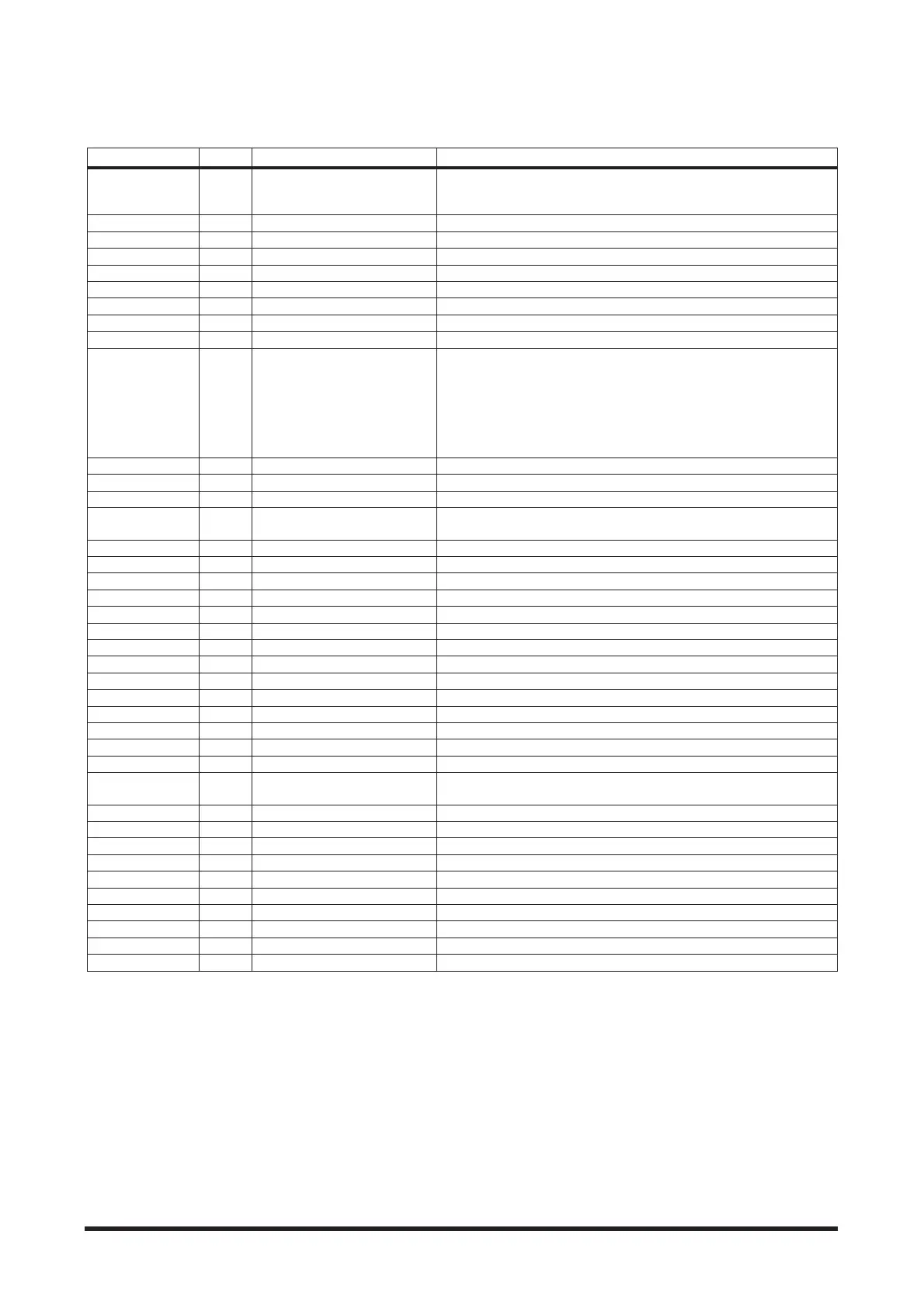
Parameter Display Range Description
Amp Type TYPE
Heavy1, Heavy2, Lead1, Lead2,
Drive1, Drive2, Crunch1,
Crunch2, Clean1, Clean2, Solid
Amp type
Gain GAIN 0.0 to 10.0 Adjusts the amount of distortion
Master MSTR 0.0 to 10.0 Adjusts the volume
Tone TONE 0.0 to 10.0 Adjusts the tone
Treble TRE 0.0 to 10.0 Adjusts level of high range frequencies
High Middle HMID 0.0 to 10.0 Adjusts level of upper mid frequencies
Low Middle LMID 0.0 to 10.0 Adjusts level of lower mid frequencies
Bass BASS 0.0 to 10.0 Adjusts level of low frequencies
Presence PRE 0.0 to 10.0 Adjusts level of extremely high frequencies
Speaker
Simulator
SP
Off, American 412, British 412,
Modern 412, YAMAHA 412, Hybrid
412, American 212, British 212,
Modern 212, YAMAHA 212, Hybrid
212, American 112, Modern 112,
YAMAHA 112, Hybrid 112, 410,
210
When using a line connection to connect directly to a mixer, this can be
used to simulate the natural characteristics of a speaker giving the tone
a more natural sound
N. G. Threshold NGTH 0.0 to 10.0 Level at which the noise gate activates
N. G. Attack NGAT 0.0 to 120 ms Time required for the noise gate to open after signal exceeds threshold
N. G. Hold NGHL 0.02 to 2040 ms Time noise gate stays open
N. G. Decay NGDC 6 to 44500 ms
Time required for the noise gate to close after signal goes below thresh-
old
Comp. Threshold CTHR -54.0 to 0.0 dB Level at which compressor activates
Comp. Ratio CRAT 1:1 to ∞:1 Compression ratio
Comp. Attack CATT 0 to 120 ms Time required for compressor to peak after exceeding threshold
Comp. Release CREL 6 to 11500 ms Time required for compressor to terminate after going below threshold
Comp. Knee CKNE Hard, 1 to 5 Adjusts the width of the gain curve just above the threshold
Comp. Gain CGAI 0.0 to 18.0 dB Output level
Wave WAVE Sine, Triangle Chorus modulation waveform
Chorus Delay CHDT 0.0 to 30.0 ms Chorus delay time
Chorus Speed CHSP 0.0 to 10.0 Chorus speed
Chorus Depth CHDP 0.0 to 10.0 Modulation depth
Chorus Level CHLV 0.0 to 10.0 Chorus level
FB. Delay DTFB 0.0 to 1000.0 ms Loop delay time
Tap L DT.L 0 to 100 % Left channel delay output time (see page 31)
Tap R DT.R 0 to 100 % Right channel delay output time (see page 31)
Delay FB. Gain D.FB -99 to 99
Feedback gain (plus values for normal-phase feedback, minus values for
reverse-phase feedback)
Delay High D.HI 0.1 to 1.0 Delay high-frequency feedback ratio
Delay Level DLVL 0.0 to 10.0 Delay level
High Pass Filter DHPF Thru to 8.00 kHz High-pass filter cutoff frequency. For delay, reverb
Low Pass Filter DLPF 50.0 Hz to Thru Low-pass filter cutoff frequency. For delay, reverb
Reverb Ini. Delay RIDL 0.0 to 500.0 ms Initial delay before reverb begins
Reverb Time RT 0.3 to 99.0 s Reverb time
Reverb High R.HI 0.1 to 1.0 ms High-frequency reverb time ratio
Reverb Diffusion RDIF 0 to 10 Left and right reverb spread
Reverb Density RDNS 0 to 100 Reverb density
Reverb Level RLVL 0.0 to 10.0 Reverb level



 To Next Page