CONNECTIONS
Connecting external components
En 31
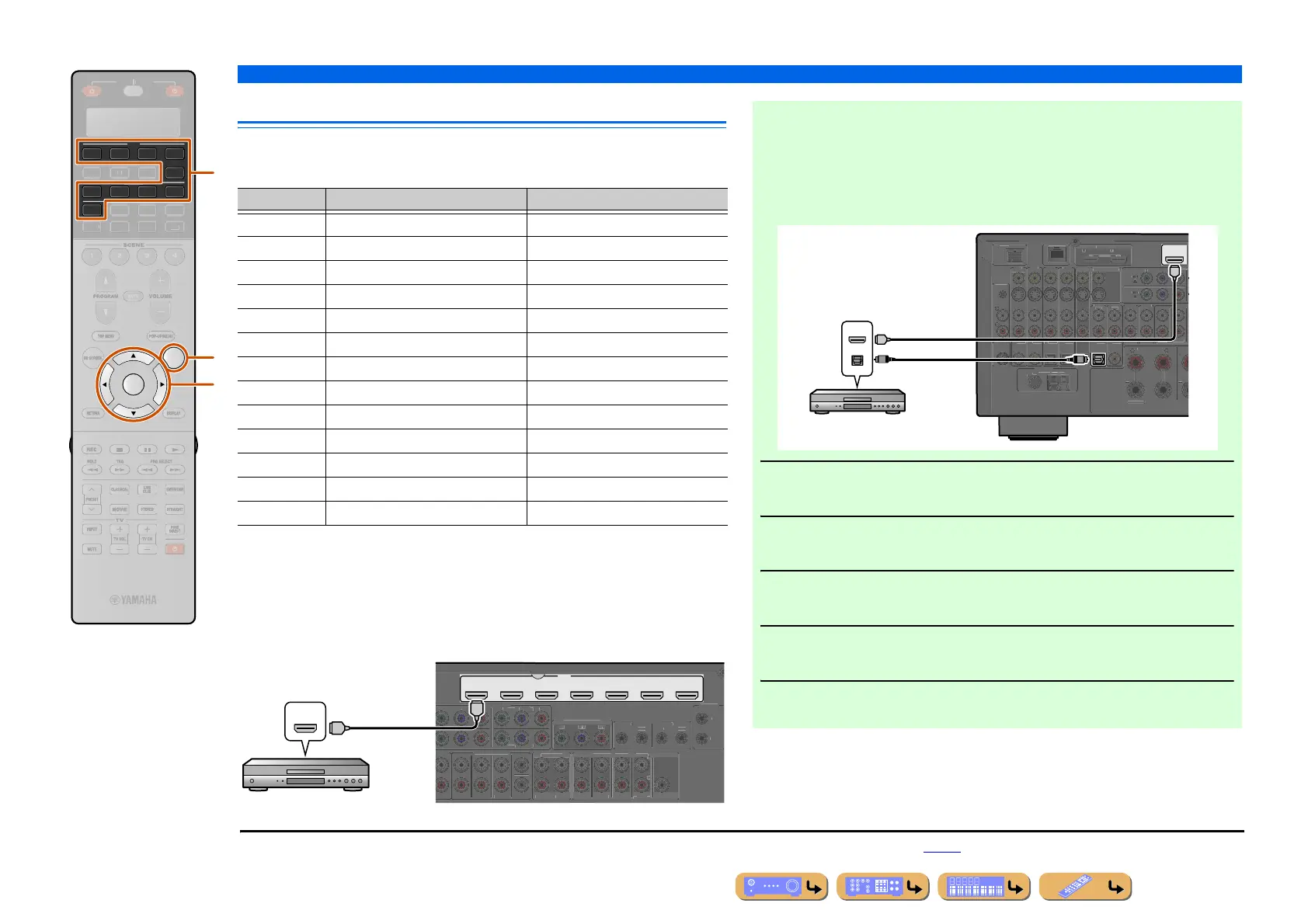
Connecting BD/DVD players and other devices
This unit has the following input jacks. Connect them to the appropriate output jacks on
the playback devices such as BD/DVD players.
■
Connecting BD/DVD players and other devices with
HDMI cable
Connect the device with an HDMI cable to one of the HDMI jacks of the AV1-7. The
HDMI IN jack of the VIDEO AUX on the front panel can also be used.
Select the input source (AV1-7 or V-AUX) that the playback device is connected to for
playback.
AV
4
4
31
2
V-AUX
4
31
2
PHONO
OPTION
ENTER
R
E
ECEIVE
B
LTI
ET
D
K
IRI
A
p
i
d
Input jack Video input Audio input
AV 1 J1 HDMI/Component video/S-video/Video HDMI/Coaxial digital/Analog (Stereo)
AV 2 J1 HDMI/Component video/S-video/Video HDMI/Coaxial digital/Analog (Stereo)
AV 3 J1 HDMI/Component video/S-video/Video HDMI/Optical digital/Analog (Stereo)
AV 4 J1 HDMI/Component video/S-video/Video HDMI/Optical digital/Analog (Stereo)
AV5 HDMI HDMI
AV6 HDMI HDMI
AV7 HDMI HDMI
AUDIO1 — Optical digital/Analog (Stereo)
AUDIO2 — Coaxial digital/Analog (Stereo)
AUDIO3 — Analog (Stereo)
AUDIO4 — Analog (Stereo)
VIDEO AUX HDMI/S-video/Video HDMI/Optical digital/Analog (Stereo)
PHONO — Analog (for turntable connection only)
AV 1 AV 2 AV 3 AV 4
HDMI
AV 5 AV 6 AV 7
(1 BD/DVD)
V
DI
4
FRONT
SURROUN
SUR. BACK
SUBWOOFE
ENTE
M
LTI
H INP
T
COMPONENT VIDEO
ONITOR OUT/ZONE OU
NE
PRE
T
Z
NE
FRONT/
F. PRESENCE
D
SURROUN
SUR. BACK
ENTE
REAR
1
T
REM
T
TRI
ER
T
12
.1
.
Z
NE
HDMI
HDMI
HDMI
HDMI output
BD/DVD player
■ Receiving video signals from the HDMI jack and audio signals
from jacks other than HDMI
This unit can use the AV1-4 or AUDIO1-4 input jacks to receive audio signals from
other input jacks.
For example, if a playback device cannot produce audio signals from an HDMI jack,
use the following method to change the audio input.
1
Press dInput selector to choose an input source (AV1-4, V-AUX,
AUDIO1-4, or PHONO).
2
Press pOPTION to enter the Option menu.
3
Press iCursor B / C to choose “Audio Select” and press
iENTER.
4
Press iCursor D / E to choose an audio input jack and press
iENTER.
5
Once setup is complete, press pOPTION to close the Option menu.
AV 1
(1 BD/DVD)
NE2
Z
NE
DMI OUT
EXTRA SP
PH
N
ND
D
K NETW
R
AV
AXIAL
AXIAL
PTI
AL
PTI
AL
PTI
AL
UDI
AUDI
2
UDI
3
UDI
4
R
N
RR
N
ULTI
MP
NE
AXIA
AV
R
R
ELE
TABL
IRIU
HD Radio
N
(4 RADI
)
1
V 2
M
N.
T
Z
NE
HDMI
OPTICAL
HDMI
HDMI
O
O
HDMI/Audio (Optical)
output
BD/DVD player
J
1 : Coaxial digital and optical digital jack function can be assigned to other AV jacks using “Input Assignment.” Refer to “Input Assignment” for details (☞p. 124).












 To Next Page