INTRODUCTION
Part names and functions
En 13
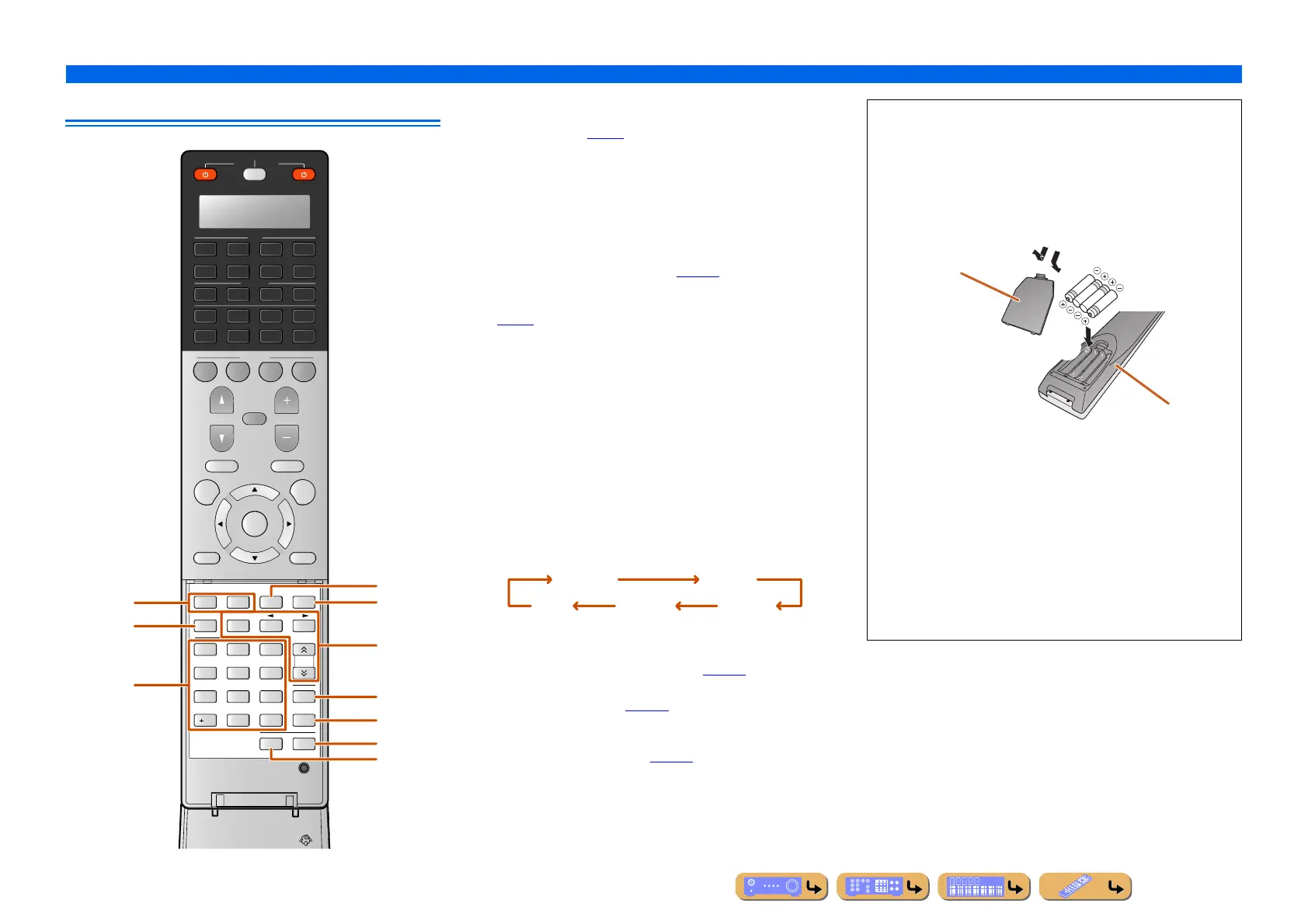
Remote control with the cover open
t Sound selection keys
Switch between the current sound field effect (sound program) and the
surround decoder (☞
p. 51).
u INFO
Cycles the information displayed on the front panel display (the name
of the currently selected input source, the sound program, the
surround decoder, the FM/AM tuner frequency, etc.).
v Numeric keys
Enter numbers.
w PARTY
Switches the party mode on and off (☞
p. 149).
x HDMI OUT
Switches the output jack connected to an HDMI compatible TV
(☞
p. 48).
y Radio control keys
Operates the FM/AM tuner or SIRIUS Satellite Radio tuner. These
keys are used when using the tuner input.
z SLEEP
Switches this unit to standby mode automatically after a specified
period of time has elapsed (sleep timer). Press this key repeatedly to
set the time for the sleep timer function.
The SLEEP indicator lights up when the sleep timer is on.
A LEVEL
Adjusts the output level for each speaker (☞
p. 114).
B SETUP
Setup this remote control (☞
p. 130).
C ZONE
Switches the zone to be operated by the remote control between the
Main zone, Zone2, and Zone3 (☞
p. 149).
2
3
SOURCE
RECEIVER
AV
AUDIO
SCENE
MUTE
RETURN DISPLAY
TOP MENU
POP-UP/MENU
VOLUME
PROGRAM
1
4
4
31
2
75
6
V-AUX
4
31
2
USB
MULTI
NET
PHONO
TUNER
DOCK
4
ON SCREEN
OPTION
ENTER
FM
MEMORY
AM
INFO
3
TUN./CH
21
6
9
8
SLEEP
7
ENT
0
LEVEL
10
PARTY
ENHANCER
HDMI OUT
SUR.
DECODE
ZONE
SETUP
4
5
SIRIUS
CATEGORY
[ A ]
u
v
t
y
z
x
A
B
C
w
MEMORY Presets radio stations.
FM Sets the FM/AM tuner band to FM.
AM
(CATEGORY D / E)
Sets the FM/AM tuner band to AM.
Selects a category of the SIRIUS Satellite Radio
channel.
TUN./CH H / I Changes tuning frequencies or SIRIUS Satellite
Radio channels.
120min. 90min.
60min.30min.Off
■ Installing batteries in the remote control
When inserting batteries in the remote control, remove the
battery compartment cover from the reverse side of the remote
control, and insert four AAA batteries into the battery
compartment so that they match with the polarity markings (+
and -).
Replace the batteries with new ones if the remote control can
only be operated within a narrow range.
NOTE
If there are remote control codes for external components
registered to the remote control, removing the batteries for more
than 2 minutes, or leaving exhausted batteries in the remote
control, may clear the remote control codes. If this should occur,
replace the batteries with new ones, and set the remote control
codes.
b
a
c
Battery compartment
cover
Battery compartment












 To Next Page