En 98
SETUP
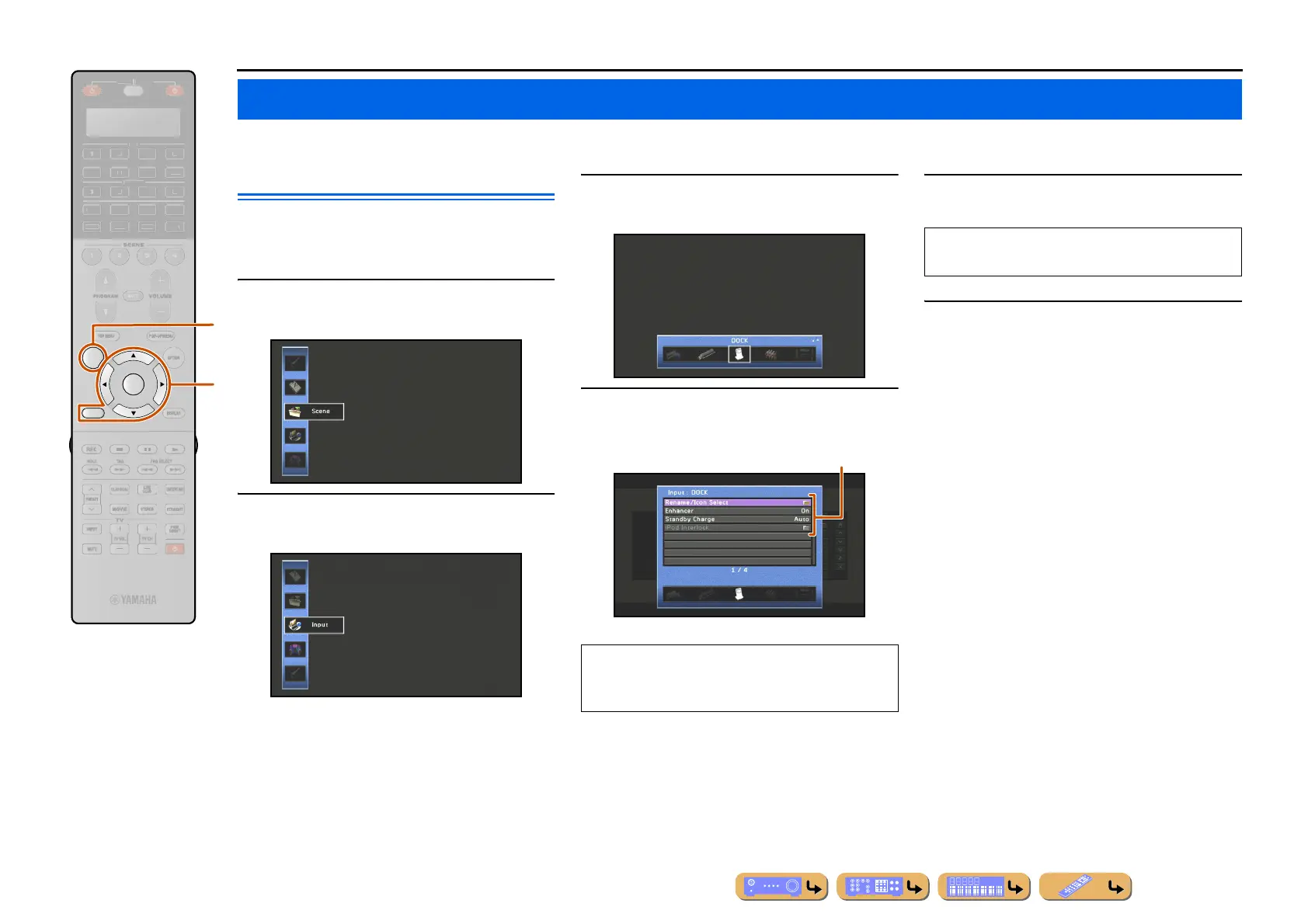
Settings, such as the name of an input source or the icon displayed for an input source can be changed from the Input menu.
Configuring input sources
The name of an input source and its icon, as well as other
input source settings, can be changed from the Input
menu displayed on the TV screen.
1
Press hON SCREEN.
2
Use iCursor B / C to select “Input” and
press iENTER.
3
Use iCursor D / E to select an input source
to be configured and press iCursor B.
4
Use iCursor B / C to select an item and
press iENTER.
5
Use iCursor B / C to adjust the setting.
6
Press hON SCREEN to close the menu.
Configuring input sources (Input menu)
RETURN
ON SCREEN
ENTER
R
E
ECEIVE
DI
-A
B
LTI
ET
H
N
D
K
IRI
A
i
h
If the selected item contains additional items, use
iCursor B / C to select the desired item and press
iENTER.
Settings
Pressing iRETURN displays the previous menu
screen. Repeat steps 4 to 5 to adjust multiple settings.












 To Next Page