EasyManua.ls Logo

Yamaha TX 816 - Page 43

Yamaha TX 816
79 pages
Print Icon
To Next Page IconTo Next Page
To Previous Page IconTo Previous Page
Loading...
•
THE
MUSIC
COMPOSER SYSTEM
-MIDI
CHANICL SETTINGS-
CHI CH2
CH3 CH4 CH5 CH6 CH7
CH6
W" s
*
6
:-.-,u.
c
1
.-
u
-
:j u (J LI-
•
J-
]
mo
Mo Mo
»
f
c
nMioi
IN
OUT
IN*
^
nor
<pO
Imidi
J
OUT
The
Music
Composer
Program
enables
you to actually
compose
music in
the CX5M,
by entering
data
for
individual
notes,
voice
changes,
tempo changes,
dynamics,
and so on. The
music
can
be composed in
up to eight
monophonic
parts
(or smaller
number
of
polyphonic
parts,
as
long
as no
more than
8 notes
are
played simul-
taneously).
But
the CX5M has
only one MIDI
output- -how
can
each of the
eitht
parts
be played on
a
separate
TF1
module? The
solution
is
simple...
The
Music
Composer
owner's
manual
givesj
full
instructions
on
how to
insert MIDI
channel
numbers
into the program.
With
a composition
scored for eight parts,
the
obvious
course is
to
insert
a MIDI
channel
number
at
the
beginning
of each
part
(mathcing
the parts
numbers,
1 thru
8),
and
switch the
corresponding TF1
modules
to
receive
MIDI
data on the same
channel,
using the
Set Receive
Basic
Channel
sub- mode.
The CX5M
can then
act as a sequencer
to control the TX816,
instead of
using
its
own
built-in FM
Tone
Generator
Module
to
create
sounds. The FM
voices
on the
TX81
6
are
each created
by six
operators
and
give
much richer
tones
than the
4-
operator
voices in the CX5M,
so your FM
Music
compositions
will be
greatly
en-
hached.
You
also have
a total choice
of
256 voices in
the TX816, as
opposed to
only
46
in the CX5M.
You can
allocate
each of the
eight
parts to a
different
MIDI
channel,
and
insert MIDI
commands
to change
the voices
on the TX816
at any
point
in the
score.
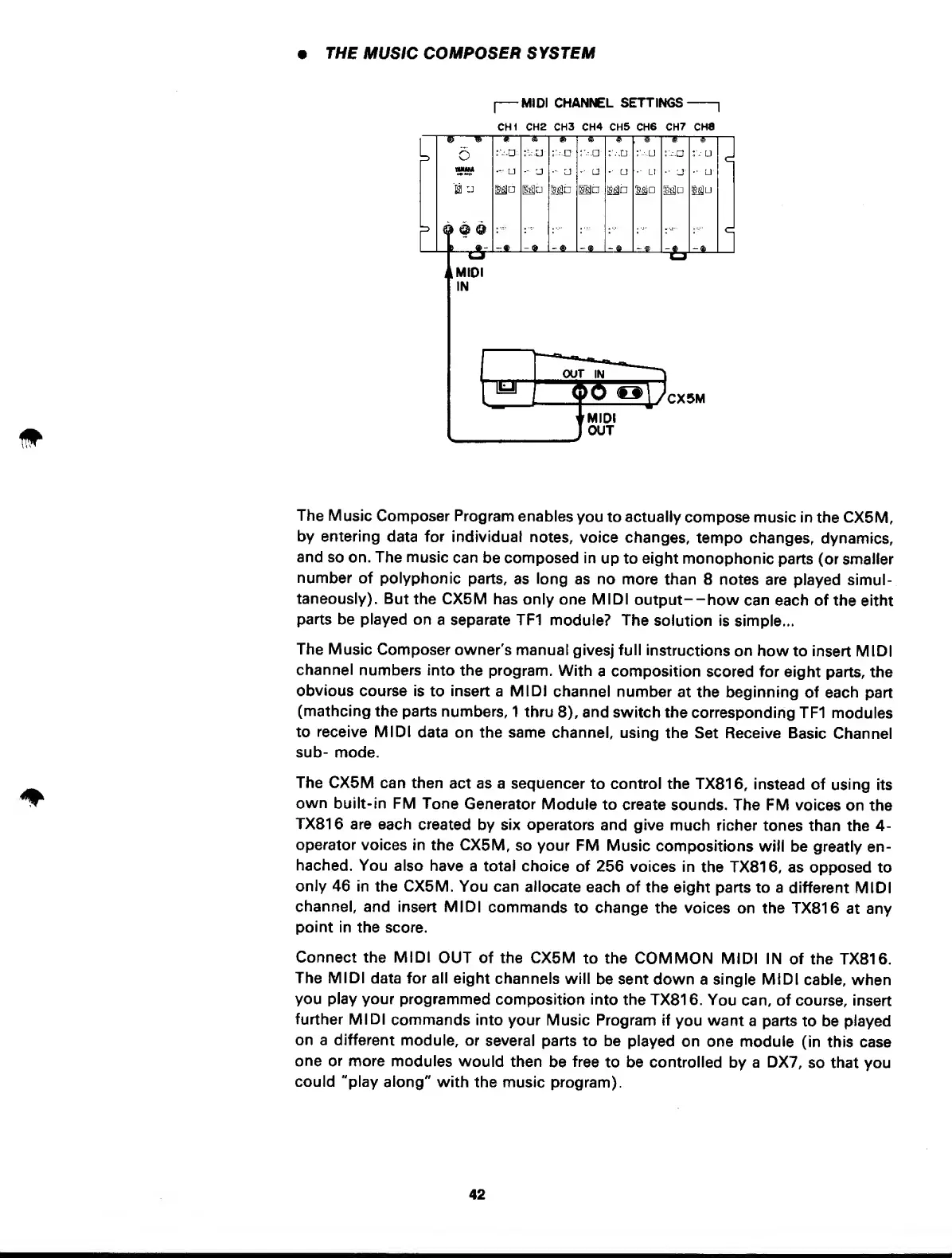
Connect the MIDI
OUT of the CX5M
to the
COMMON
MIDI IN of
the TX816.
The MIDI
data for all
eight channels
will
be
sent
down a single MIDI
cable, when
you play your
programmed
composition
into
the TX816.
You
can, of course,
insert
further MIDI
commands
into your Music
Program if
you
want
a parts
to be
played
on a different
module, or
several
parts to be
played
on one
module
(in this
case
one or
more
modules
would then
be
free
to be controlled
by a
DX7,
so
that
you
could "play
along"
with the
music program).
42