PRODUCT OVERVIEW
JH Series Operation Manual 27
12/05
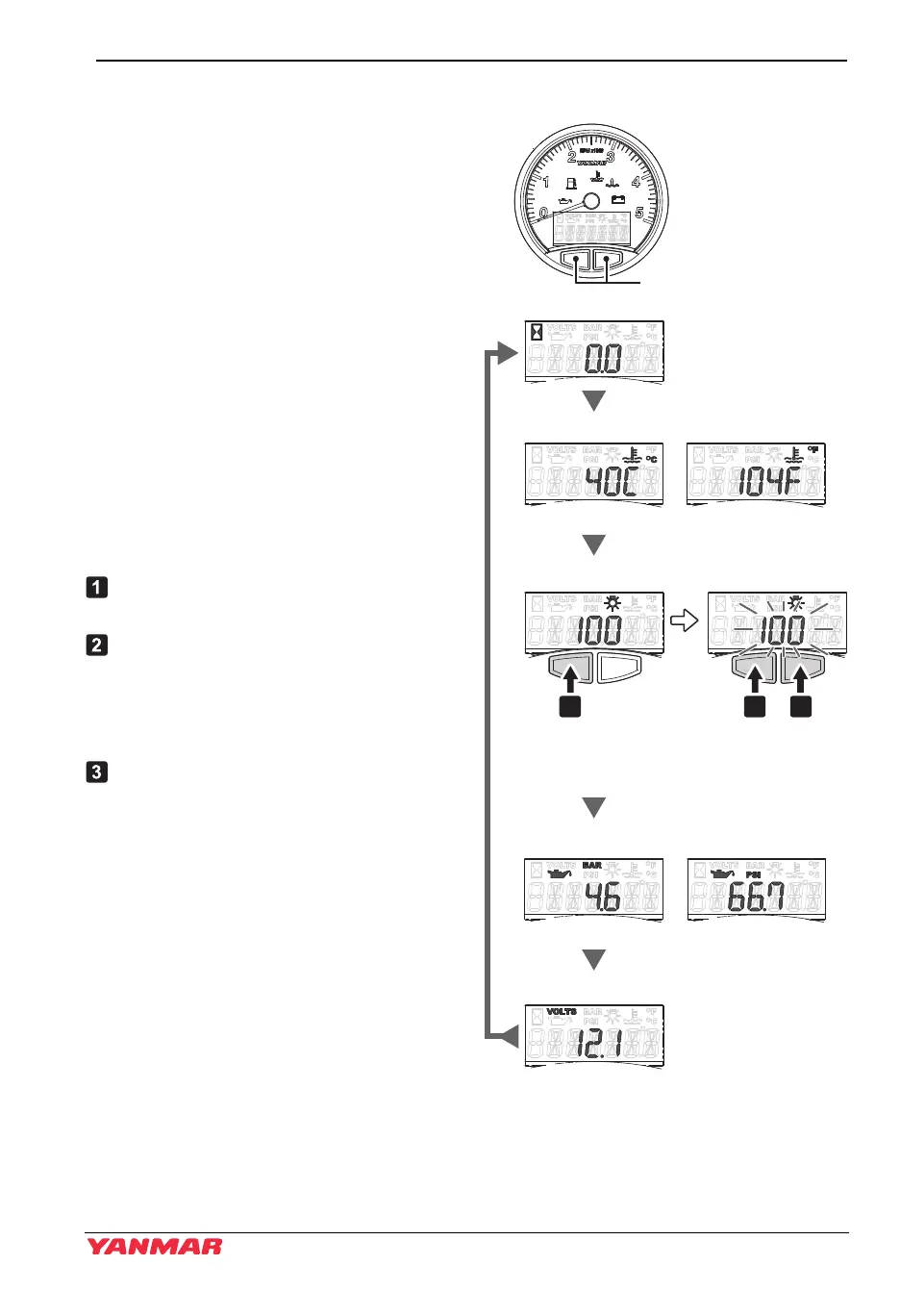
LCD control (hourmeter, coolant temperature, display brightness, oil pressure, battery voltage)
You can switch (scroll) between displays
by pressing the buttons on the bottom.
• Switching screens by pressing the
right button (Pressing the left button
switches the screens in the opposite
direction.)
Press the power switch.
• After 4 seconds, the LCD shows the
hourmeter.
Pressing the right button on the bottom of
the LCD shows the temperature display.
Select between Metric units (°C) and
Imperial units (°F) at the "System Units
screen" on the next page.
Pressing the right button again shows the
LCD brightness settings.
To set the brightness of the backlight:
Press the left button continuously and
the digits of the LCD start flashing.
In this condition, press the right button
to decrease the brightness and the left
button to increase the brightness.
(The brightness changes in 6 steps of
20 %.)
To set the desired brightness, do not
touch the buttons for 3 seconds.
Note: Continuously pressing means
holding the button for approx. 2
seconds.
Next, press the right button to show the
pressure display. Select between Metric
units (BAR) and Imperial units (PSI) at the
"System Units screen" on the next page.
Press again to show the battery voltage.
Pressing the button once more returns the
display to the initial hourmeter.
Figure 1
Figure 15
Scroll
Push and hold
(display will blink when
ready)
Scroll
100, 80, 60, 40, 20, 0
(value will be set after
3 seconds)
Return to hourmeter
EnglishMetric
EnglishMetric
055130-00EN00
1 2 3
Engine hour ( >300 min
-1
)
Coolant temperature
Backlighting Brightness
Oil pressure
Battery voltage
JH5_EN_OPM.book 27 ページ 2013年8月8日 木曜日 午前9時23分



 To Next Page