AFFZP0BB – ACE3 – User Manual Page – 127/139
Program Vacc
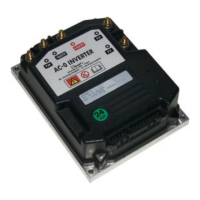
Choose “Function” “Program Vacc” menu.
When “Acquire” is pressed, the PROGRAM VACC procedure starts:
Select the Enable switch, if any;
Select the direction switch (either forward or backward);
Depress the pedal to its maximum excursion.
Displayed values will vary accordingly to operator inputs.



 To Next Page