INSTALLATION INSTRUCTIONS AND FIRST-TIME SET-UP
Axio Observer Fitting the TFT display to the 7, 7 materials stand ZEISS
12/2016 431004-7244-001 59
4.12 Fitting the TFT display to the 7,
7 materials stand
Switch off the microscope before
fitting the TFT display.
• Prior to fitting the TFT display insert the supplied
spacer disks into the stand recesses.
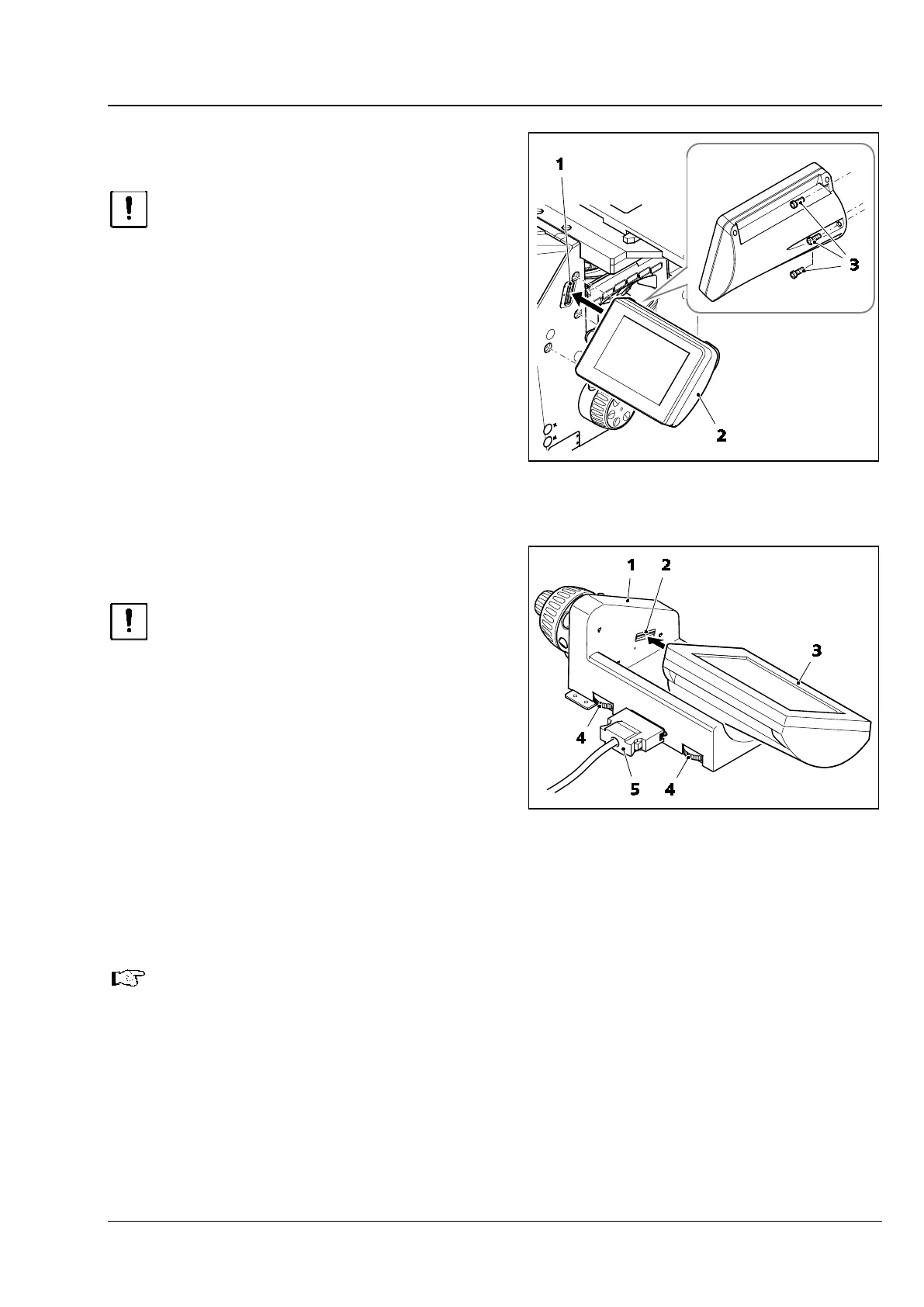
• Place the TFT display (Fig. 41/2) on the right side
of the stand. Ensure that the pin contact
(Fig. 41/1) is inserted precisely into the relevant
opening.
• Screw the TFT display tight using the three
screws (Fig. 41/3).
The stand and TFT display are electrically
connected via the pin contact.
4.13 Fitting the TFT display to the
docking station
Switch off the microscope before
fitting the TFT display and docking
station.
• If the TFT display is fitted to the 7, 7 materials
stand, it must first be removed from the stand.
• After this, cover the screw holes and the plug
contact opening on the stand with the cover
caps supplied.
• Put the TFT display (Fig. 42/3) on the docking
station (Fig. 42/1) and screw it on, using the
long Allen screwdriver provided. Ensure that the
pin contact (Fig. 42/2) is inserted precisely into
the relevant opening.
• To connect the docking station to the 7, 7 materials stand, the appropriate plug-in module must be
installed at the rear of the stand.
The plug-in module should only be installed by ZEISS Service or sales personnel.
• Insert the docking station cable (Fig. 42/5) into the connector on the rear of the stand.
• The angle of the TFT display can be adjusted using the two knurled screws (Fig. 42/4) on the rear of
the docking station.
Fig. 41 Fitting the TFT display
Fig. 42 Fitting the TFT display to the
docking station








 To Next Page