56
BEFORE USING
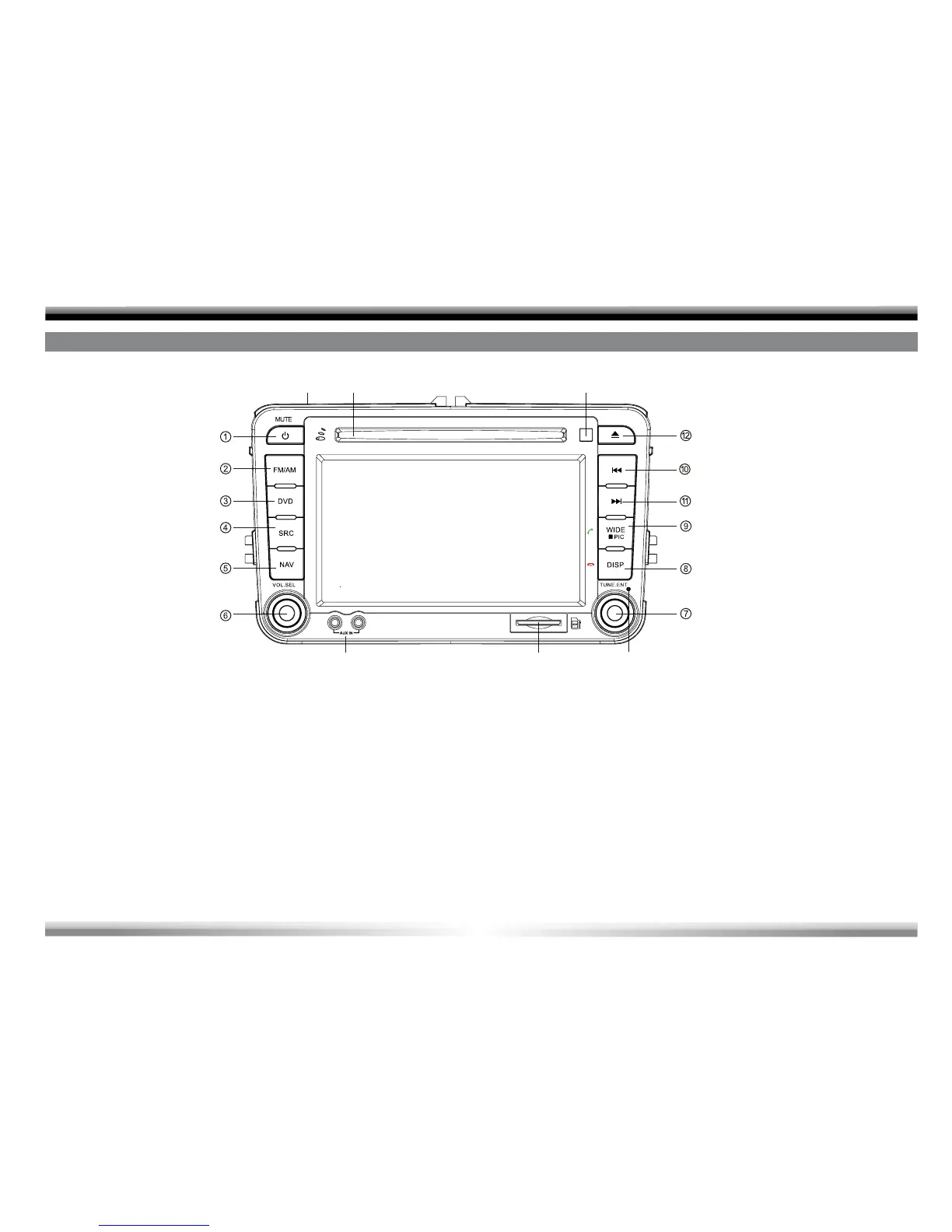
1. [MUTE/Power] Key: Mute audio outputs/ Unit power
2. [FM/AM] Key: Enter radio mode/ Change radio band
3. [DVD] Key: Enter disc mode
4. [SRC] Key: Open SOURCE MENU
5. [NAV] Key: Enter navigation mode
6. [VOL.SEL] Knob: Adjust volume/ EQ setting
7. [TUNE.ENT] Key: Play/ Pause/ Enter/ Move cursor up/down
(DVD MENU)
8. [DISP/Hangup] Key: Display playback information/ Hangup
9. [WIDE/PIC/Call] Key: Change display mode/ Image Setting/
Call
10. [Left/Previous] Key: Auto search down/ Previous/ Move cursor
to the left selection (DVD MENU)
11. [Right/Next] Key: Auto search up/ Next/ Move cursor to the
right selection (DVD MENU)
12. [Eject] Key: Eject disc inside
13. Microphone (BT)
14. Disc Slot
15. Remote Sensor
16. RESET Key
17. SD Slot
18. AUX-Jack
FRONT PANEL



 To Next Page