REMOTE CONTROL MODEL MBR3420
TV OPERATIONS
The following functions and operations apply to your
Zenith TV. The remote control must be in the TV mode to
operate your TV.
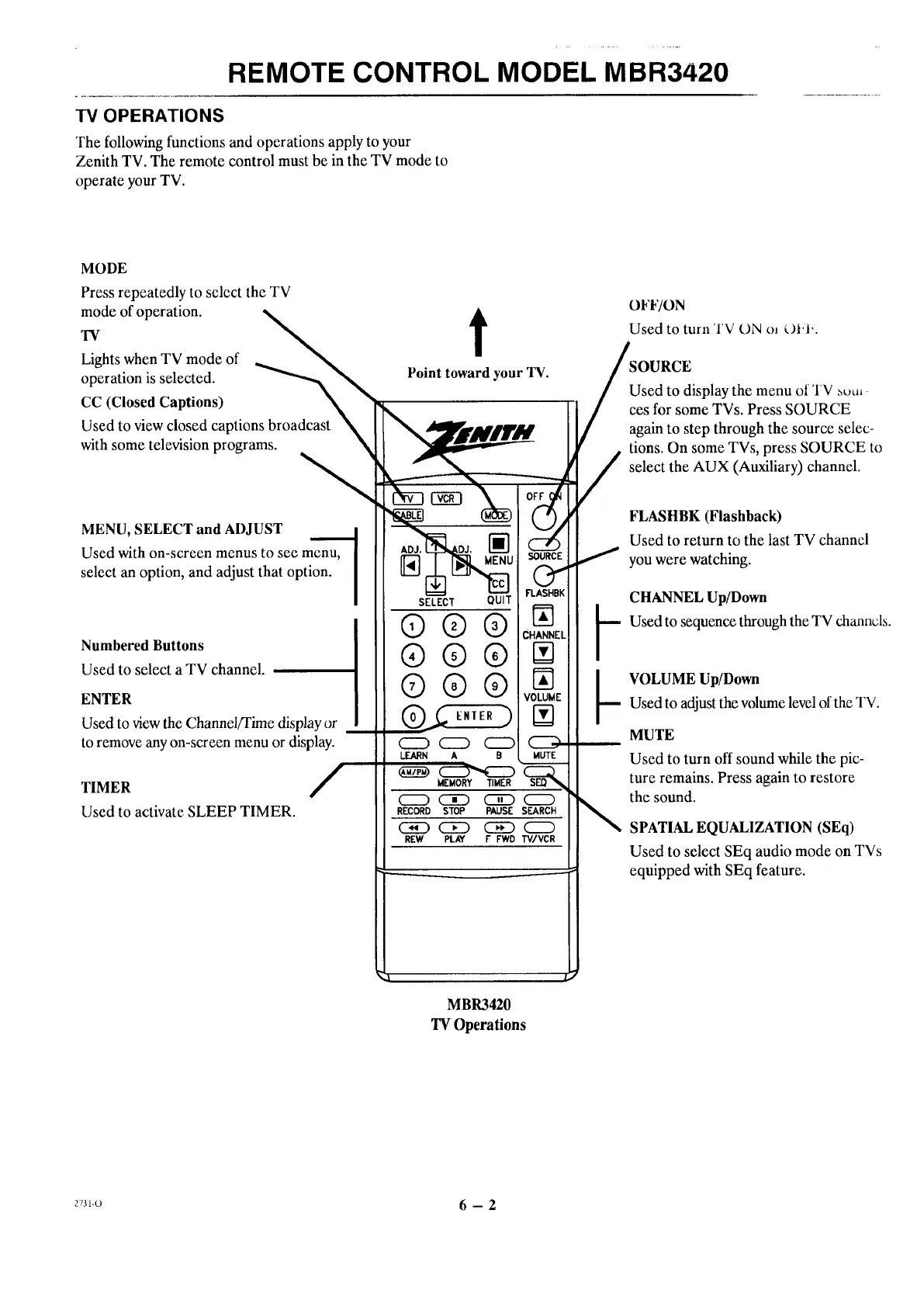
MODE
Press repeatedly to select the TV
._de of operation.
Lights when TV mode of __
operation is selected. _',._
CC (Closed Captions)
Used to view closed captions broadcast
with some television programs. N
MENU, SELECT and ADJUST
Used with on-screen menus to see menu,
select an option, and adjust that option.
Numbered Buttons
Used to select a TV channel.
ENTER
Used to viewthe Channel/Time display or
to remove any on-screen menu or display.
TIMER /
Used to activate SLEEP TIMER.
t
Point toward your TV.
® ® ®lvoB
MEMORY TIMER SEQ
CZ) CED (_D C=)
RECORD STOP PAUSE SEARCH
C_D C]E3 __
REW PLAY F FWD TV/VCR
4
MBR3420
TV Operations
OFF/ON
Used to turn TV L)N o_ _.)Jvl'.
ieOURCE
sed to display the menu of TV _uu,
s for some TVs. Press SOURCE
gain to step through the source selec-
tions. On some TVs, press SOURCE to
select the AUX (Auxiliary) channel.
FLASHBK (Flashback)
Used to return to the last TV channel
you were watching.
CHANNEL Up/Down
k Used to sequence through the TV channds.
b VOLUME Up/Down
Used to adjustthe volume level of the TV.
MUTE
Used to turn off sound while the pic-
ture remains. Press again to restore
the sound.
SPATIAL EQUALIZATION (SEq)
Used to select SEq audio mode on TVs
equipped with SEq feature.
r_31o 6 - 2




 To Next Page