THE FIRST TIME YOU OPERATE YOUR TV
STEP 1. CONNECT THE POWER
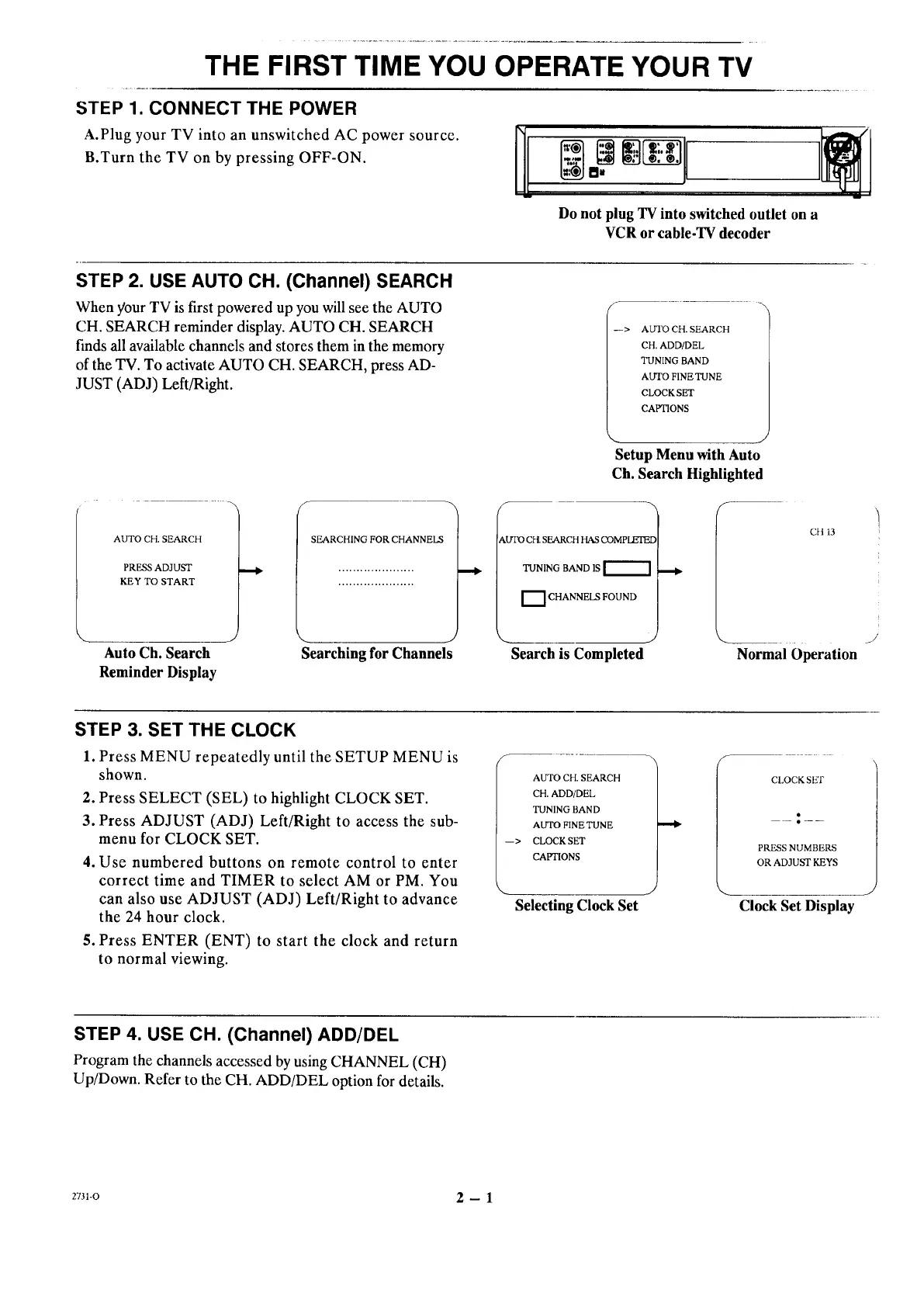
A.Plug your TV into an unswitched AC power source.
B.Turn the TV on by pressing OFF-ON.
Do not plug TV into switched outlet on a
VCR or cable-TV decoder
STEP 2. USE AUTO CH. (Channel) SEARCH
When your TV is first powered up you will see the AUTO
CH. SEARCH reminder display. AUTO CH. SEARCH
finds all available channels and stores them in the memory
of the TV. To activate AUTO CH. SEARCH, press AD-
JUST (ADJ) Left/Right.
f
--> AUTO CH. SEARCH
CH. ADD/DEL
TUNING BAND
AUTO FINE TUNE
CLOCK SET
CAPTIONS
Setup Menu with Auto
Ch. Search Highlighted
AUTO CH. SEARCH
PRESS ADJUST
KEY TO START
Auto Ch. Search
Reminder Display
SEARCHING FOR CHANNELS
Searching for Channels
kLrI'O CH. SEARCH HAS (X)MPLEI'EE
TUNING BAND IS
""I CHANNELS FOUND
_____ Y
Search is Completed
CH 13
Normal Operation
.)
STEP 3. SET THE CLOCK
1. Press MENU repeatedly until the SETUP MENU is
shown.
2. Press SELECT (SEL) to highlight CLOCK SET.
3. Press ADJUST (ADJ) Left/Right to access the sub-
menu for CLOCK SET.
4. Use numbered buttons on remote control to enter
correct time and TIMER to select AM or PM. You
can also use ADJUST (ADJ) Left/Right to advance
the 24 hour clock.
5. Press ENTER (ENT) to start the clock and return
to normal viewing.
AUTO CH. SEARCH
CH. ADD/DEL
TUNING BAND
AUTO FINE TUNE
CLOCK SET
CAPTIONS
Selecting Clock Set
CLOCKSE'F
PRESS NUMBERS
OR ADJUST KEYS
Clock Set Display
STEP 4. USE CH. (Channel) ADD/DEL
Program the channels accessed by using CHANNEL (CH)
Up/Down. Refer to the CH. ADD/DEL option for details.
2731-O 2 -- 1




 To Next Page