SETUP MENU
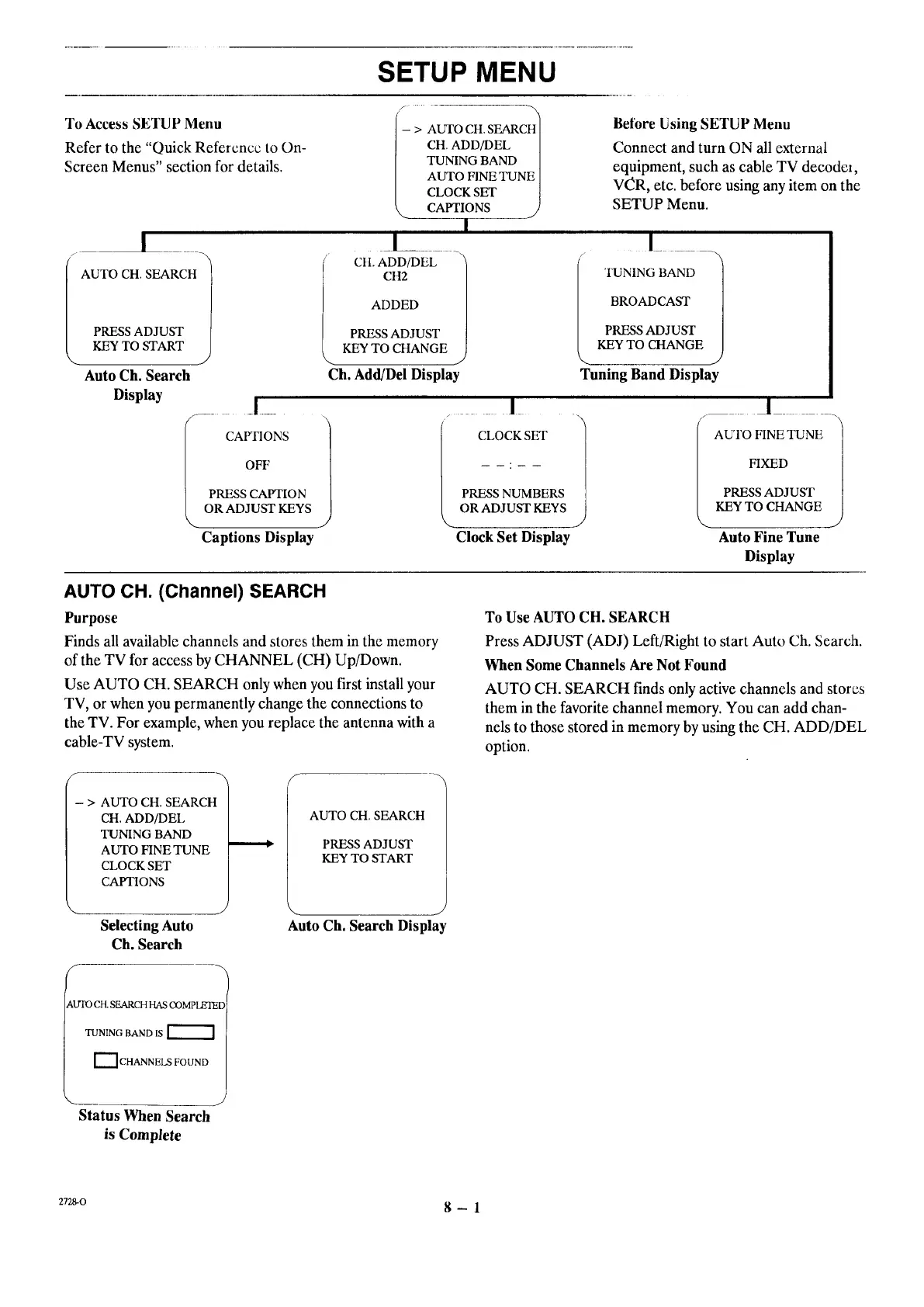
To Access SETUP Menu
Refer to the "Quick Reference to On-
Screen Menus" section for details.
1
/
AUTO CH. SEARCH
PRESS ADJUST
- > AWFO CH. SEARCH
] CH. ADD/DEL
| TUNING BAND
| AUTO FINE TUNE
| CLOCK SET
_ CAPTIONS j
Before Using SETUP Menu
Connect and turn ON all external
equipment, such as cable TV decodc_,
V(_R, etc. before using any item on the
SETUP Menu.
I
CH2 TUNING BAND
ADDED BROADCAST
PRESSADJUST PRESSADJUST
KEYTO CHANGE KEYTO CHANGE
Ch. Add/Del Display Tuning Band Display
KEY TO START
Auto Ch. Search
Display
CAFFIONS 1
OFF
PRESS CAPTION
OR ADJUST KEYS
Captions Display
i I
CLOCK SET i
PRESS NUMBERS
OR ADJUST KEYS
Clock Set Display
I
AUTO FINETUNE t
FIXED
PRESS ADJUST
KEY TO CHANGE
Auto Fine Tune
Display
AUTO CH. (Channel) SEARCH
Purpose
Finds all available channels and stores them in the memory
of the TV for access by CHANNEL (CH) Up/Down.
Use AUTO CH. SEARCH only when you first install your
TV, or when you permanently change the connections to
the TV. For example, when you replace the antenna with a
cable-TV system.
To Use AUTO CH. SEARCH
Press ADJUST (ADJ) Left/Right to start Auto Ch. Search.
When Some Channels Are Not Found
AUTO CH. SEARCH finds only active channels and stores
them in the favorite channel memory. You can add chan-
nels to those stored in memory by using the CH. ADD/DEL
option.
- > AUTO CH. SEARCH
CH. ADD/DEL
TUNING BAND
AUTO FINE TUNE
CLOCK SET
CAPTIONS
Selecting Auto
Ch. Search
AUTO CH. SEARCH
PRESS ADJUST
KEY TO START
Auto Ch. Search Display
kUTOCH. SEARCHHAS OOMPLEIE[
TUNING BAND IS
[[_ CHANNELS FOUND
Status When Search
is Complete
ZT_O 8- 1




 To Next Page