QUICK REFERENCE TO ON-SCREEN MENUS
MENU OPERATION EXAMPLE
MENU (__
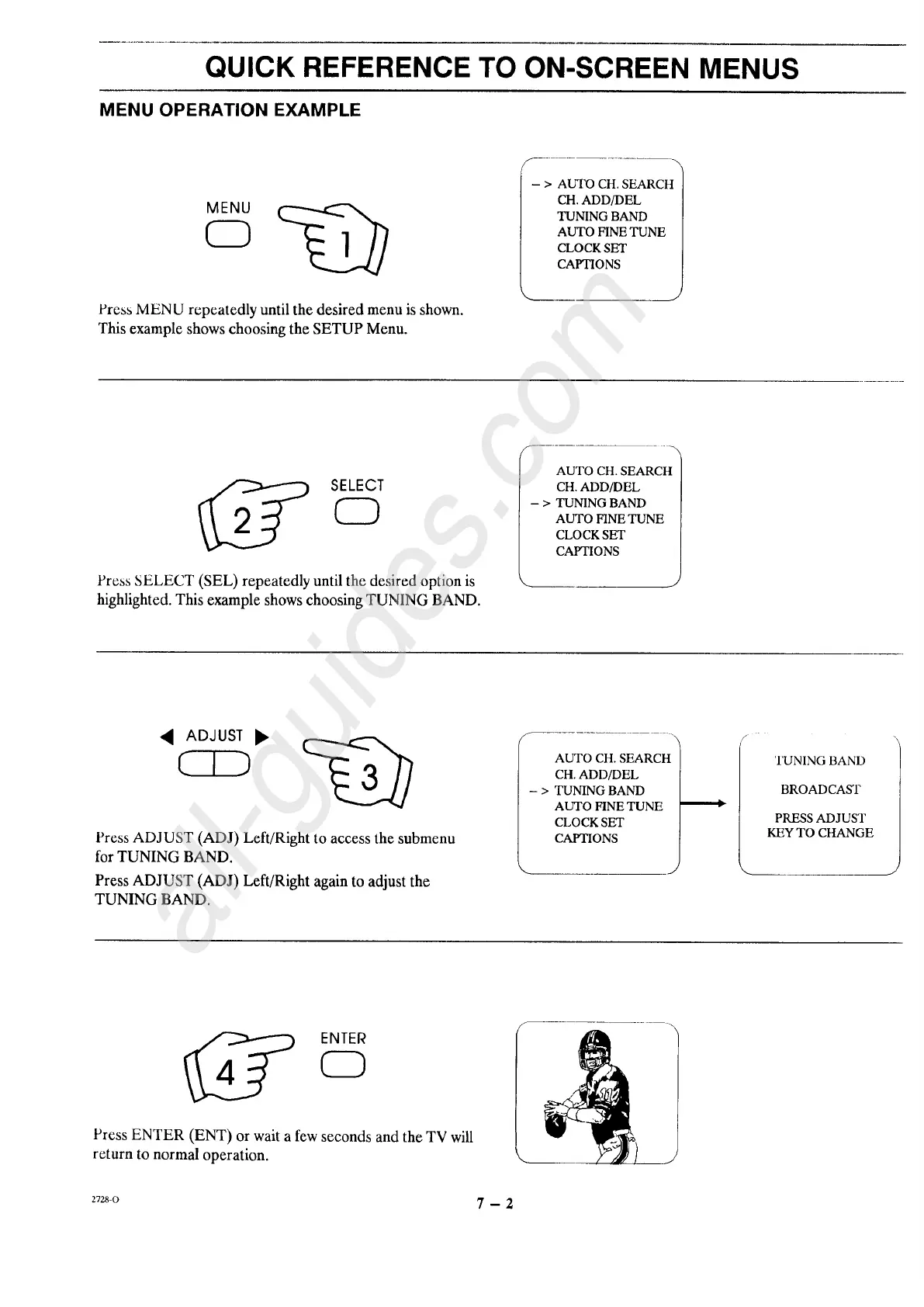
Press MENU repeatedly until the desired menu is shown.
This example shows choosing the SETUP Menu.
CH.ADD/DEL
TUNINGBAND
AUTO FINETUNE
CLOCKSET
CAPTIONS
./
SELEGT
0
Press SELECT (SEL) repeatedly until the desired option is
highlighted. This example shows choosing TUNING BAND.
AUTO CH. SEARCH
CH. ADD/DEL
- > TUNING BAND
AUTO FINE TUNE
CLOCK SET
CAPTIONS
Press ADJUST (ADJ) Left/Right to access the submenu
for TUNING BAND.
Press ADJUST (ADJ) Left/Right again to adjust the
TUNING BAND.
AUTO CH. SEARCH
CH. ADD/DEL
- > TUNING BAND
AUTO HNE TUNE
CLOCK SET
CAPTIONS
#
TUNING BAND
BROADCAST
PRESS ADJUST
KEY TO CHANGE
J
ENTER
CD
Press ENTER (ENT) or wait a few seconds and the TV will
return to normal operation.
z7zs-o 7 - 2




 To Next Page