Initial Configuration
Tip
Some settings reveal or hide other settings. When using Internet Explorer, it is
often necessary to click elsewhere on the screen after making a selection
before that selection is considered active.
♦ To configure the IP Gateway System Parameters
1. Use a computer connected to the IP Gateway through the network or by a
crossover cable.
2. Connect to the IP Gateway by entering its IP address in your web browser’s
address bar. The default address is 192.168.0.1.
3. If prompted for a password, enter it. The factory-configured password is
8206363.
Tip
If the IP address or password doesn’t work, a DIP switch can be set to force
the IP Gateway to run with a factory hard-coded password and IP address (see
DIP Switches on page 18). Ensure that power is removed when changing DIP
switch set
tings.
4. Click View or Modify Configuration. From the resulting screen you can
configure the IP Gateway, the links, and the audio levels. The following
procedures describe configuration in further detail.
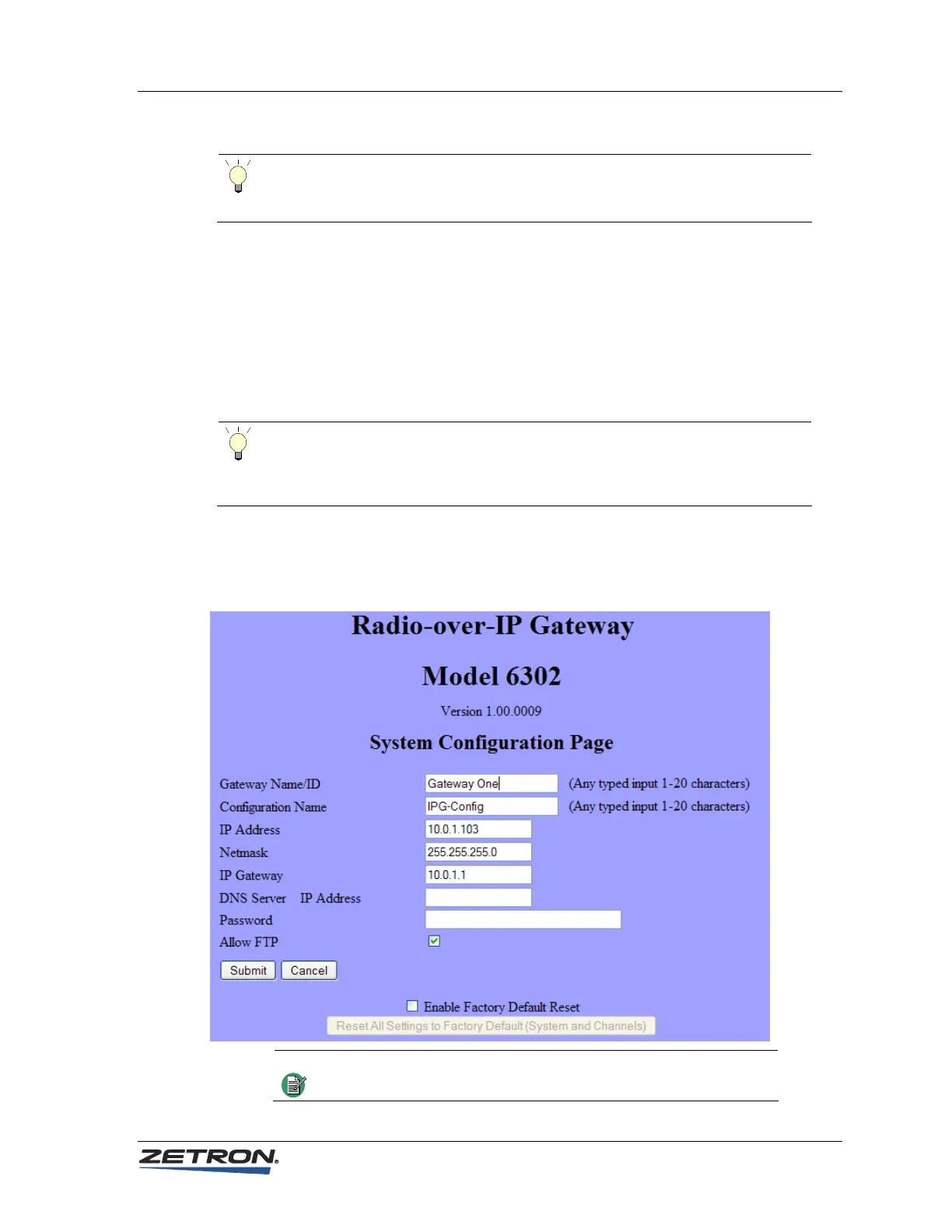
5. Click System Parameters. The following configuration screen displays.
Note
The settings shown here are examples only and do not reflect
the default settings.
25



 To Next Page