42 Installation and Operating Instructions V03
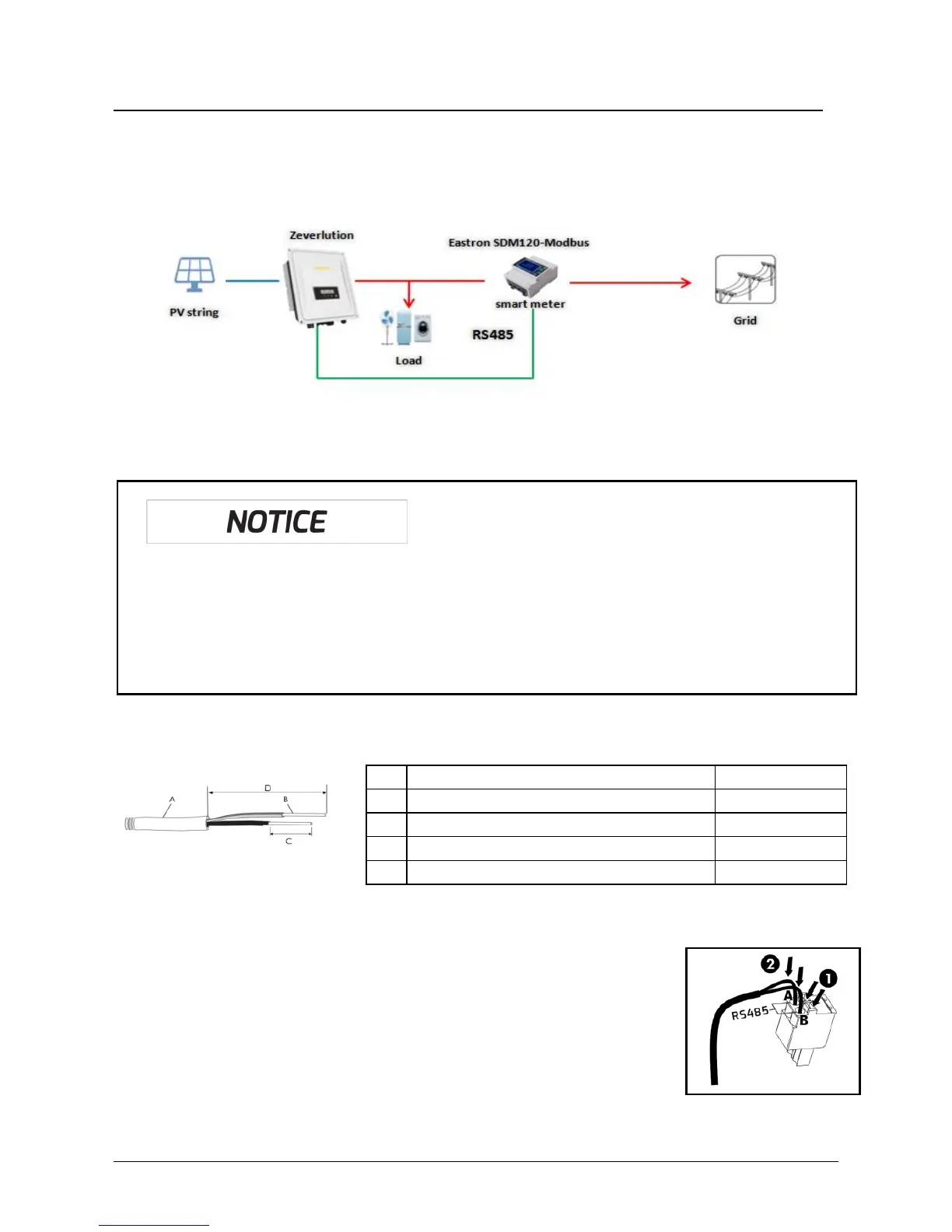
6.5 Active power control with smart meter &ComBox
The inverter can control active power output via connecting smart meter and
ComBox integrated in Zeversolar’sinverter,following is the system connection mode.
Smart meter(model: SDM120-Modbus) connecting method and baud rate setting
method, please refer to smart meter user manual.
Connect the smart meter to the inverter:
1. Cable Requirements:
2. Connect the conductors to the supplied smart meter connector in accordance
with the symbol ‛A“ and ‛B“.When doing so, ensure the
conductors are plugged completely into the terminal up to the
insulation.
3. Route the cable into inverter through the cable gland,
referring to the network cable connection (Section 6.1).
4. Plug the assembled smart meter connector into the pin connector.
Possible reason of communication failure due to incorrect connection
• ComBox only supports single inverter to do active power control
• The overall length of the cable from combox to smart meter should not
exceed 1,000 m



 To Next Page