Installation and Operating Instructions V03 37
6.2 System monitoring via Ethernet
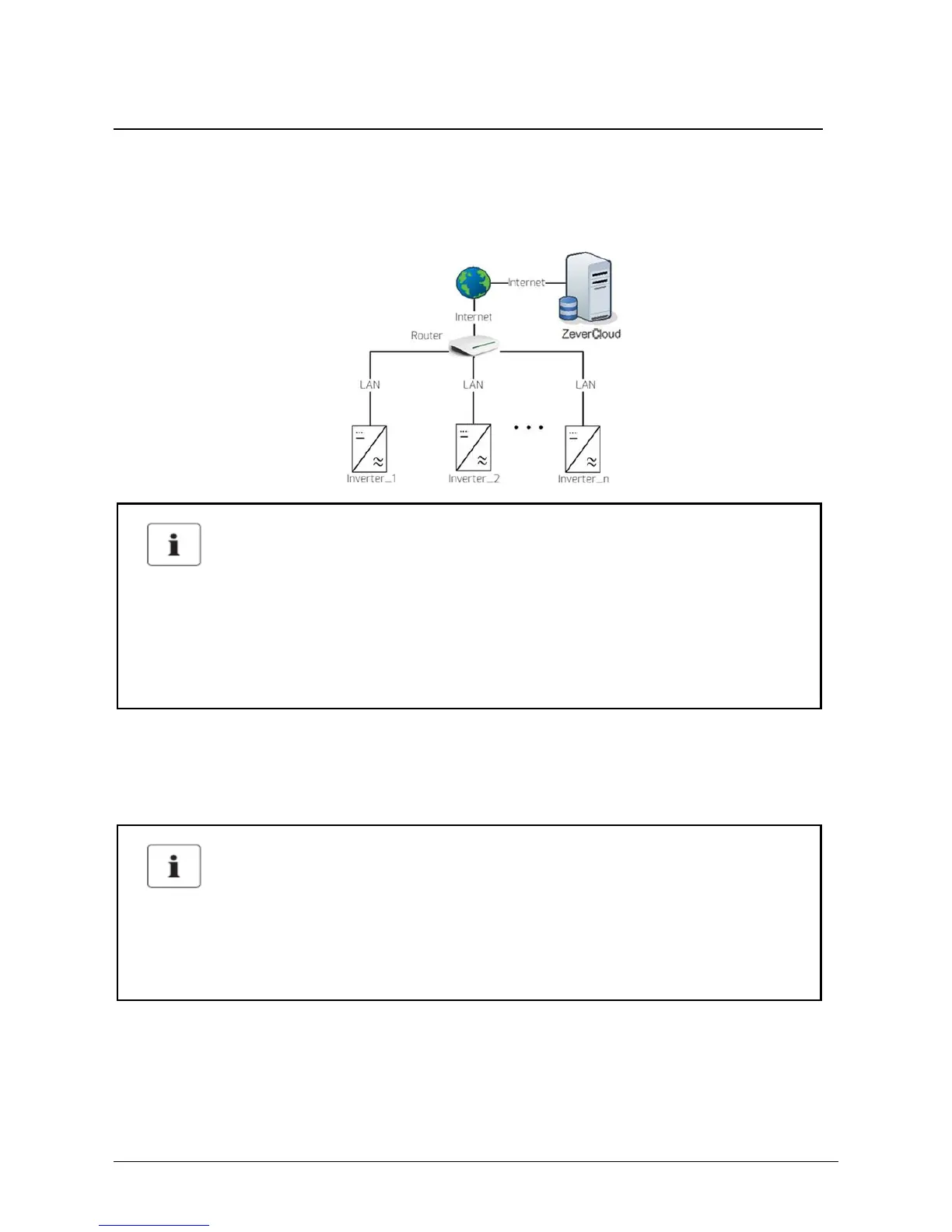
User can monitor the inverter through the integrated ComBox with Ethernet module
(optional), The connection diagram between the inverter and internet with network
cable is shown as follows.
The inverter is connected to the network by simply connecting the network cable
from the router to the Ethernet port on the ComBox. For connecting the network
cable, please refer to the relative instruction at section 6.1.
The inverter obtains an IP address from the router via DHCP automatically and
shows it on the display. The time it takes to connect to the network depends on the
network communication conditions.
Possible reason of communication failure due to DHCP
• The router needs to support DHCP services if the ComBox use the DHCP
function.
Possible reason of communication failure due to closed port
• The ComBox uses port #6655 and #80 communicates with the ZeverCloud.
Both of these two ports must be opened, or else the ComBox cannot connect
to the ZeverCloud and upload data



 To Next Page