Configuring Windows 95/98/Me or Windows NT/2000/XP (DHCP-capable)
Computers
Each PC that supports DHCP and is located on your LAN must be configured so it can
communicate with the Broadband Firewall Router. Follow these steps to configure the reset of
the PCs on your LAN.
(If you want to manually specify an IP address and related settings for the computers, please
see the Selecting an IP Address section later in this chapter).
Note: The steps described in this section are for TCP/IP-capable operating systems like
Windows 95/98/Me or Windows NT/2000/XP. For non-TCP/IP systems like
DOS/Windows 3.x, please see the Configuring Non-DHCP Computers section later
in this chapter.
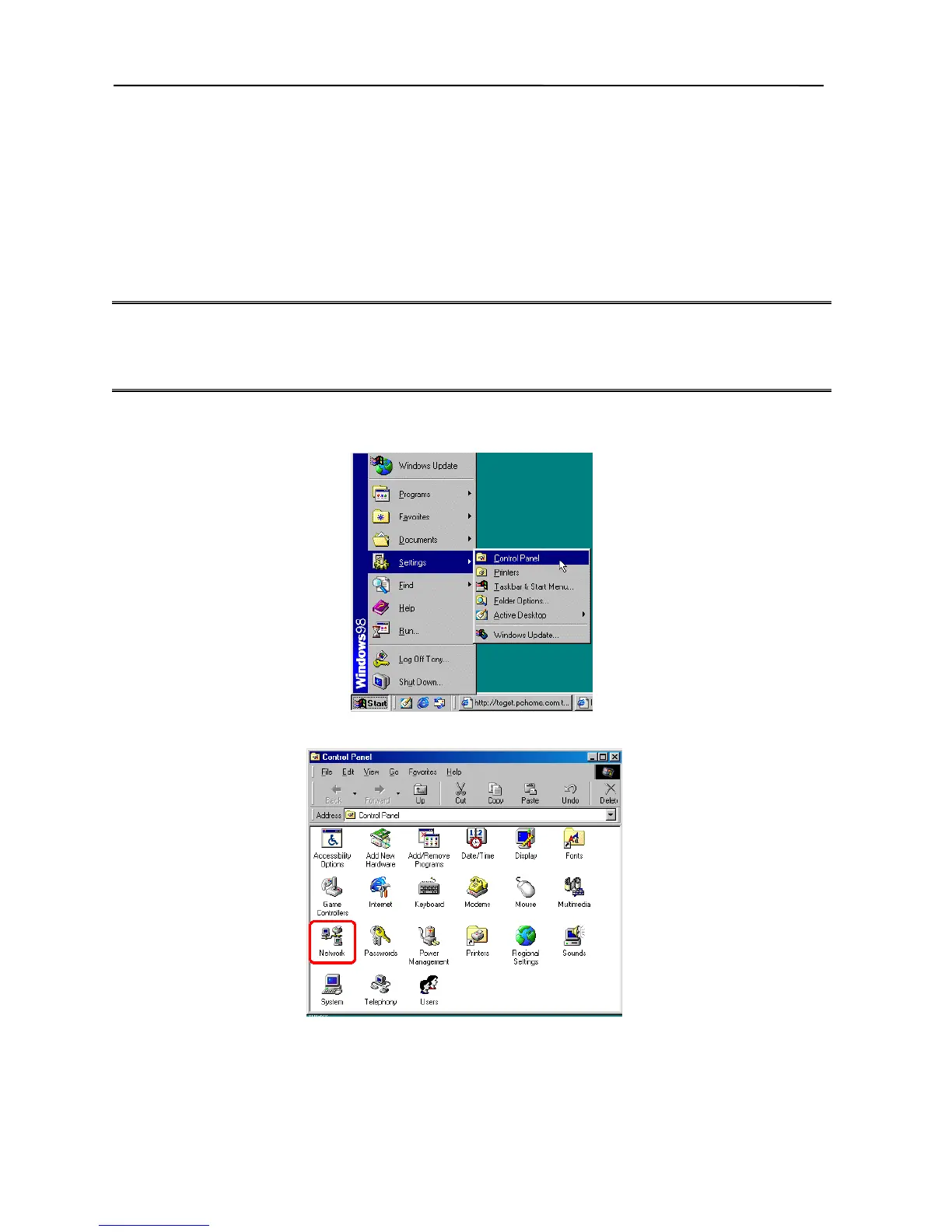
1. From your Windows 95/98/Me or Windows NT/2000/XP desktop, click Start, point to
Settings, and select Control Panel.
2. Double-click the Network icon.
3. Check to see if the TCP/IP protocol is installed. If not, please add this protocol before
proceeding to the next step.
4. Select TCP/IP protocol and click Properties.
9



 To Next Page