Home
Zoom
Voice Recorder
H3-VR
Page 92 (Adjusting the Display Contrast)
Zoom H3-VR - Adjusting the Display Contrast
119 pages
Manual
Save Page as PDF
To Next Page
To Next Page
To Previous Page
To Previous Page
Loading...
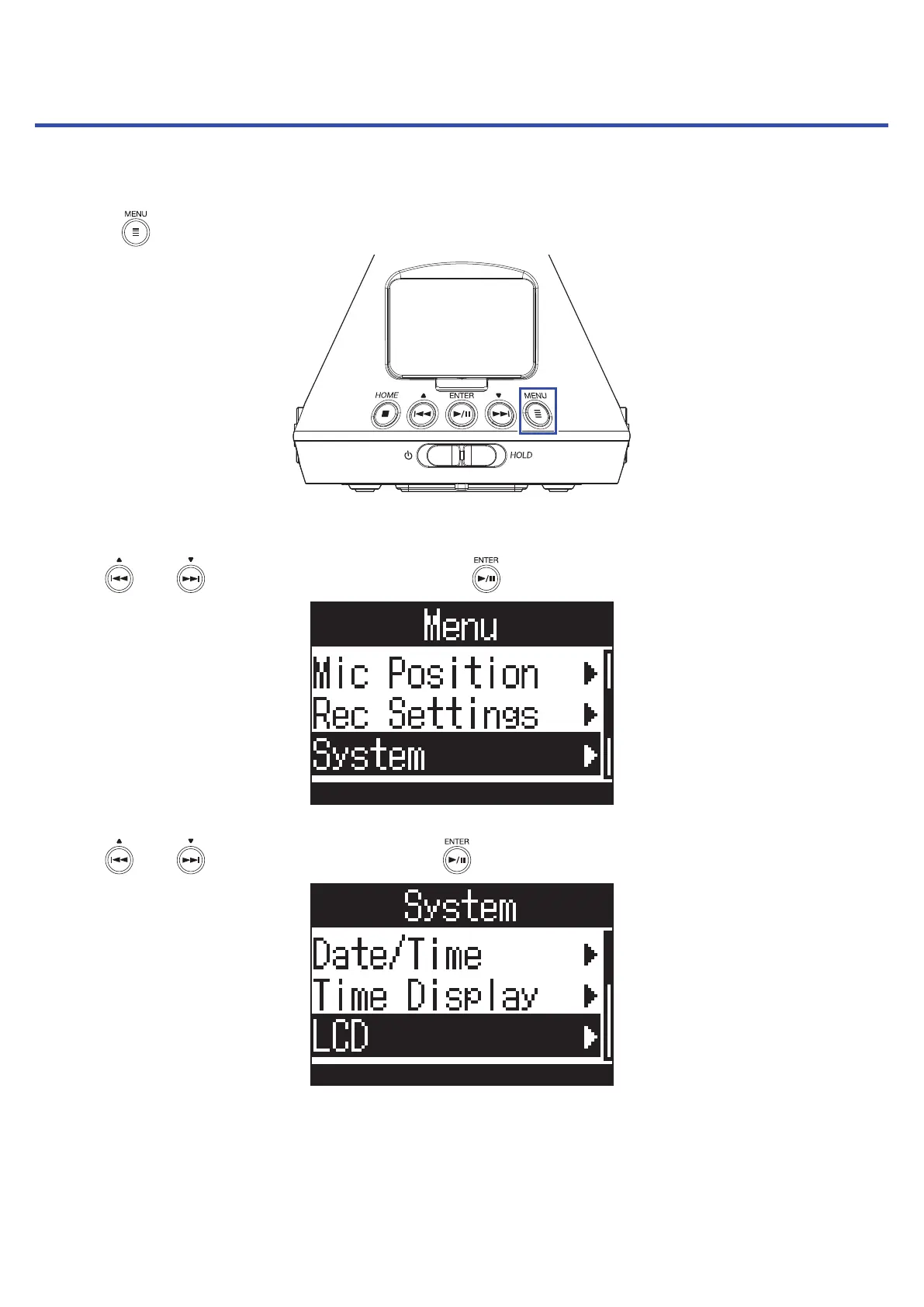
Adjusting the display contr
ast
The contrast (displa
y brightness level diff
erences) can be set.
1.
Pr
ess
.
This opens the Menu Screen.
2.
Use
and
to select "System
", and press
.
3.
Use
and
to select "L
CD", and press
.
92
91
93
Table of Contents
Main Page
Default Chapter
2
Notes about this Operation Manual
2
Introduction
3
Table of Contents
4
Contents
4
What Is 3D Sound
7
3D Sound Overview
7
Ambisonics Formats
7
Features
7
Recording Formats
8
Binaural Format
10
Features
10
Recording Examples
11
Example 1: Studio Recording
11
Example 2: Live Recording
11
Example 3: Field Recording
12
Names of Parts
13
Preparations
17
Supplying Power
17
Using Batteries
17
Using an AC Adapter
19
Inserting Microsd Cards
20
Turning the Power On/Off
22
Turning the Power on
22
Turning the Power off
22
Preventing Misoperation (HOLD Function)
23
Activating the HOLD Function
23
Deactivating the HOLD Function
23
Setting the Language Shown (First Time Starting Up)
24
Setting the Date and Time (First Time Starting Up)
25
Recording
26
Home Screen (in Recording Standby)
26
Preparing to Record
27
Setting the MIC Position
27
Setting the Recording Mode
30
Setting the Recording Format
32
Monitoring the Input Sound
34
Setting Ambisonic Monitoring
35
Adjusting Input Levels
37
Setting Low-Frequency Cutoff Filter
38
Setting the Limiter
40
Setting File Names
45
Enabling the Sound Marker Function
47
Setting the Recording Time Display
49
Recording
51
Playback
52
Playing Recordings
52
Changing the Playback Mode
53
Setting the Playback Time Display
58
Managing Folders and Files
60
Creating Folders
60
Selecting Folders and Files
62
Changing Folder and File Names
65
Checking File Information
67
Checking File Marks
69
Deleting Marks
72
Deleting Folders and Files
73
Adjusting Connected Equipment Levels (Playing Test Tones)
75
Using USB Functions
77
Using as a Card Reader
77
Connecting to a Computer
77
Disconnecting from a Computer
79
Using as an Audio Interface
80
Connecting to a Computer or Ios Device
80
Disconnecting from a Computer or Ios Device
82
Audio Interface Settings
83
Enabling Direct Monitoring
83
Enabling the Loop Back Function
84
Operating with an Ios Device
85
Pairing with an Ios Device
85
Disconnecting from an Ios Device
86
Inputting Characters
87
Setting the Type of Batteries Used
88
Setting the Display Backlight
90
Adjusting the Display Contrast
92
Setting the Language Shown
94
Setting the Date and Time
95
Formatting Microsd Cards
98
Testing Microsd Card Performance
100
Conducting a Quick Test
100
Conducting a Full Test
103
Restoring Default Settings (Factory Reset)
106
Checking the Firmware Versions
108
Updating the Firmware
110
Responding to Alert Messages
112
Troubleshooting
114
Recording/Playback Trouble
114
Other Trouble
114
Metadata List
116
Specifications
118
Other manuals for Zoom H3-VR
Quick Guide
16 pages
Supplementary Manual
12 pages
Related product manuals
Zoom H1
14 pages
Zoom H8
136 pages
Zoom Handy recorder H2
94 pages
Zoom Handy REcorder H1
2 pages
Zoom F1
73 pages
Zoom F8n
198 pages
Zoom F4
160 pages
Zoom F6
199 pages
Zoom iQ5
30 pages



 To Next Page