Functions of parts
Front
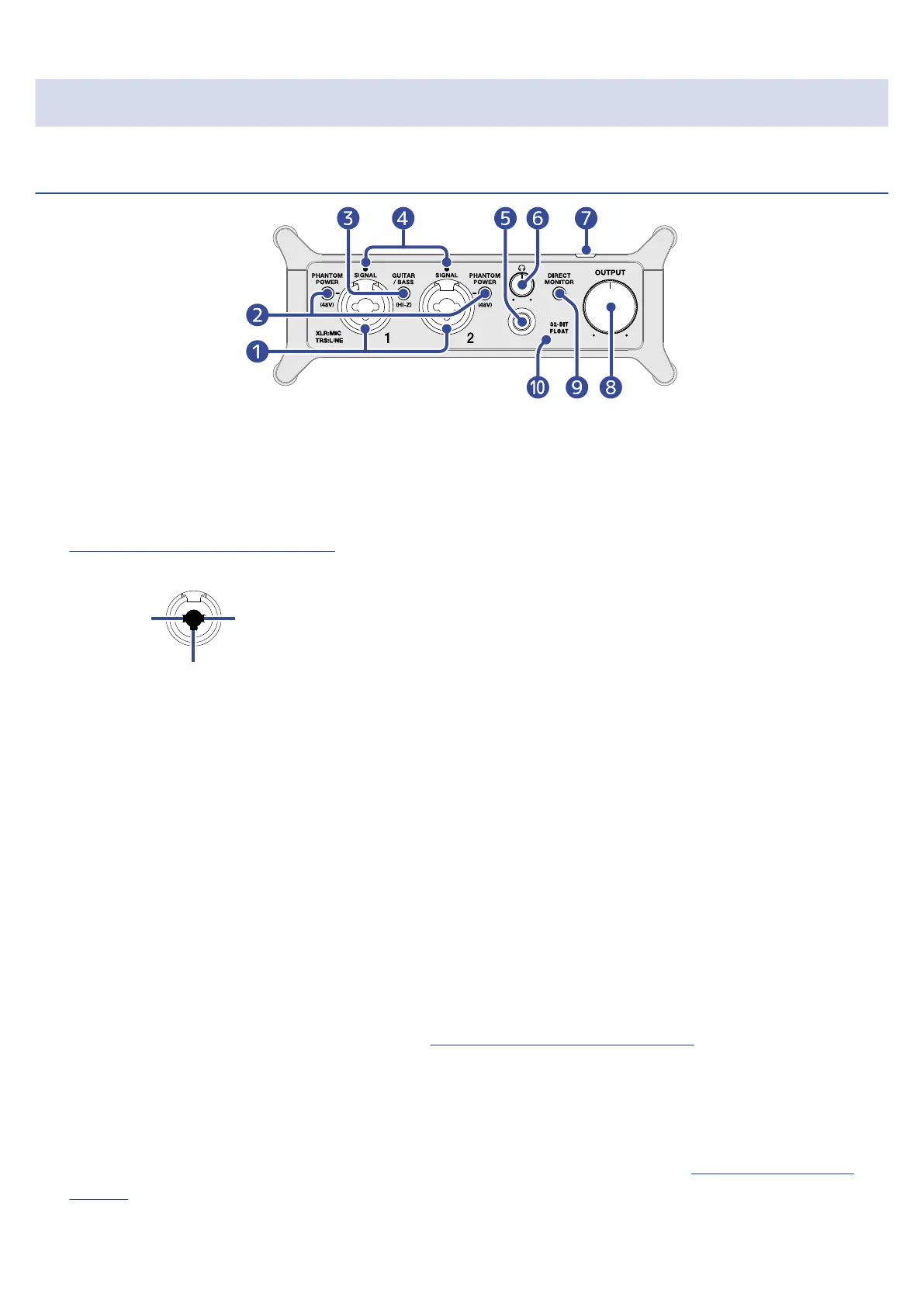
❶
Input jacks 1–2
These input jacks have built-in mic preamps. Connect mics, keyboards, guitars and other audio sources
to them. These can be used with both XLR and standard phone (balanced or unbalanced) plugs. Please
use XLR plugs to connect mics and phone plugs to connect keyboards and guitars, for example.
(→
Connecting instruments and mics)
1: GND
2: HOT
3: COLD
❷
PHANTOM POWER switches
These turn +48V phantom power on/off. Set this to ON when connecting condenser mics.
❸
GUITAR/BASS switch
Use this to enable Hi-Z support for the Input jack 1 circuit. Turn this on as necessary for the connected
guitar or bass.
❹
SIGNAL indicators
These light when signals are being input.
❺
Headphone jack
This outputs a stereo signal. Connect headphones here.
❻
Headphone knob
Use this to adjust the headphone volume. (→ Adjusting the headphone volume)
❼
Power indicator
This lights when the power is on.
❽
OUTPUT knob
Use this to adjust the volume of the signals output from the OUTPUT jacks. (→ Adjusting the output
volume)
10



 To Next Page