N5071 Speed Dome Network Camera H.264 / D1 Real-Time
- 63 -
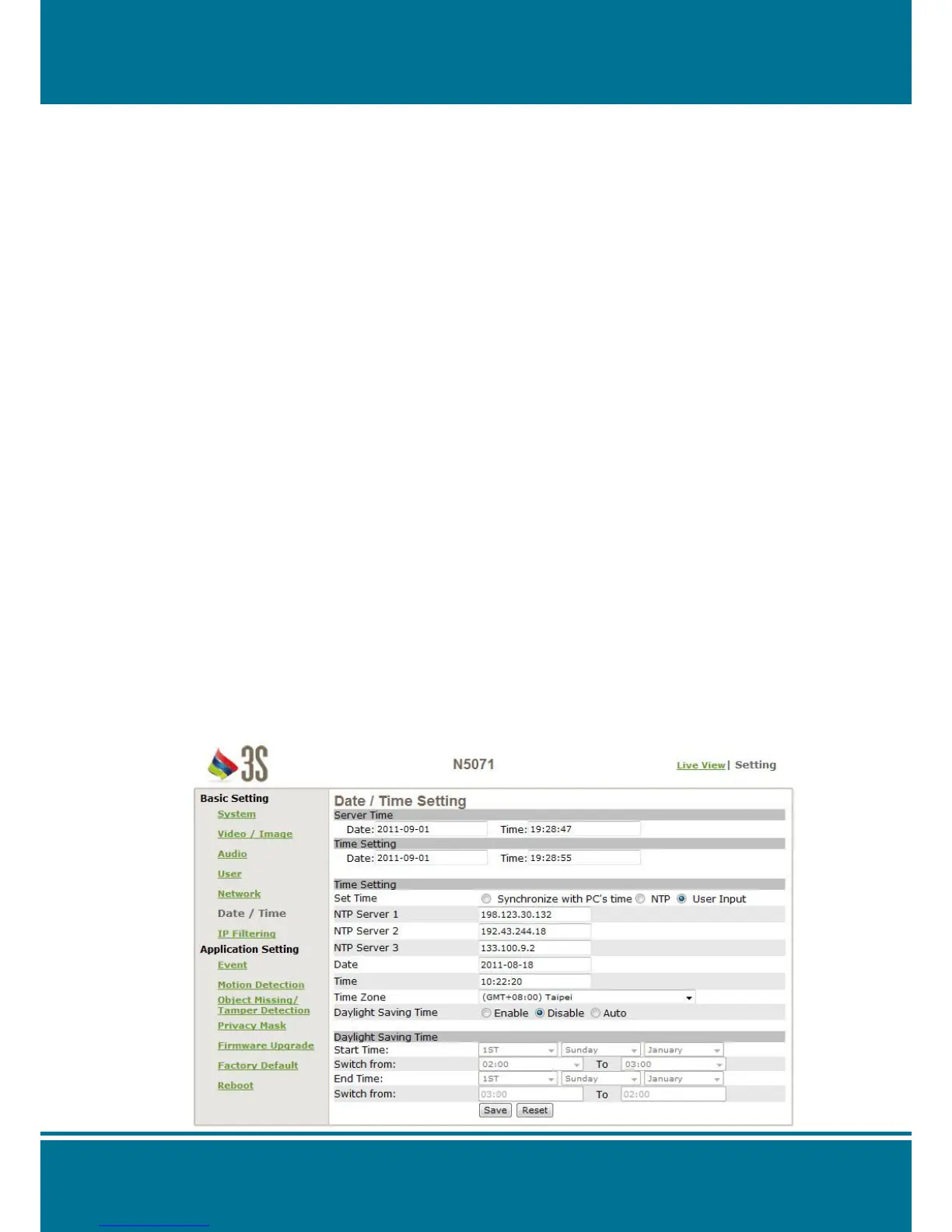
Date/Time
Server Time (the date/time of the server)
PC Time (the date/time of your PC)
Time Setting (date/time setting)
It provides 3 ways for you to synchronized the time as below:
1. To synchronize the time from PC’s time:
To preset time synchronized for the camera from your PC time.
2. Get the time from an NTP server:
To synchronize the time from the NTP (Network Time Protocol)
Click NTP in the Time Setting.
Enter the IP address in the NTP server. (1~3)
Press the SAVE to apply it.
Once the NTP time obtain, the N5071 Speed Dome Network Camera will updated the
time.
NOTE:
The default NTP servers as below:
NTP Server 1: 198.123.30.132
NTP Server 2: 192.43.244.18
NTP Server 3: 133.100.9.2
3. Change the time by manually:
Click User Input in the Time Setting.
Select the format of date to display, i.e. “yyyy/mm/dd” format.
Select the format of date to display, “hh:mm:ss” by 24 hours format.
Select the time zone.
Select Adjust to adjust the time.



 To Next Page