User’s Manual
User’s ManualUser’s Manual
User’s Manual
EAP200
EAP200EAP200
EAP200 Enterprise Access Point ENGLISH
42
Copyright © 4IPNET, INC.
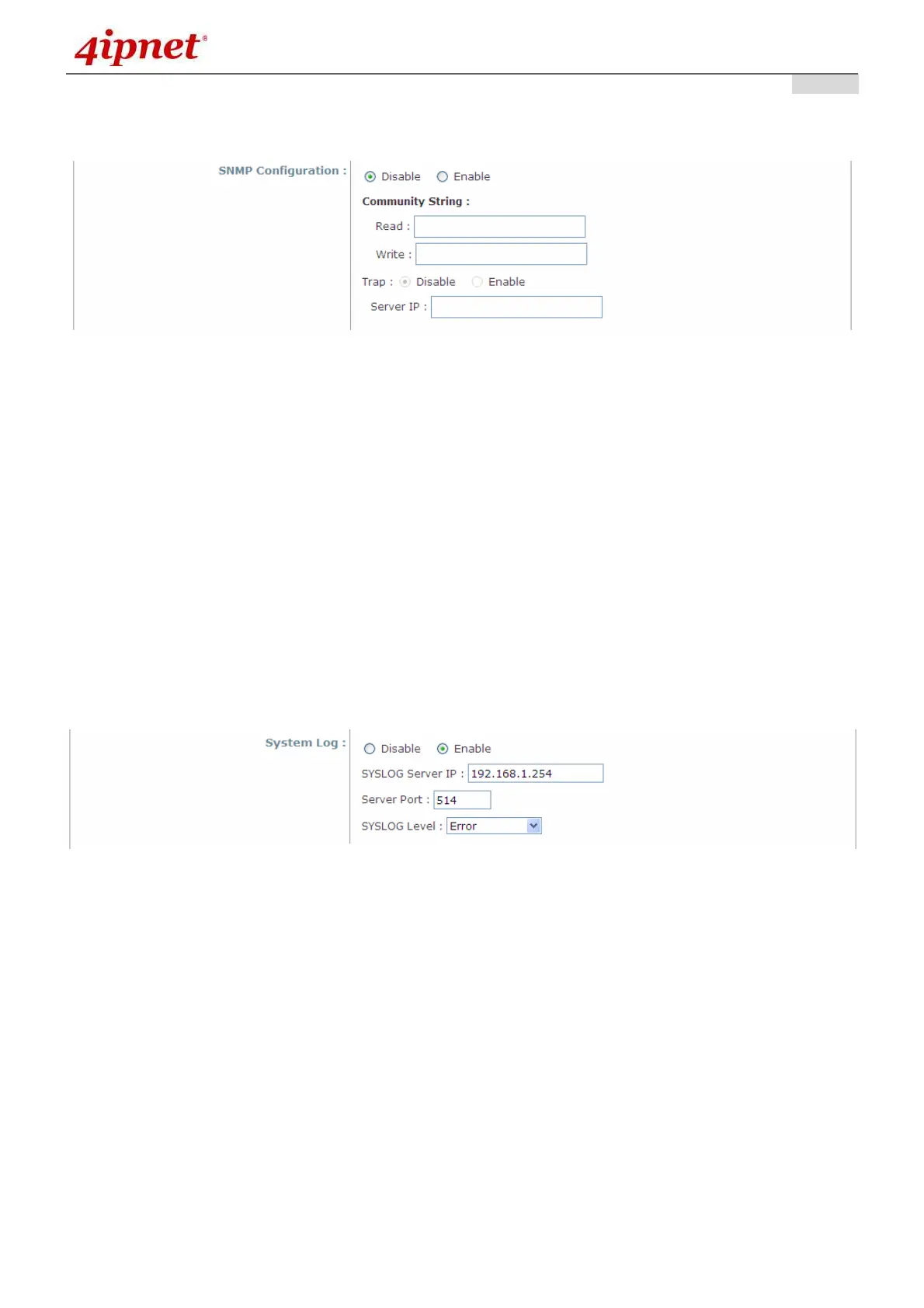
• SNMP Configuration: By enabling SNMP function, the administrator can obtain the system information
remotely.
SNMP Configuration Fields
Enable/ Disable: Enable or Disable this function.
Community String: The community string is required when accessing the Management Information
Base (MIB) of the system.
o Read: Enter the community string to access the MIB with Read privilege.
o Write: Enter the community string to access the MIB with Write privilege.
Trap: When enabled, events on Cold Start, Interface UP & Down, and Association & Disassociation
can be reported to an assigned server.
o Enable/ Disable: Enable or Disable this function.
o Server IP Address: Enter the IP address of the assigned server for receiving the trap report.
• System Log: By enabling this function, specify an external SYSLOG server to accept SYSLOG
messages from the system remotely.
System Log Fields
Enable/ Disable: Enable or Disable this function.
Server IP: The IP address of the Syslog server that will receive the reported events.
Server Port: The port number of the Syslog server.
Syslog Level: Select the desired level of received events from the drop-down menu.



 To Next Page