User’s Manual
User’s ManualUser’s Manual
User’s Manual
EAP200
EAP200EAP200
EAP200 Enterprise Access Point ENGLISH
8
Copyright © 4IPNET, INC.
2.3 Hardware Description
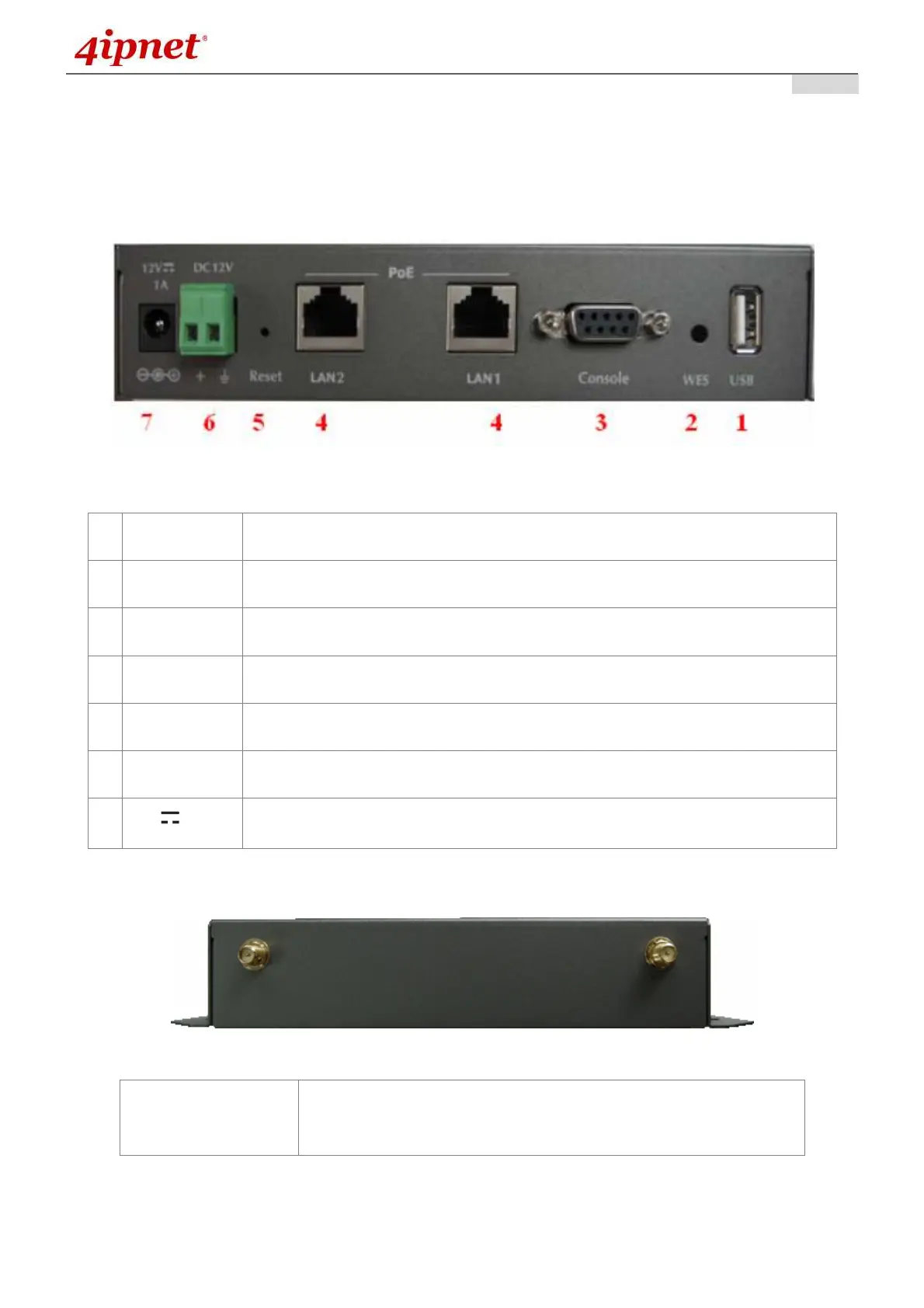
This section depicts the hardware information including all panel description.
Connector Panel
EAP200 Connector Panel
1
USB Disabled for future usage only.
2
WES Press to start running WES process.
3
Console Attach the serial cable here.
4
LAN1 / LAN2
Attach the Ethernet cable here for connection with wired local networks.
5
Reset Hardware reset button, press once to reset to the system.
6
DC 12V Attach the power socket here.
7
12V
Attach the power adapter here.
Antenna Panel
EAP200 Antenna Panel
Antenna Connector:
Attach the antennas here. The system supports one RF interface
with two SMA connectors.



 To Next Page