EasyManua.ls Logo

A&D FC-5000Si - 2 Front Panel Overview

A&D FC-5000Si
86 pages
Print Icon
To Next Page IconTo Next Page
To Previous Page IconTo Previous Page
Loading...
2. FRONT PANEL OVERVIEW
2. Front Panel Overview
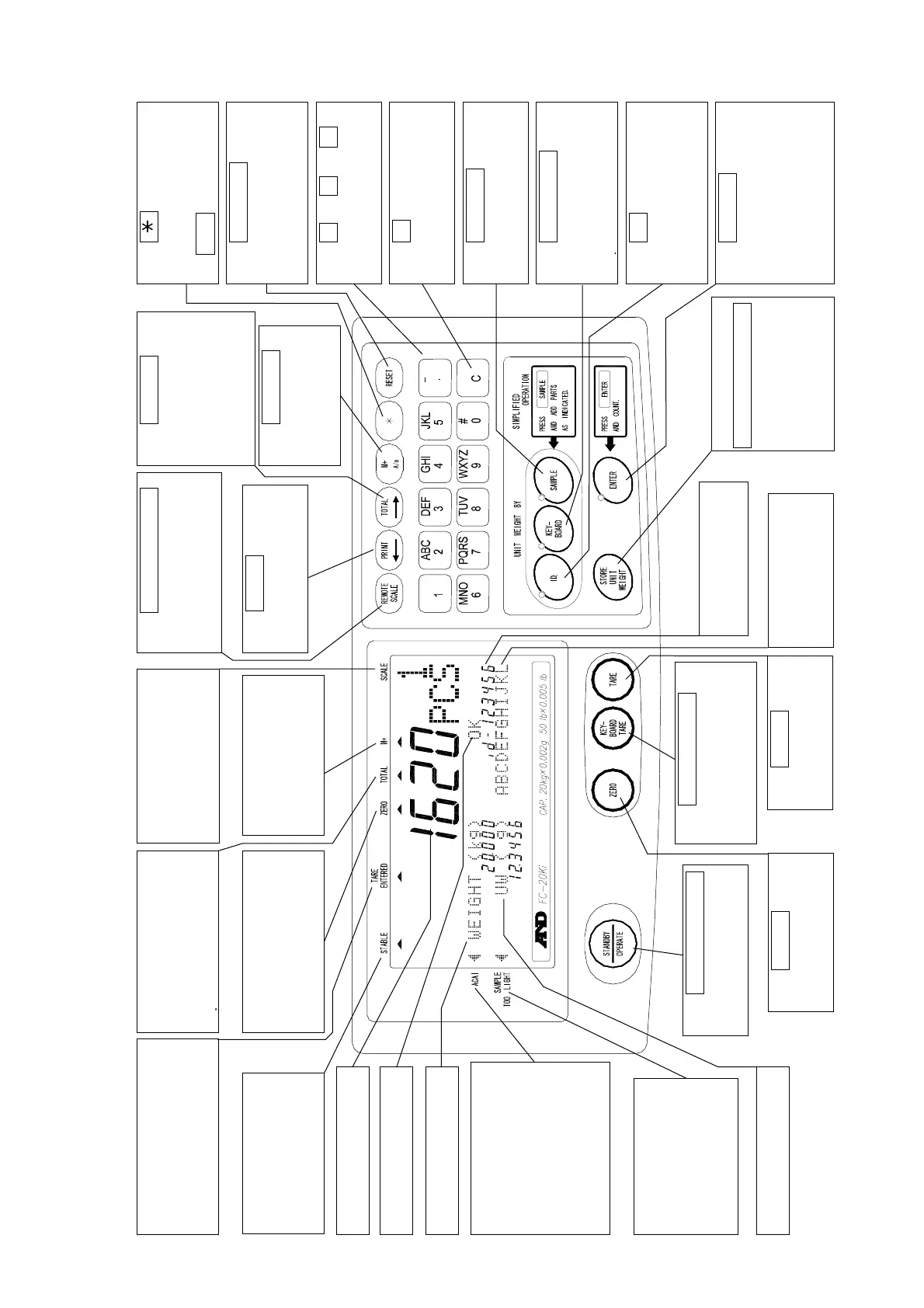
The key displays
comparator limits and
time & date, or works
as
M-
key.
The TA
indicator com
RE ENTERED
es
weight on when the tare
is subtracted.
T
he STABLE
indicator comes on
when the weighing
data is stable.
Count (pcs) display.
Comparator results.
The ACAI indicator
comes on when
weight is within the
ACAI range. When
meeting the ACAI
addition range, it will
blink.
The SAMPLE
TOO LIGHT
indicator comes on
when the unit
weight is too light.
Unit weight display.
The TOTAL
indicator comes on
when the count display
is showing the total
l
The ZERO indicator
comes on when the
scale is at the center
of zero.
The
STANDBY/OPERATE
key turns the display
on and off.
The
ZERO
key
returns the scale to
the center of zero.
SCALE
1: main scale is used.
2: remote scale is
__used.
The M+ indicator
comes on when
count data is being
accumulated.
The
REMOTE SCALE
key switches between
the main and a remote
scale (if used).
The
PRIN
T
key
sends count, weight
or unit weight data.
The
KEYBOARD TARE
key allows entering a
known tare weight
from the 10-key pad.
The
TARE
key
subtracts the tare
weight.
ID number displa
y
(6 digit).
Item code sto
r
ed
in the ID memory
(12 digit).
The
TOTAL
key
displays the
accumulated data
on the count
display and also
back again.
The
PRIN
T
key sends count,
weight or unit
weight data.
The
STORE UNIT WEIGHT
key stores the unit
weight on display,
item code data to
ID memory.
The
RESE
T
key
clears the Unit Weight
data in memory (but
not in ID memory).
The
0 ~
9
&
.
10-keys send numbers
to the display.
The
C
key clears the
display 10-key input.
The
SAMPL
E
key is
used when entering
sample size.
The
KEYBOARD
key is used when unit
weight is to be
entered via the 10-key
d
The
ENTE
R
key
enters unit weight,
sample size, ID or
other data into the
scale from the 10-key
The
ID key is used
when recalling unit
weight data from ID
memory.
pad.
Weight displa
y
9

Table of Contents

Related product manuals