This function is not to clear the last M+ addition, but to subtract count data instead
of addition. The number of additions is increased.
There is no automatic M- function.
7. COMPARATOR FUNCTION
The scale contains a comparator function that checks the amount on the weighing
pan against set acceptable count or weight
levels. When the comparator function is
activated, “
HI
”, “
OK
” or “
LO
” is displayed.
Before the comparator will work, upper and
lower limits must be set (refer to below). The
levels are set by count or weight. So, if you
are using weight for your comparator levels,
calculate the weight before starting the
procedure below.
If OP-04 is installed, comparator relay output
is also available.
The comparator responds as follows,
“
HI
” Upper limits < Count / Weight data
“
GO
” Lower limits ≤ Count / Weight data ≤ Upper limits
“
LO
” Count / Weight data < Lower limits
888-100
81
pcs
2AAWEIGHT (kg)ABDEHOKLOaa
121341567811.100578id-123456
2A3SAAMUUW (g)2BCDEFGHIJKL
123451167111.000
Ñbee
, bee
…Ò
Upper limit 102 pcs
Lower limit 98 pcs
The beeper is set ON at
To Set the Comparator
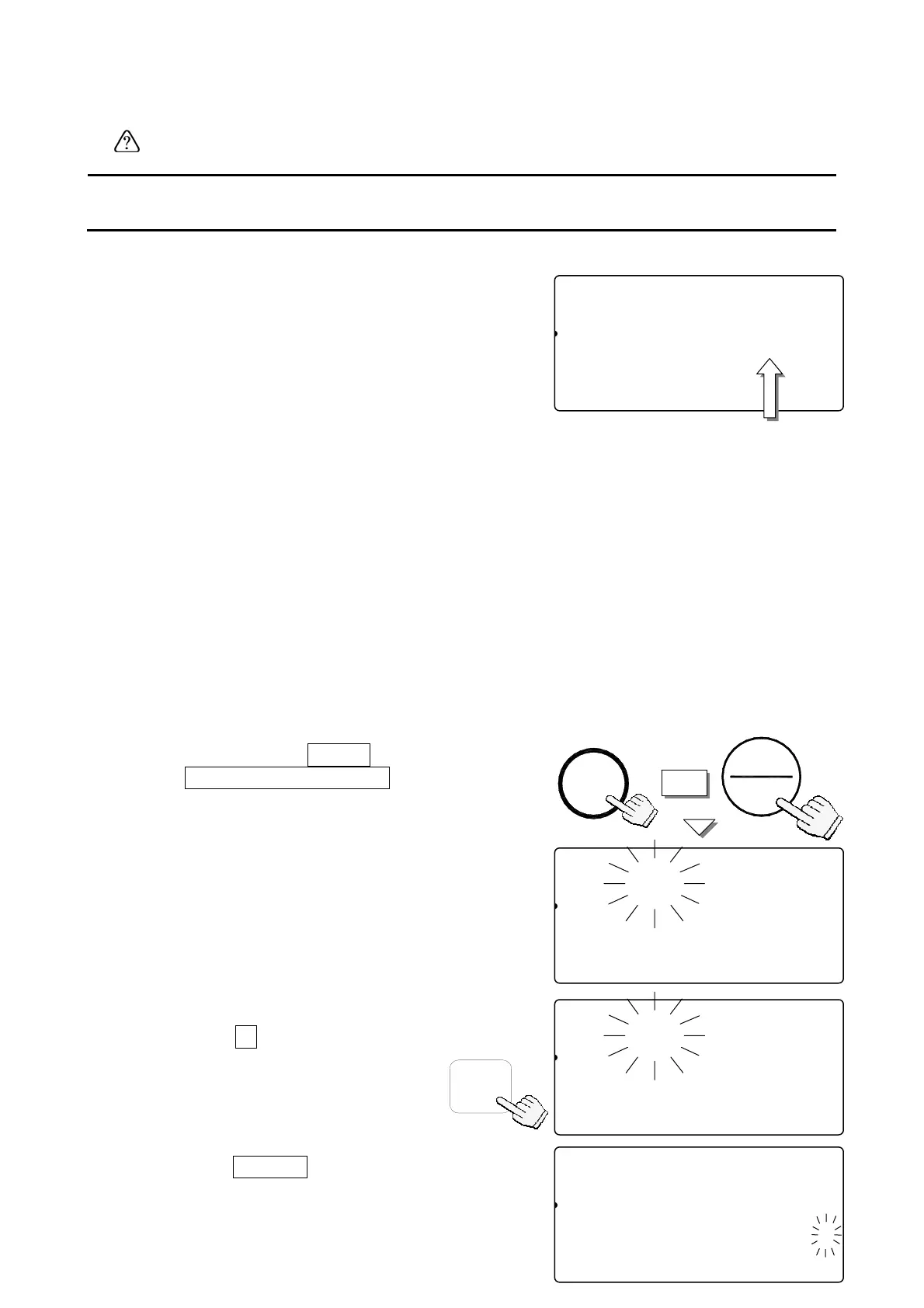
Start with the scale in standby mode, display OFF.
1. Press and hold the
ZERO
key, then press
28
the
STANDBY/OPERATE
key – release
both.
The count display will show “f-00”
with “00” blinking.
2. Press the
5
key to enter into the
F-Function
f-05-
X Comparator .
ZERO
+
OPERAT
STANDBY
5
f-05-01
81
pcs
Comparator
12345678C000045678id-000000
23SAMUUW (g)12Clear ID
12345670.0000045678901234567
f-000
81
pcs
Set Function No.
12345678C000045678id-000000
23SAMUUW (g)12Clear ID
12345670.0000045678901234567
f-05-00
81
pcs
Comparator
12345678C000045678id-000000
23SAMUUW (g)12Clear ID
12345670.0000045678901234567
3. Press the
ENTER
key.



 To Next Page