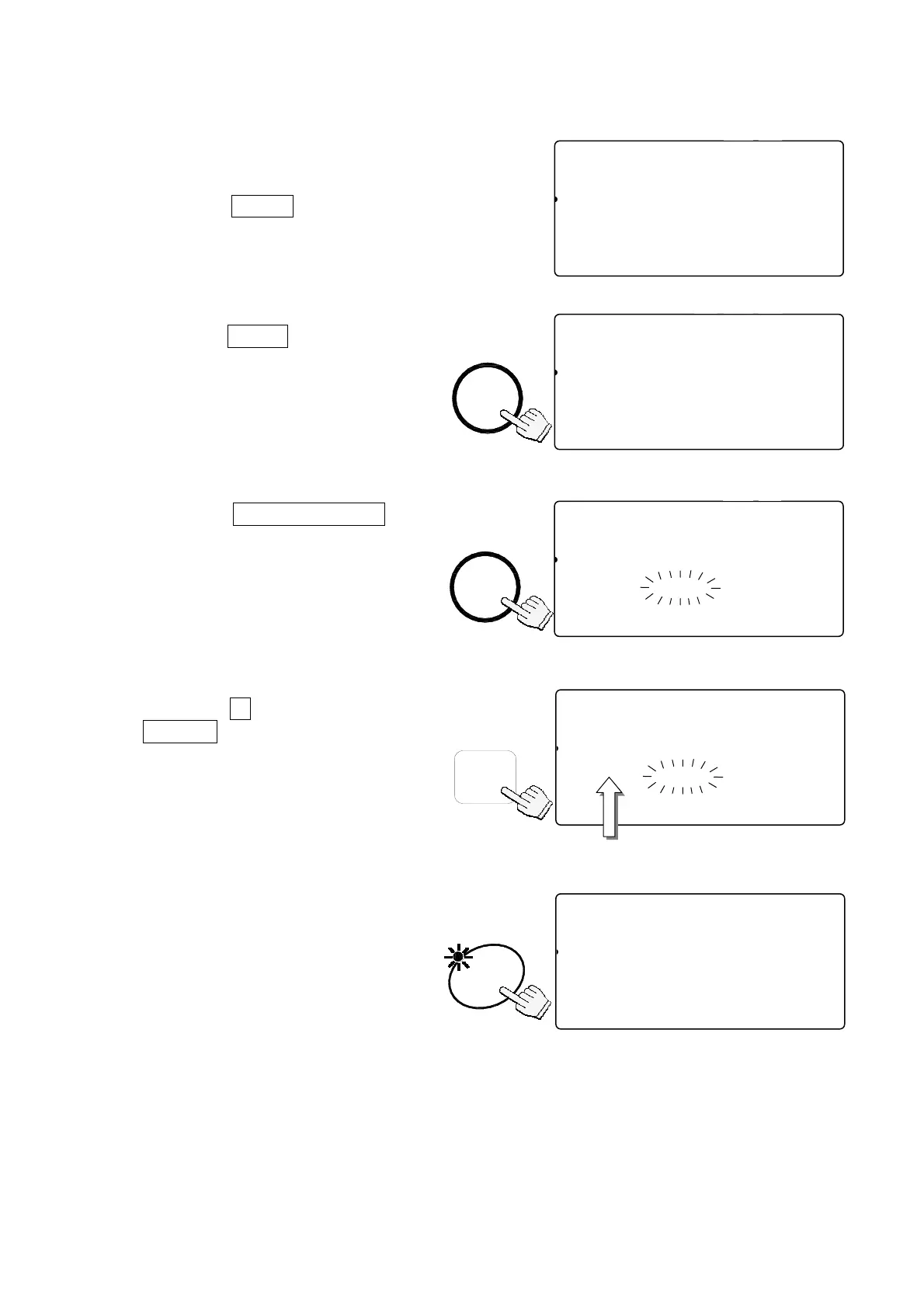
4-2. To Clear TARE
Either:
1. Have nothing on the weighing pan.
If the ZERO indicator is not displayed,
press the
ZERO
key to zero the scale.
2. Press the
TARE
key.
The weight display will go to “0”,
and the TARE ENTERED indicator
will be turned off (tare cleared).
Or:
1. Press the
KEYBOARD TARE
key.
The weight display will blink
(display is any tare weight
previously entered).
2. Press the
0
key and press the
ENTER
key.
3. The tare weight is cleared and
the TARE ENTERED indicator
will be turned off.
STABL
888-554
81
pcs
2AAWEIGHT (kg)
1234105678-0.615
23SAaaMPUW (g)
1234151671.11000456789012345
TARE
ZERO
M+
SCALE
TOTAL
ENTERED
STABL
888-510
81
pcs
A
2 WEIGHT (kg)
12134567890.000
23SAAMPUW (g)
123456171.110004567890123456
TARE
ZERO
M+
SCALE
TOTAL
ENTERED
TARE
STABL
8888810
81
pcs
2AWEIGHT (kg)
123415678-0.000
23SAAMPUW (g)
123456171.110004567890123456
ZERO
TOTAL
M+
TARE
ENTERED
SCALE
0
TARE
KEY-
BOARD
STABL
888-554
81
pcs
2WAETARE (kg)
12341567890.615
23SAAMUUW (g)
123456171.110004567890123456
TARE
ZERO
M+
SCALE
TOTAL
ENTERED
ENTER
888-554
81
pcs
2AWETARE (kg)
12314567890.000
23SAAMUUW (g)
123451671.11000
Enter TARE weight ‘0’.
20



 To Next Page