These temporary limits will disappear when the
display is turned off.
8. TIME AND DATE FUNCTION
The scale has a time and date function and that data can be sent through the
RS-232C interface. There are two ways to set time and date.
To Set in the F-Function Settings
Start with the scale in standby mode, with the display is turned off.
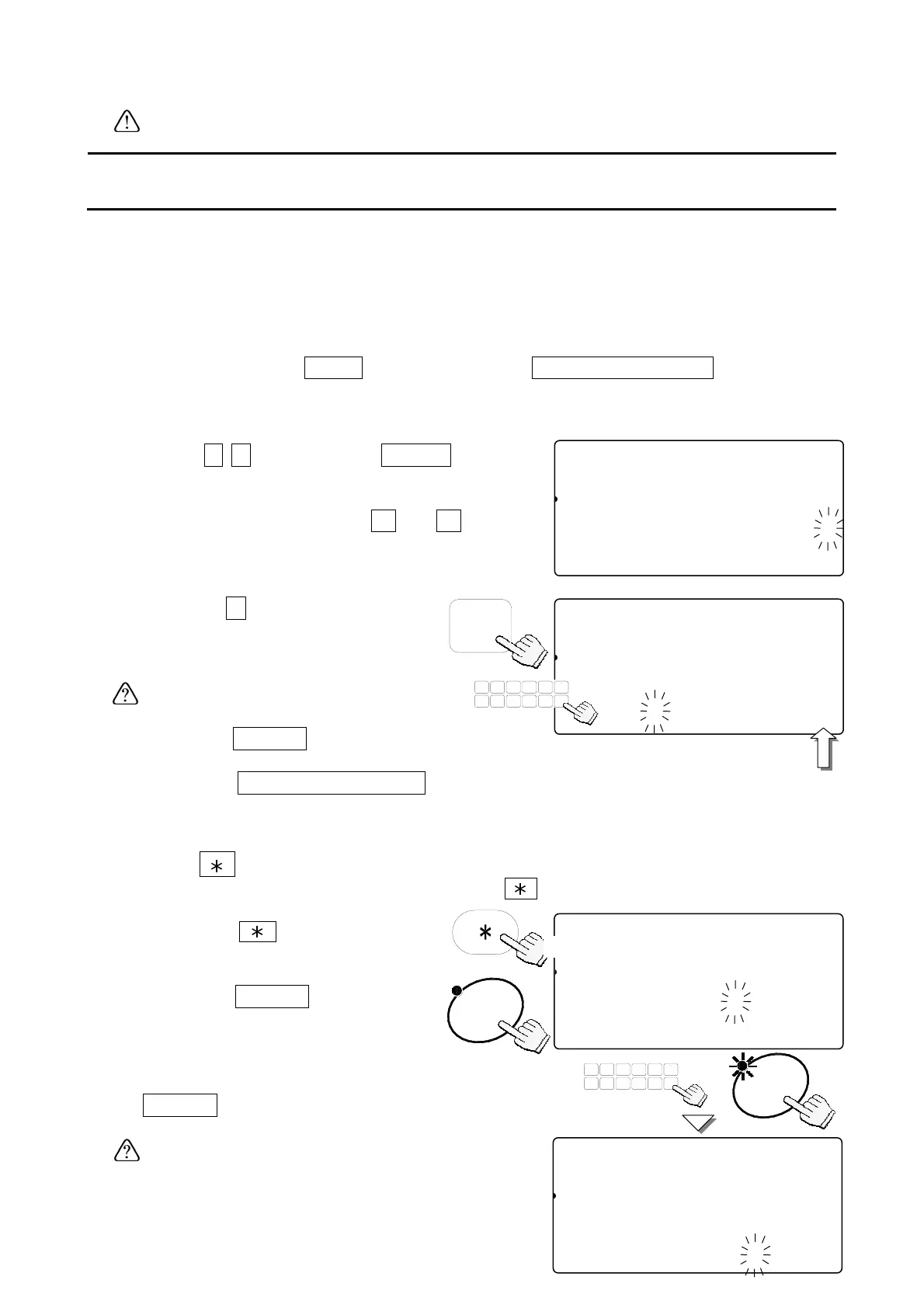
1. Press and hold the
ZERO
key, then press the
STANDBY/OPERATE
key
– release both to enter the F-Function setting mode.
The count display will show “f-00” with “00” blinking.
2. Key in
1
1
and press the
ENTER
key
30
to display the setting value, time and date.
If you want to change the order of year,
month and date, use the
0
Æ
2
to
change the setting.
3. Press the
C
. The first digit of time
and date will blink.
Use the 10-key pad to set the time
and date.
The "seconds" value” is fixed to “00”.
4. Press the
ENTER
key to return to the step 2
and the clock will start from “00” seconds.
5. Press the
STANDBY/OPERATE
key to exit,
and press it again to turn the display back ON.
Using the Key to Set the Time and Date
Set the F-Function f-09-01="0" to use the key as this function.
1. Press the
key twice to
display the time and date.
2. Press the
ENTER
key, then
the first digit of date will blink.
3. Use the 10-key pad to set the date and press the
ENTER
key. Then the first digit of time will
blink.
The “seconds” value is fixed to “00”.
f-11-01
81
pcs
Comparator
123456789012345678901234561
23SAMUUWM AAD AAAAY AAh AAm AAs
12345670.0201202003012034056
f-11-01
81
pcs
Comparator
123456789012345678901234561
23SAMUUWM AAD AAAAY AAh AAm AAs
12345670.0201202003012034000
The second
displa
is fixed to
TUV
DEFABC
MNO
6
1
78
PQRS
23
JKLGHI
09
WXYZ
4
#
5
C
.
888-100
81
pcs
2AAWEIGHT (kg)ABDE Y M D
121341567811.100572003 2 12
2A3SAAMUUW (g)2BCD h m s
123451167111.000123412 34 56
888-100
81
pcs
2AAWEIGHT (kg)ABDE Y M D
121341567811.100572003 2 12
2A3SAAMUUW (g)2BCD h m s
123451167111.000123412 34 00
ENTER
Twice
TUV
DEFABC
MNO
6
1
78
PQRS
23
JKLGHI
09
WXYZ
4
#
5
C
.
ENTER



 To Next Page