5-3. Store Item Code by ID Number
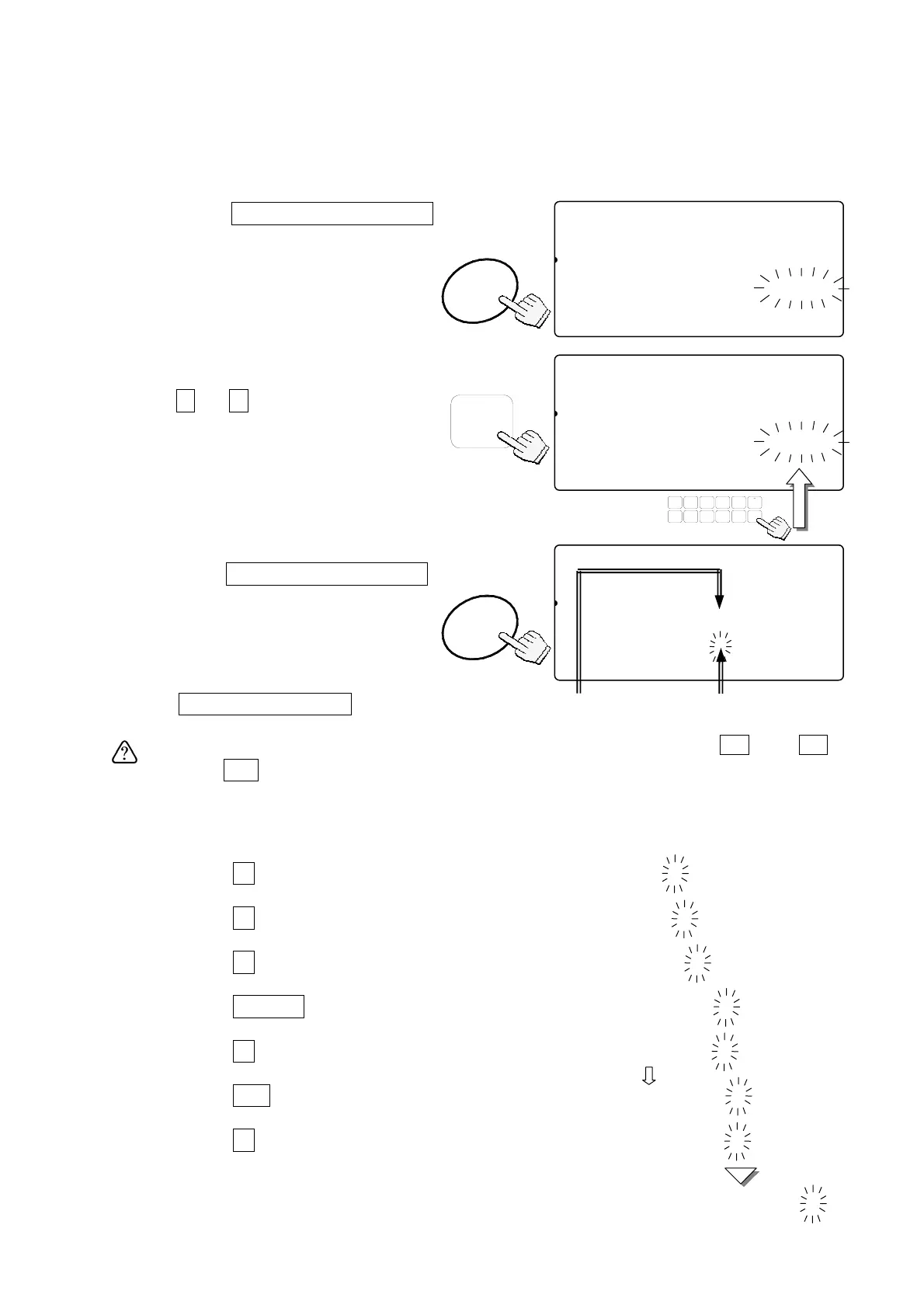
An item code of up to 12 alphanumeric characters can be set using the 10-key pad,
and it will be stored with the ID number.
1. Press the
STORE UNIT WEIGHT
key. “id-000000” will appear with
Ñ000000Ò
blinking.
2. Enter the ID number desired using
the
0
Æ
9
10-key pad.
3. Press the
STORE UNIT WEIGHT
key again.
The symbol “
A
” with blinking cursor
Ñ_Ò will appear.
To return to step 2, press
the
STORE UNIT WEIGHT
key.
To select the symbol “
A
”, “
a
” or “
1
”,
press the
M+
(A/a) key.
Example of entering “A&D Co., Ltd.”: Select the symbol “
A
” first.
4. Press the
2
(ABC) key to place “
A
”. “
A
”
A
5. Press the
0
(#) key several times to place “
&
”. “
A
”
A &
6. Press the
3
(DEF) key to place “
D
”. “
A
”
A&D
7. Press the
TOTAL
(Æ) key twice to shift the cursor. “
A
”
A&D _
8. Press the
2
(ABC) key several times to place “
C
”. “
A
”
A&D C
9. Press the
M+
(A/a) key to change the symbol “
A
” to “
a
”. “
a
”
A&D C_
10. Press the
6
(MNO) key several times to place “
o
”. “
a
”
A&D Co
Repeat these procedures to the last letter.
“
a
”
A&D Co.,Ltd.
8888810
81
pcs
2AWEIGHT (kg)
12345671891.1104567id-000000
23SAMAUUW (g)
12345617111.000
STORE
WEIGHT
UNIT
STORE
WEIGHT
8888810
81
pcs
2AWEIGHT (kg)a A
UNIT
12345617891.1104568id-123456
23SAMAUUW (g)A _
12345617111.00045
Cursor can be
moved using
Æ
and
Å
keys.
0 Æ 9
8888810
81
pcs
2AWEIGHT (kg)
12345617891.1104578id-123456
23SAMAUUW (g)
12345617111.000434567
TUV
DEFABC
MNO
6
1
78
PQRS
23
JKLGHI
09
WXYZ
4
#
5
C
.
This shows which type of
character will be entered.
A
: Capital letter
a
: Lowercase letter
1
: Numeric character
23



 To Next Page