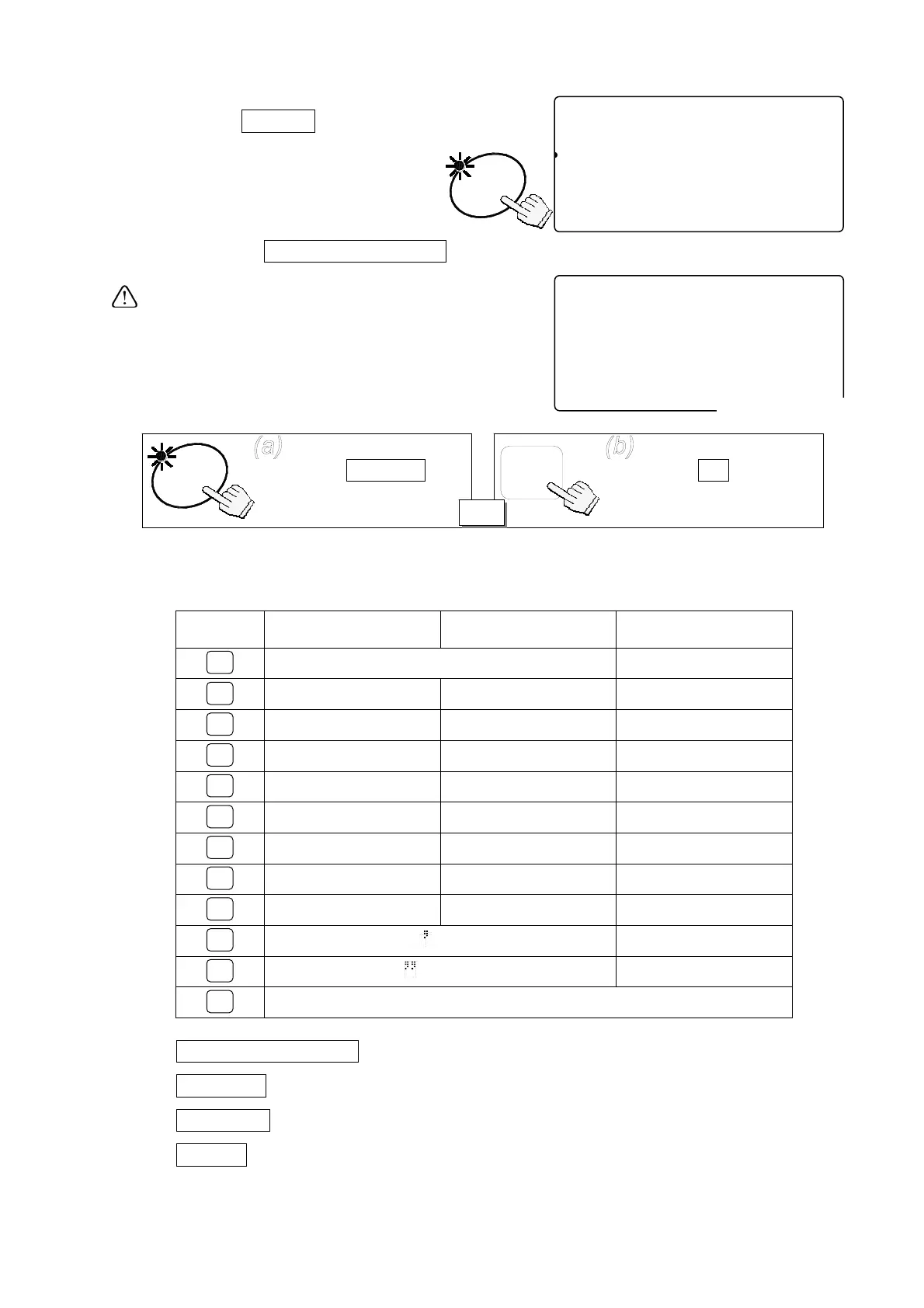
11. Press the
ENTER
key.
The ID number is stored with
Item code and the display returns
to normal.
You may return to step 2 by
pressing the
STORE UNIT WEIGHT
key.
If the same ID number was previously stored,
the scale beeps twice.
You must then select one of two options:
either (a) Overwrite the old ID unit weight, or
(b) Select a different ID number:
Alphanumeric Character Table
Key Capital Letters Lowercase Letters Numeric Characters
@ [ ] ^ _ 1
A B C a b c 2
D E F d e f 3
G H I g h i 4
J K L j k l 5
M N O m n o 6
P Q R S p q r s 7
T U V t u v 8
W X Y Z w x y z 9
# $ % &
( ) * + , 0
- . / !
: ; < = > ? .
Clear (Space)
STORE UNIT WEIGHT
: ID number input ÅÆ Item code input
PRINT Å
: To shift the cursor left
TOTAL Æ
: To shift the cursor right
M+ A/a
: CapitalÆLowercaseÆNumericÆCapitalÆ…
-----10
81
pcs
2AWEIGHT (kg)
123516-1--1.11056 8id-123456
23S1AAUUW (g) A&D Co.,Ltd.
12341567111.000
ENTER
-----10
81
pcs
2AWEIGHT (kg)
123456--1-1.1105678id-123456
23S1AMUUW (g) A&D Co.,Ltd.
1234567l111.000
Ñbeep, beepÒ
Press the ENTER key
to overwrite the old ID
number.
ENTER
Press the C key to
clear and retype the new
ID number.
C
OR
1
2
3
4
5
6
7
8
9
0
.
C
24



 To Next Page