2. The scale will clear the last M+ addition.
If the scale beeps 4 times, there is no M+ addition to erase.
Automatic M+ Accumulation Mode
M+ Accumulation can also be done automatically each time you count a different
batch, As soon as you have a stable count, it will be added to the M+ memory and
the scale will beep. The weight display will have to return to near zero before
another count can be added.
Automatic M+ accumulation is set by F-Function f-03-01 at “1”.
Only positive counts can be added. If F-Function f-03-02 is set at “1” (to accept
negative count data), it will be ignored.
Once there is an automatic M+ accumulation, the display must return to less than
+5d before another count can be accumulated.
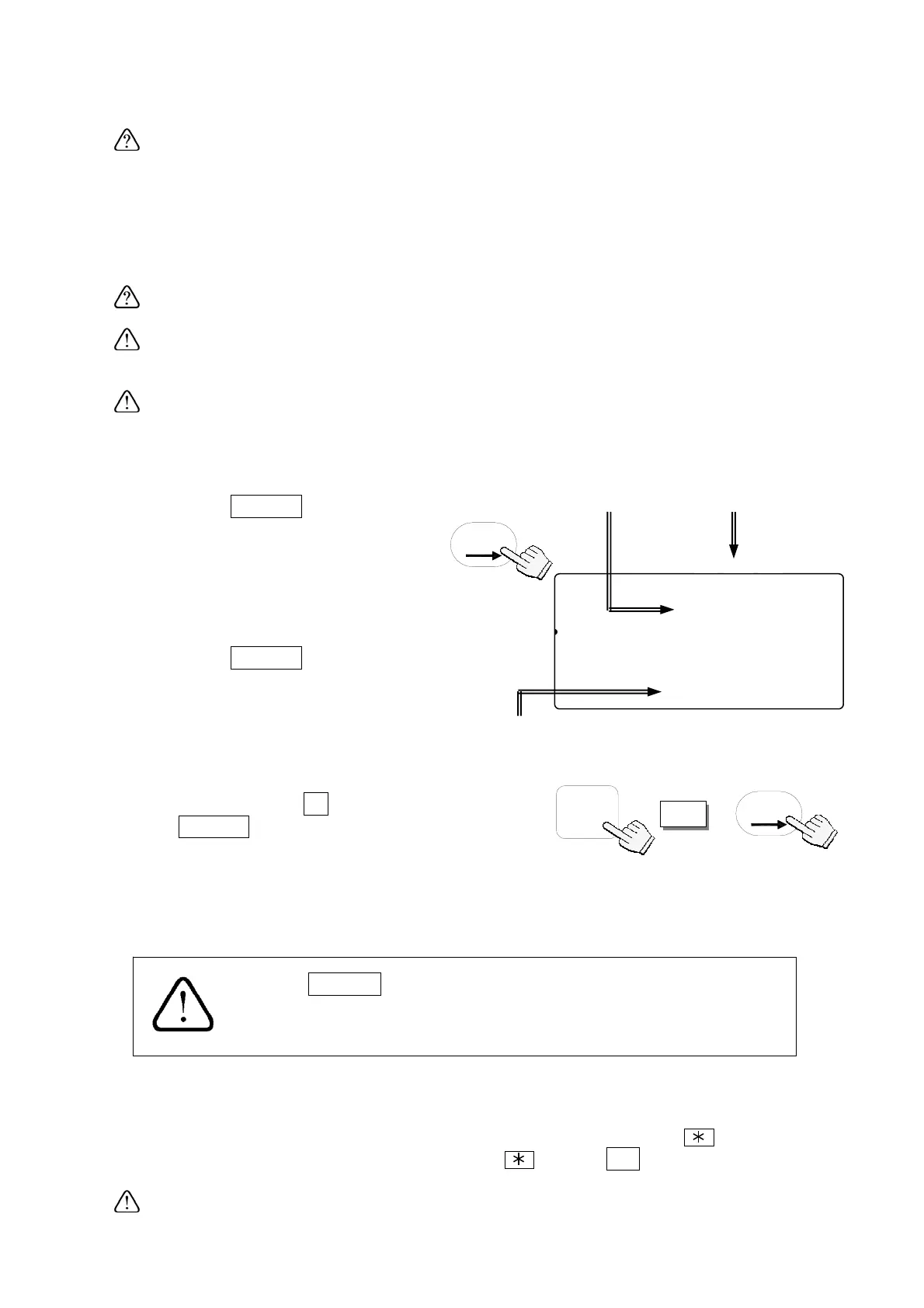
6-2. Viewing the M+ Total
1. Press the
TOTAL
key.
The count display will show the
total count and the TOTAL
indicator will come ON.
The number of additions to the M+
memory is also shown.
2. Press the
TOTAL
key again.
The display will return to normal.
TOTAL
TOTAL indicator
comes ON.
TOTAL
Count
Number of additions to M+ memory
STABL
8888678
81
pcs
2AWEIGHT (kg)
123456718-0.000
23SAAMTotal N
12345167111007
ZERO
TOTAL
M+
TARE
ENTERED
SCALE
6-3. Clearing the M+ Total
1. Press and hold the
C
key, then press
the
TOTAL
key – release both.
2. The scale will clear the M+ memory, and the TOTAL indicator and the M+
indicator will go OFF.
TOTAL
C
+
The
RESET
key does not clear the total data.
The total data is held in memory, but if AC/Battery power to
scale is interru
ted
the total data will be lost.
6-4. The M- Function
The scale can subtract count data from M+ memory by using the
key.
Set the F-Function f-09-01="1" to use the
key as
M-
key.
27



 To Next Page