10. F-FUNCTION PARAMETERS
10-1. To Change or View F-Function Settings
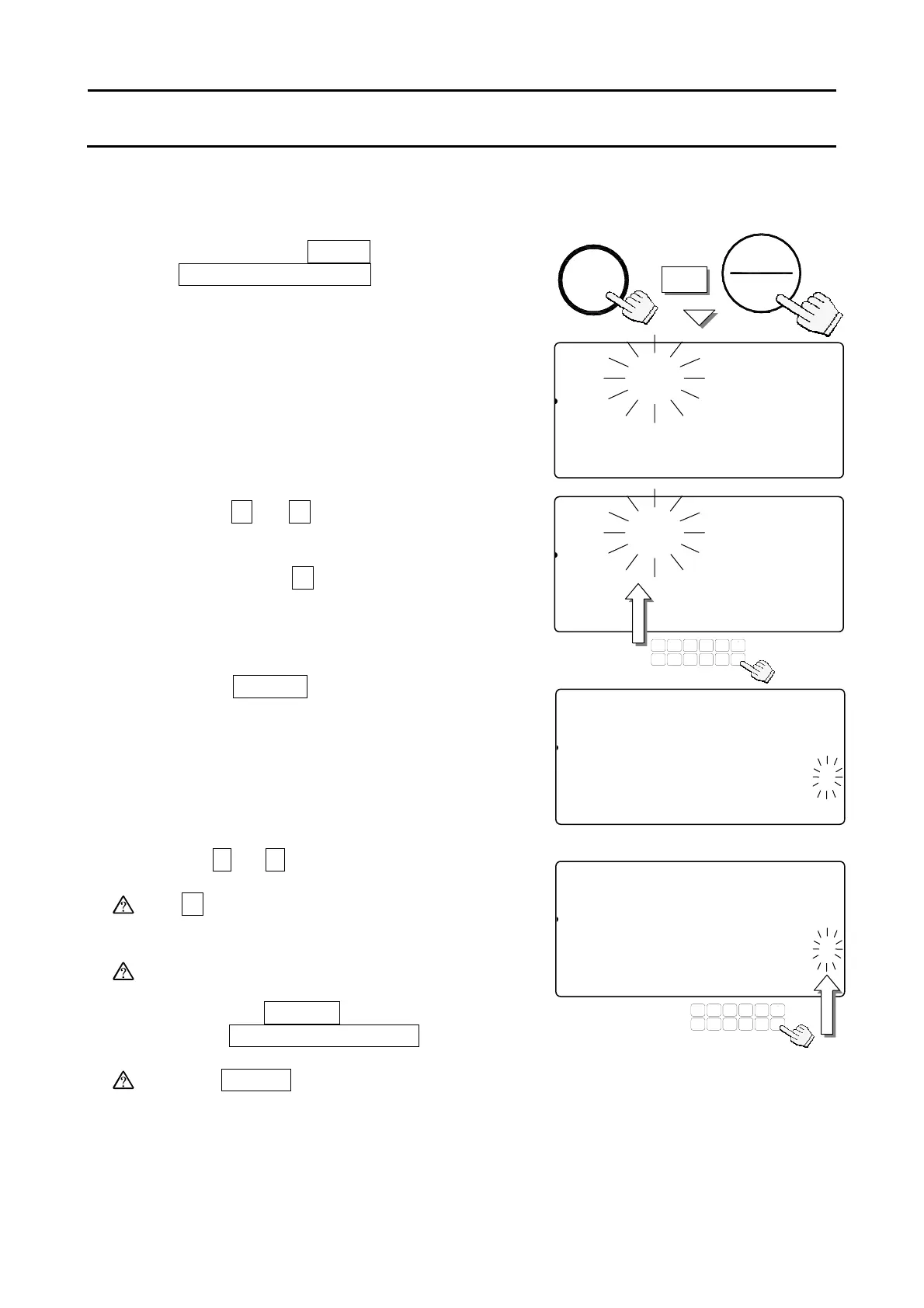
Start with the scale in standby mode, with the display is turned off.
1. Press and hold the
ZERO
key, then press
the
STANDBY/OPERATE
key.
The count display will show “f-00” with
“00” blinking. Then release the both keys.
2. Press the
0
Æ
9
keys to display the
number of the F-Function.
For example: the
5
key to enter into the
F-Function
f-05-
X Comparator.
3. Press the
ENTER
key.
The count display will show the F-Function
and its present setting will blink.
4. You may now either change the setting (step 5)
or move to the next F-Function (step 6).
5. Use the
0
Æ
9
keys to change the setting.
The
C
key clears the input setting if you press
the wrong key and want to re-enter.
If you make a mistake and want to escape
without saving any changes made after the
last time the
ENTER
key was pressed –
press the
STANDBY/OPERATE
key to exit.
After the
ENTER
key is pressed, the data is
entered.
f-05-00
81
pcs
Comparator
12345678C000045678id-000000
23SAMUUW (g)12Clear ID
12345670.0000045678901234567
TUV
DEFABC
MNO
6
1
78
PQRS
23
JKLGHI
09
WXYZ
4
#
5
C
.
ZERO
+
OPERAT
STANDBY
f-05-01
81
pcs
Comparator
12345678C000045678id-000000
23SAMUUW (g)12Clear ID
12345670.0000045678901234567
f-05-01
81
pcs
Comparator
12345678C000045678id-000001
23SAMUUW (g)12Clear ID
12345670.0000045678901234567
TUV
DEFABC
MNO
6
1
78
PQRS
23
JKLGHI
09
WXYZ
4
#
5
C
.
f-000
81
pcs
Set Funtion No.
12345678C000045678id-000000
23SAMUUW (g)12Clear ID
12345670.0000045678901234567
34



 To Next Page