TARE
The
TARE
key will subtract the displayed
container weight.
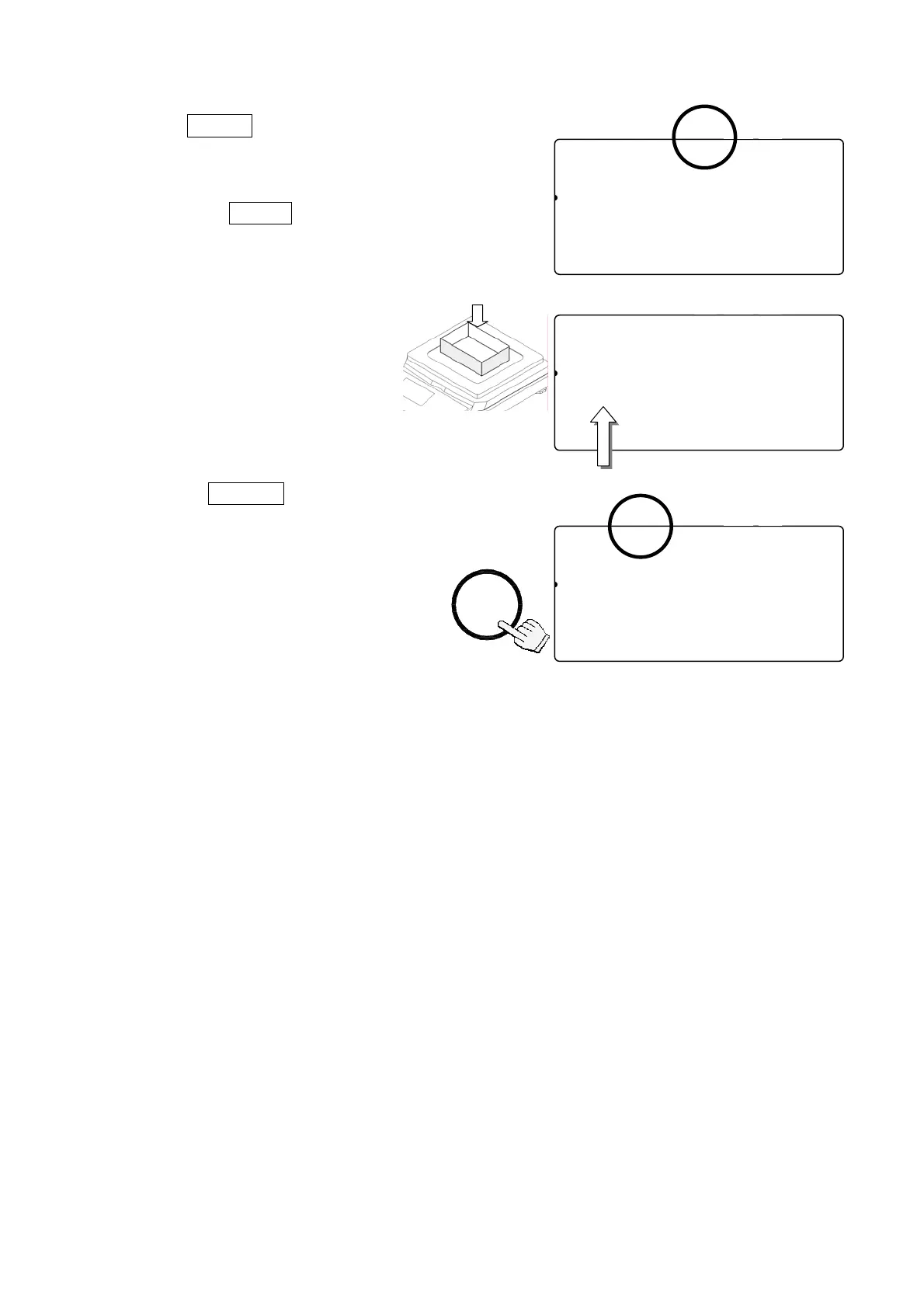
1. Remove everything from the weighing pan and
press the
ZERO
key to zero the scale.
2. Place a tare container on the
weighing pan. The weight
display will show the weight
of the container.
3. Press
TARE
key. Then the
display shows “-------” and waits
for the weighing data to become
stable.
4. The scale will subtract the weight
of the container and the weight
display changes to net weight.
The TARE ENTERED indicator will be displayed.
STABL
8888810
81
pcs
W2WEIGHT (kg)
12134567890.000
23ASAMPUW (g)
123415670.000004567890123456
TARE
ENTERED
ZERO
TOTAL
M+
SCALE
STABL
8888810
81
pcs
W2WEIGHT (kg)
12314567890.650
23SAMAPUW (g)
123451670.00000
TARE
ENTERED
ZERO
M+
SCALE
TOTAL
Container weight
STABL
8888810
81
pcs
W2WEIGHT (kg)
12134567890.000
23ASAMPUW (g)
123415670.000004567890123456
TARE
ENTERED
ZERO
M+
SCALE
TOTAL
TARE
11



 To Next Page