Using OP-01 Bar Code Reader
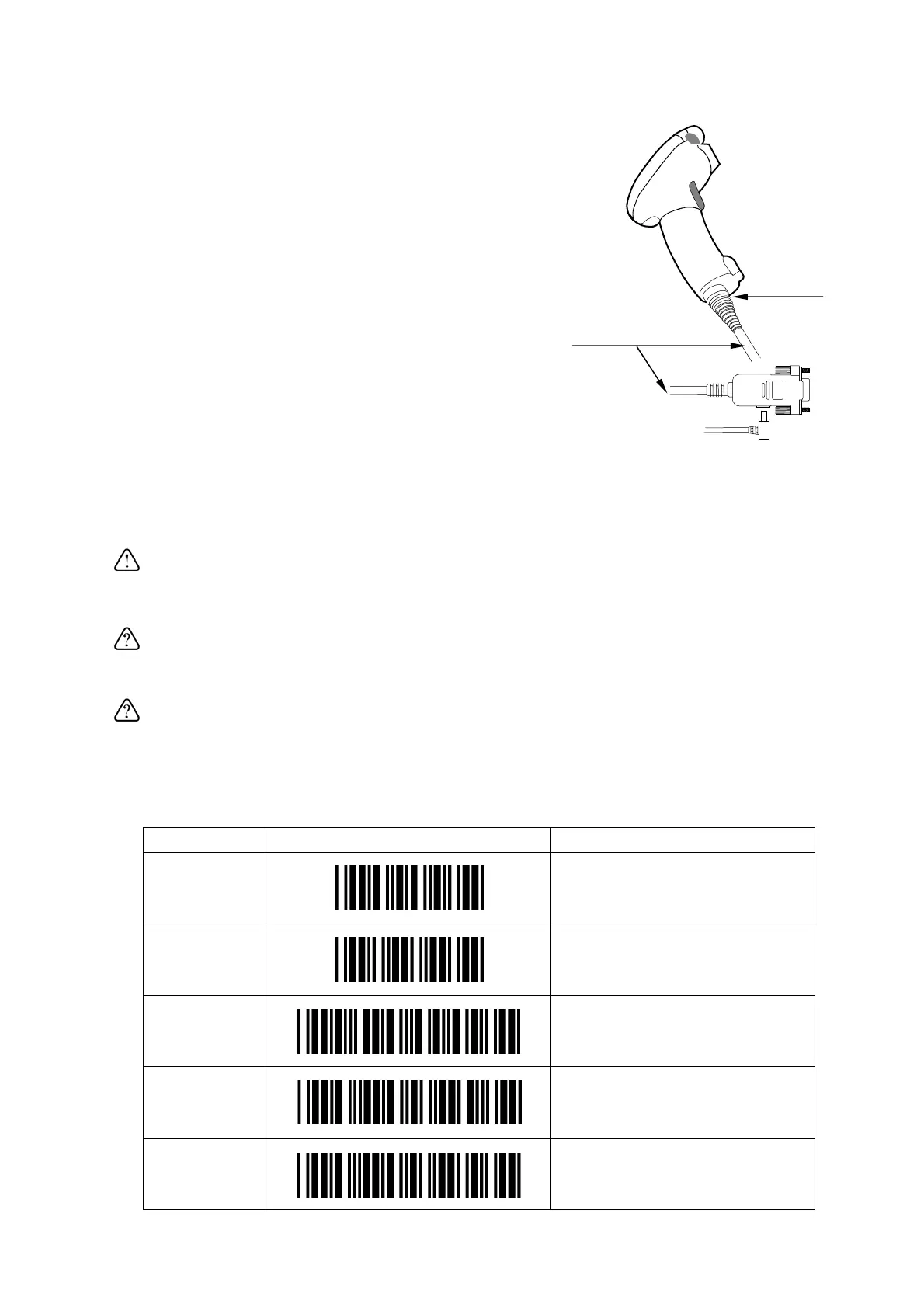
1. Plug the modular connector of RS-232C cable
into the port on the bottom of bar code reader,
and twist the lock to the right to lock it.
2. Connect the other end of the RS-232C cable to
the RS-232C interface of the scale.
3. Plug in the AC adapter for OP-01. AC adapter
jack is located at the side of the RS-232C cable
connector.
Lock
RS-232C cable
4. Set the F-Function f-06/07/08-01="5"
according to the interface you connected.
For example, to use Ch.1 (PORT 1), set
f-07-01="5".
AC adapter plug
5. Read the next bar codes step by step, then the
bar code reader will be set to work with the
scale.
This sets the RS-232C to be 9600 bps and 8 bits data / non parity. Set the
F-Function f-06/07/08-04="2" and f-06/07/08-05="2". For example, to use Ch.1
(PORT 1), set f-07-04="2" and f-07-05="2".
By this set-up, the FC-i / FC-Si can accept bar codes of EAN-13/8, JAN-13/8,
UPC-A/E, Codabar (NW-7), Interleaved 2 of 5 and Code 39.
The UPC-A bar code can not be used together with EAN/JAN-13.
Refer to "
Note 1
" at "Step 4".
Note 1
: When using UPC-A bar code, skip "Step 4".
STEP Set-up Bar Code Definition
Step 1 Start of configuration
Step 2
Rest to default settings
Step 3
Select RS-232C interface
Step 4
Refer to Note 1
Force UPC-A to EAN-13
Step 5
Disable transmitting UPC-A
check digit
63



 To Next Page