Page 18
Selection for the Automatic Measurement
This setting initializes measurement intervals that is based on the internal 24-hour
clock.
Mode
mode I 07:00 ~ 21:59 The measurement is performed every quarter hour.
22:00 ~ 06:59 The measurement is performed every half hour.
mode II The AUTO ON/OFF key is pressed at rising and going to bed so that the
measurement intervals are changed and the time during sleep can be
distinguished on the data.
When the "S" is off, the measurement is performed every quarter hour.
When the "S" is displayed, the measurement is performed every half hour.
mode III The measurement interval can change six times within a maximum of
24-hours. (The recorder can store six measurement intervals (blocks) in
24-hours. A block consists of a start time and frequency.)
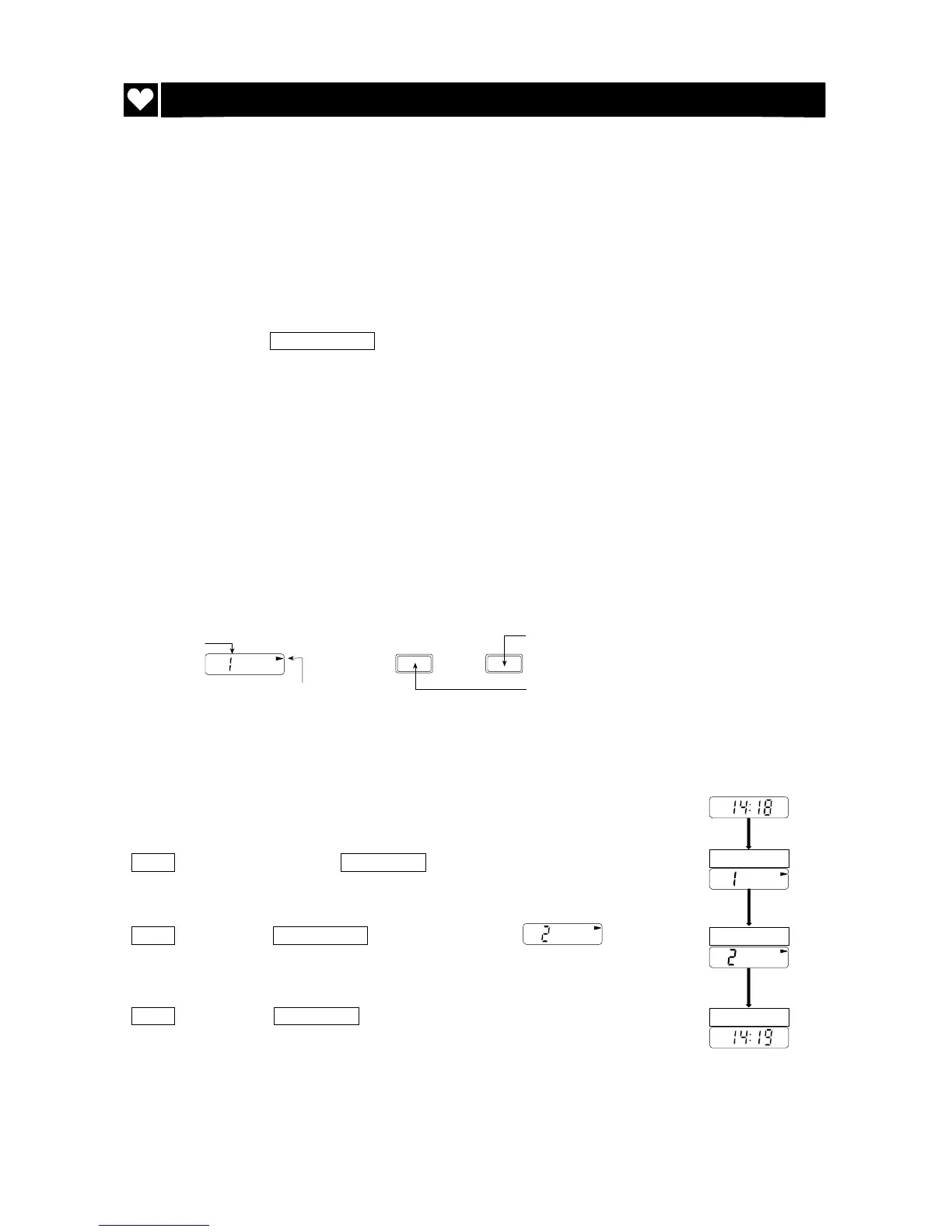
Display & key
Steps for selecting a mode
ex. Mode II is selected.
Step 1 Press and hold the START STOP key for about 3 seconds. The
current mode is displayed.
Step 2 Press the AUTO ON/OFF key so as to display of
mode II.
Step 3 Press the START STOP key. The recorder stores the mode and
displays the clock.
START STOP
AUTO ON/OFF
START STOP
AUTO
ON/OFF
START
STOP
Mode
Sign of setting parameters
for automatic measurement
Selecting a mode
Saving a mode



 To Next Page