Page 22
Deleting Old Data
Caution Confirm that the data has already been transferred and saved, when
the data is to be deleted. It is not possible to recover data that was
deleted.
It is not possible to delete data completely, if the START STOP key is
released while the buzzer sounds at Step 2.
Steps for deleting old data
Step 1 Press and hold the START STOP key for approx. 9 seconds. is displayed.
If you want to cancel this process, press the AUTO ON/OFF key.
Step 2 Press and hold the START STOP key once more until the buzzer becomes silent.
Resetting the Recorder
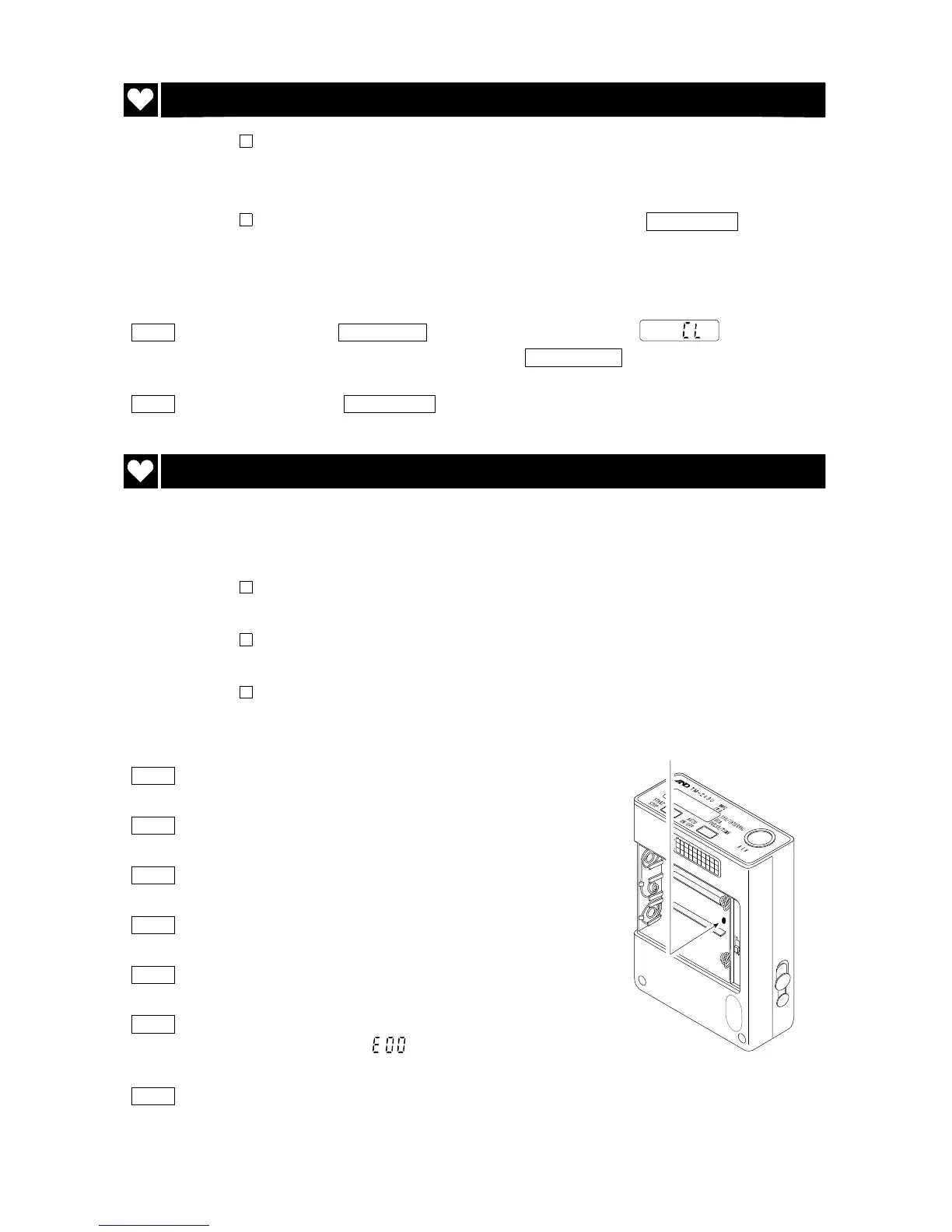
If the recorder does not work correctly, press the reset key. The recorder
deletes all data and parameters. The internal system is initialized.
Caution All data and parameters are deleted and preset initial parameters by
the reset.
Do not press the reset switch to intensely. Press this key gently so
as not to damage the components inside.
Keep foreign matter away from the reset switch hole.
Steps for reset
Step 1 Open the battery cover.
Step 2 Turn off the power switch.
Step 3 Remove the batteries from the recorder.
Step 4 Press the reset key gently.
Step 5 Place new batteries in the recorder.
Step 6 Turn on the power switch. The recorder sounds the
buzzer four times and is displayed blinking.
Step 7 Set the parameters for the display and clock. Also,
adjust the parameters for automatic measurement.
Reset key



 To Next Page