Page 13
The complete procedure for use
A Step by Step Procedure
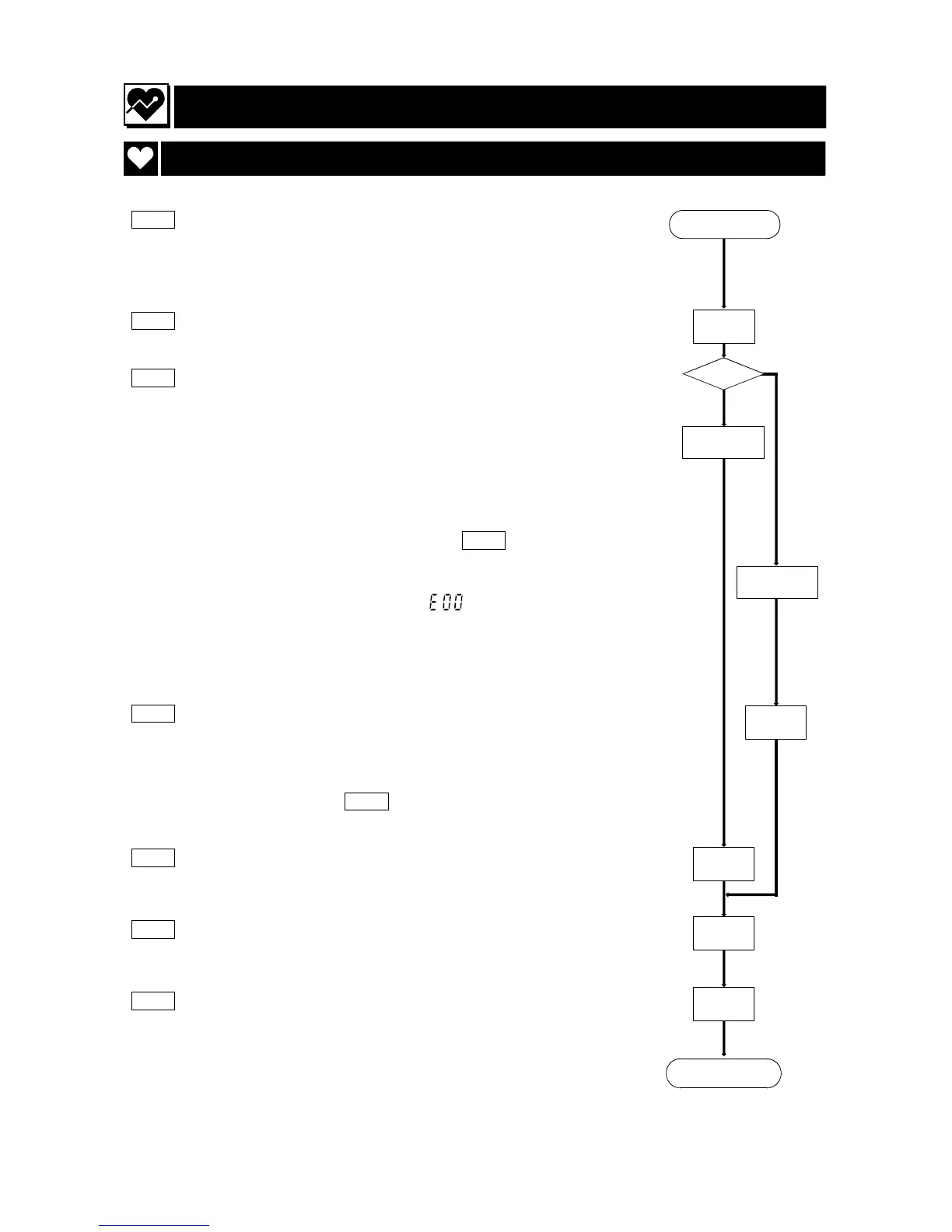
Step 1 Battery replacement.
Replace with new alkaline batteries (note direction).
Refer to page 14, "Replacing Batteries".
Step 2 Turn on the recorder using the power switch.
Step 3 With the recorder turned on, select any operation to set the
state.
Case 1 Normal state
The buzzer is sounded once and the clock is displayed. You
can use this recorder at once. The recorder stores
parameters for "display and clock" and "automatic
measurement". Please proceed to Step 5.
Case 2 Error state
When the recorder displays the error code, it is necessary
to set up parameters for "display and clock" and "automatic
measurement". Please proceed to the next step.
Step 4 Set up parameters for "display and clock". When you use
automatic measurement, set up parameters for automatic
measurement. Refer to "Parameters for the Display and
Clock" and "Selection for the Automatic Measurement".
Please proceed to Step 6 .
Step 5 Set up new parameters for "display and clock" and
"automatic measurement", if necessary.
Step 6 Delete the old data stored in the recorder. Refer to the
section "Deleting Old Data".
Step 7 Explain the "Patient Instructions" and "Notes on the Blood
Pressure Recorder "to the patient.
Step 1
Step 2
Step 3
Case 1
Normal
Case 2
Error
Step 4
Step 5
Step 6
Step 7
Next page



 To Next Page