Page 20
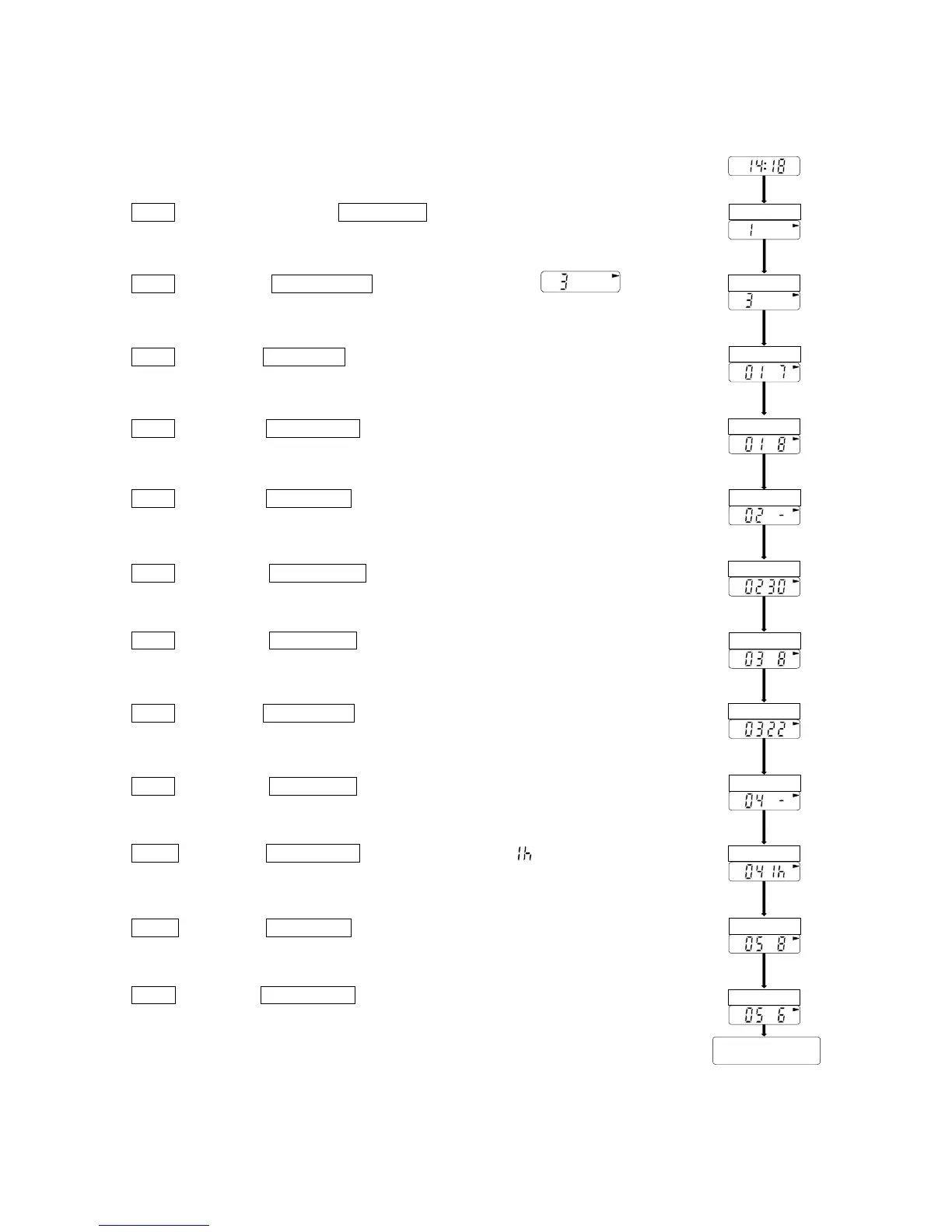
Steps for automatic measurement
ex. First block 08:00 ~ 21:59 frequency is 30 minutes
Second block 22:00 ~ 05:59 frequency is 60 minutes
Third block 06:00 ~ 07:59 frequency is 10 minutes
Step 1 Press and hold the START STOP key for approx. 3 seconds. The
current mode is displayed.
Step 2 Press the AUTO ON/OFF key so as to display for
mode III.
Step 3 Press the START STOP key. The mode is stored and the current start
time of the first block is displayed.
Step 4 Press the AUTO ON/OFF key so as to display "8" for 8:00 hours as
the start time of the first block.
Step 5 Press the START STOP key. The current frequency for the first block
is displayed.
Step 6 Press the AUTO ON/OFF key so as to display "30" for 30 minutes
as the frequency for the first block.
Step 7 Press the START STOP key. The current start time of the second
block is displayed.
Step 8 Press the AUTO ON/OFF key so as to display "22" for 22:00 hours as
the start time for the second block.
Step 9 Press the START STOP key. The current frequency for the second
block is displayed.
Step10 Press the AUTO ON/OFF key so as to display " " for 60 minutes as
the frequency of the second block.
Step11 Press the START STOP key. The current start time of the third block
is displayed.
Step12 Press the AUTO ON/OFF key so as to display "6" for 6:00 hours as
the start time of the third block.
To next page
START STOP
START STOP
START STOP
START STOP
START STOP
START STOP
AUTO ON/OFF
AUTO ON/OFF
AUTO ON/OFF
AUTO ON/OFF
AUTO ON/OFF
AUTO ON/OFF



 To Next Page