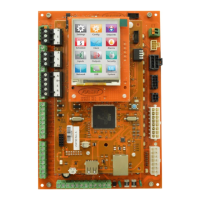
65VCCX-454 Controller Technical Guide
TROUBLESHOOTING
Updating via USB
The VCCX-454’s USB port is only used for updating the VCCX-
454’s rmware using a USB ash drive. This uses the same directory
and le naming scheme as the handheld service tool.
NOTE: Only use a FAT32-formatted USB ash drive. USB
Flash drives formatted as NTFS, exFAT, or any other
le system will not work.
Multiple hex les can be on the USB drive – the VCCX-454 will
only update if the software number is the same (SS1186) and the
hex le is a higher version than what is currently on the VCCX-454.
1. Using a computer, create a folder called APP on the
USB drive.
2. Copy the W44A2###.hex le (### represents the version
number) into the APP folder on the USB.
3. Insert the USB drive in to the USB port on the VCCX-454.
4. Power cycle or power on the VCCX-454.
5. If the VCCX-454 was able to nd an update le and it
is newer than the version currently on the VCCX-454,
the LCD will display “VALIDATE” as it is checking
the update le.
6. If it is a valid update le, the LCD will then display
“FLASHING”.
WARNING: DO NOT power o the control or remove the
USB drive while the VCCX-454 is ashing!
7. Once complete, the VCCX-454 should start the updated
rmware.
8. Remove the USB drive.


 To Next Page