Only members of Safety group are allowed to modify Safety modules, change their configuration, etc. By
default, no users without proper log-in and access rights can access safety modules.
Project administrator is allowed to use all available User Management features to find the best suitable user
setup with appropriate rights (
Ä
AC500 User Documentation).
DANGER!
It is the responsibility of project administrator to setup a proper user management for the given safety
application project to avoid unauthorized access to Safety modules.
Passwords for users with Safety group membership shall be properly selected (at least 8 symbols are
recommended with a combination of numbers and letters). An access to passwords must be strictly
controlled.
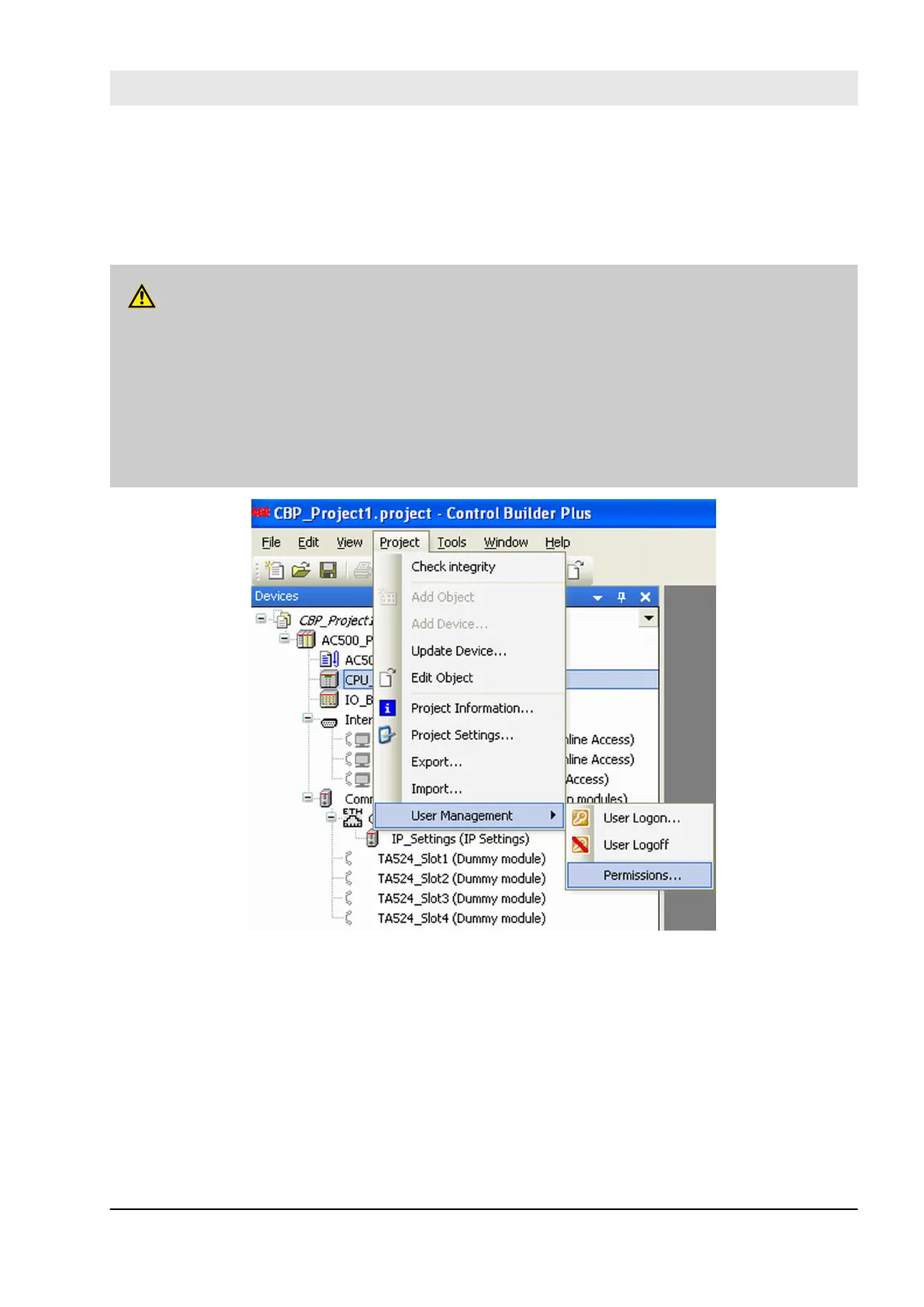
Make sure that you set “Deny” permission for proper users and groups (e.g., Everyone) through menu
“Project è User Management è Permissions …” to avoid unauthorized creation of new users in the
Safety group (Fig. 68 and Fig. 69).
Fig. 68: Selection of user management
Configuration and programming
System configuration and programming > Creation of new project and user management
30.03.2017 AC500-S 173


 To Next Page