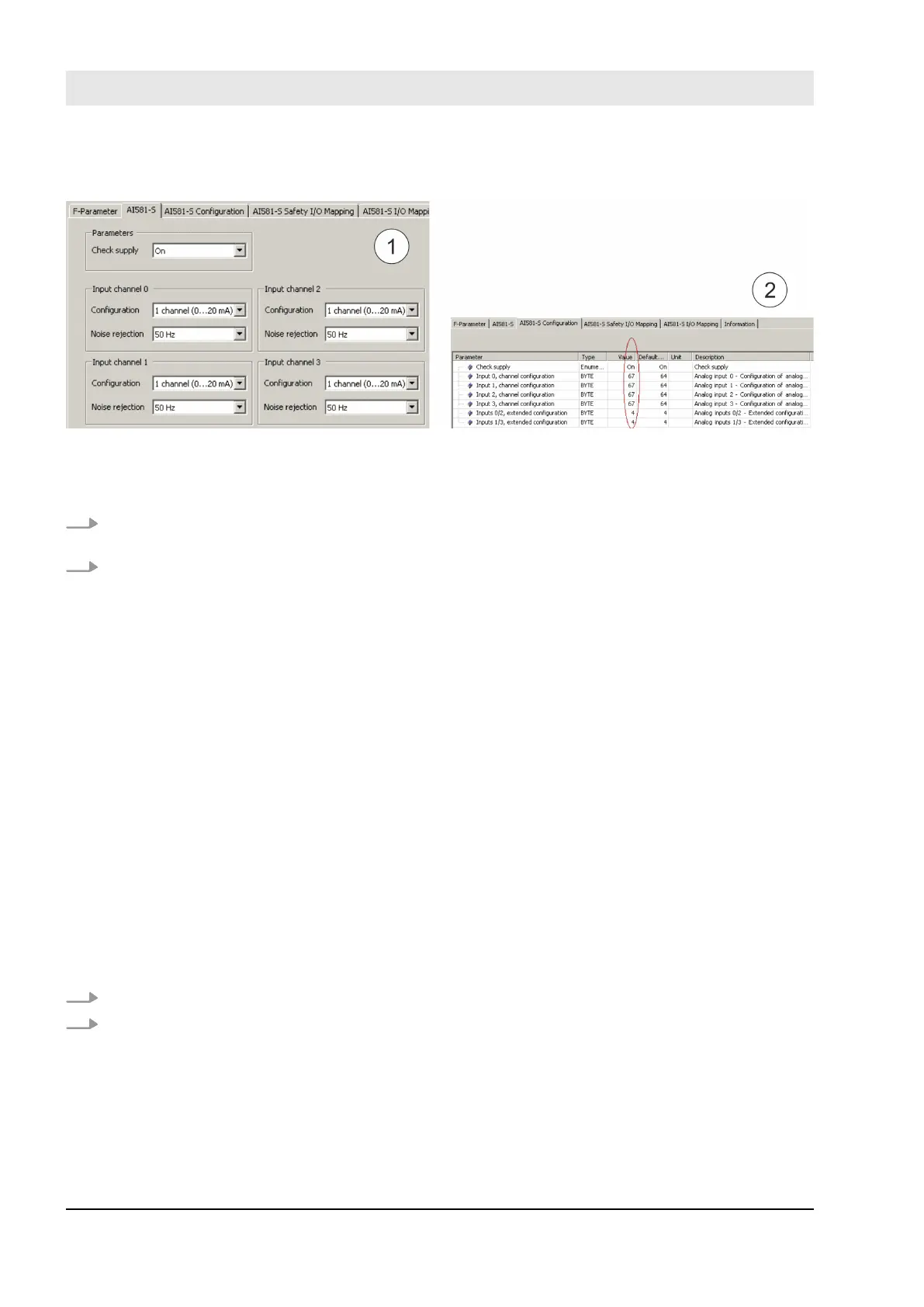
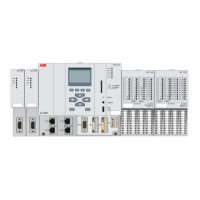
6.5.2.1 AI581-S Safety I/O tables
Fig. 128: The “AI581-S Configuration” Tab is a readback view for iParameters set in “AI581-S” Tab.
1 “AI581-S” Tab
2 “AI581-S Configuration” Tab
1. Compare that “Check supply” parameters have the same values “On” or “Off” (English settings) in both
“AI581-S” and “AI581-S Configuration” tabs.
2. Refer to “AI581-S” tab and calculate “Input channel 0” decimal equivalent (Dec_InputChannel0) as:
Dec_InputChannel0 = Configuration_Value + Noise_Rejection_Value
where:
Configuration_Value:
0 ➔ Not used
3 ➔ 1 channel (0 … 20 mA)
4 ➔ 1 channel (4 … 20 mA)
5 ➔ 2 channel (4 … 20 mA)
Noise_Rejection_Value:
0 ➔ None
64 ➔ 50 Hz
128 ➔ 60 Hz
Compare calculated Dec_InputChannel0 (
Ä
step 2) with “Input 0, channel configuration value”.
They have to be equal.
If they are not equal, stop the procedure and re-do the configuration and comparison.
If after the second iteration, there is still a difference between those values, stop verification procedure
and contact ABB technical support.
3. Repeat step 2 for the rest of analog input channels (Input 1, Input 2 and Input 3).
4. Refer to “AI581-S” tab and calculate “Analog inputs 0/2 – Extended configuration” decimal equiva-
lent (Dec_ExtConf0_2) as:
Dec_ExtConf0_2 = Tolerance_Range_Value + Min_Max_Value
where
Tolerance_Range_Value:
4 ➔ 4 %
Checklists for AC500-S Commissioning
Verification procedure for safe iParameter setting in AC500-S Safety I/Os > Verification tables for iParameter settings in AC500-S
Safety I/Os
30.03.2017AC500-S418


 To Next Page