19
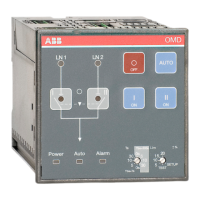
AUTOMATIC CONTROL UNIT, OMD100
AUTOMATIC CONTROL UNIT, OMD100
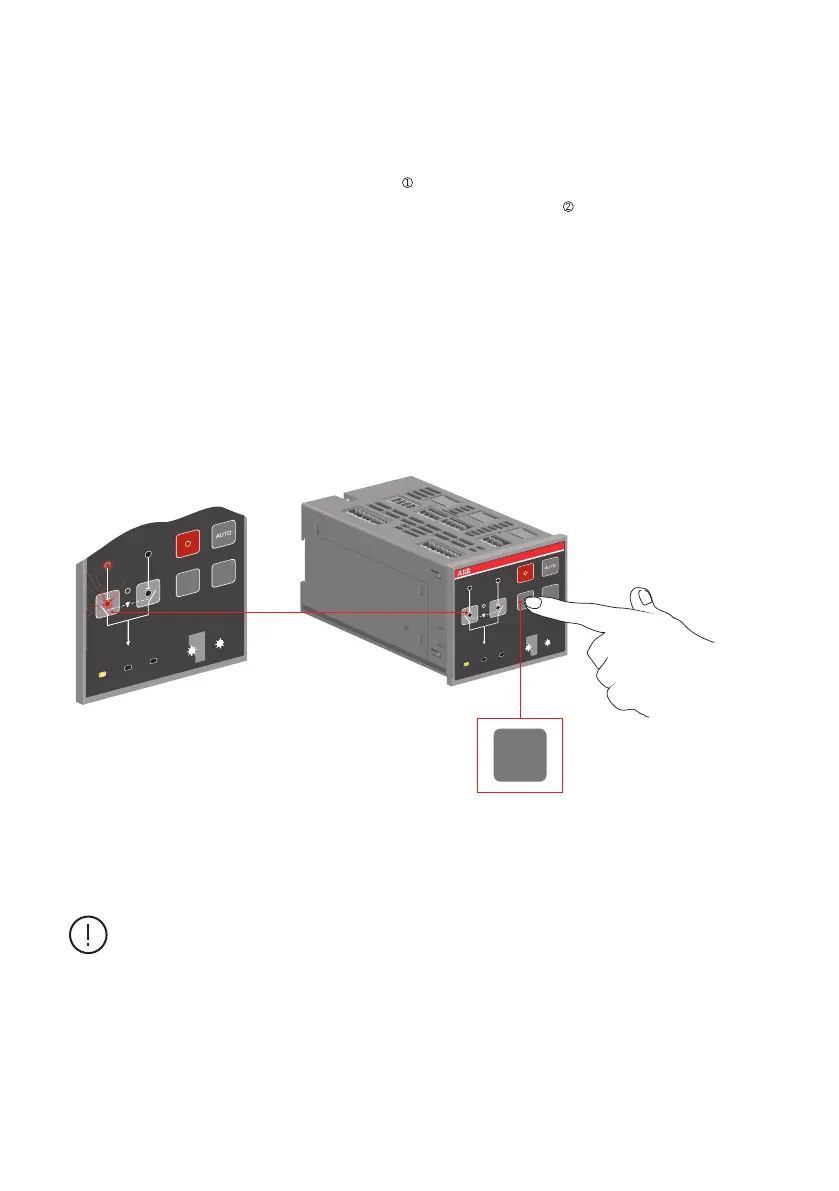
To select the switch to operate by the automatic control unit OMD100 in Manual Mode:
a. Push the appropriate I, O or II key.
b. When pushing the I-key (see the Figure 6.2/ , the I-switch will be in the
ON position (the status and the line indication, see the Figure 6.2/ and the II-switch will be in
the OFF position. If the I-switch is already in the ON position, pushing the I-key does not have
any influence.
c. When pushing the O-key, the I-switch will be in the OFF position. The II-switch remains in the
OFF position.
d. When pushing the II-key, the II-switch will be in the ON position and the I-switch will be in the
OFF position.
e. If you push the I-key while the II-switch is in the ON position, first the II-switch opens (OFF
position) and then the I-switch closes its contacts (ON position).
Figure 6.2 Selecting the switch to operate, the switch status and the chosen line indication with
LEDs in OMD100
If a new command is given before the switch has reached the position of the previous
command, the fuse (F1) of the motor operator may operate.
I
I
II
II
OFF
ON ON
20
5
10
15
+
-
%
0s
5
10
30
0s
5
10
30
Ts
Tbs=300s
Tbs=Ts
Lim
SETUP
TEST
LN 1 LN 2
Power
Auto Alarm
I
I
II
II
OMD
OFF
ON ON
20
5
10
15
+
-
%
0s
5
10
30
0s
5
10
30
Ts
Tbs=300s
Tbs=Ts
Lim
SETUP
TEST
LN 1 LN 2
Power
Auto Alarm
I
ON
A07257
2
1


 To Next Page