30
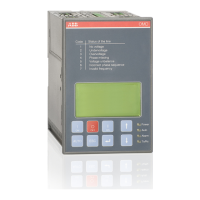
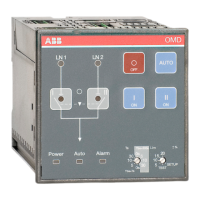
AUTOMATIC CONTROL UNIT, OMD100
—
7.2 Configuration
7.2.1 Rotary switches
Ts / Tbs = Delay times for automatic switching
The delay time is the time before activating the switching sequence and the back switching
sequence. User can choose two types of settings for delay times:
Choice 1: Darker side of the rotary switch
Available selections for the delay times are: 0, 5, 10 and 30 s. When this side is used the back
switching delay Tbs is always same as switching delay Ts.
Choice 2: Lighter side of the rotary switch
Available selections for the delay times are: 0, 5, 10 and 30 s. When this side is used the back
switching delay Tbs is always set to 300 s.
Lim = Voltage threshold with SETUP and TEST function
The available selections for voltage threshold in OMD100 are: ±5, ±10, ±15, ±20 %.
When the user wants to enter to the SETUP mode, the automatic control unit has to be set to
manual mode and Lim rotary switch has to be set to SETUP position. In SETUP mode it is possible
to choose between three operating modes: standard switching mode, no priority mode or manual
back switching mode. In the SETUP –mode user must also choose between automatic OTM_C_D,
motorized OTM40…125_CMA_ or motorized OTM_160…2500_CM_ change-over switch. . See
Section 6.4.2 Choice of Operating mode in OMD100.
When the Lim rotary switch is set to the TEST position, the automatic control unit OMD100
enters the test sequence. In test sequence it is possible to simulate switching and back switching
sequences step by step by pushing the AUTO key.
Figure 7.4 Selection of delay time and voltage threshold, the factory settings are shown in
the figure
20
5
10
15
+
-
%
0s
5
10
30
0s
5
10
30
Ts
Tbs=300s
Tbs=Ts
Lim
SETUP
TEST
KA00451


 To Next Page