99
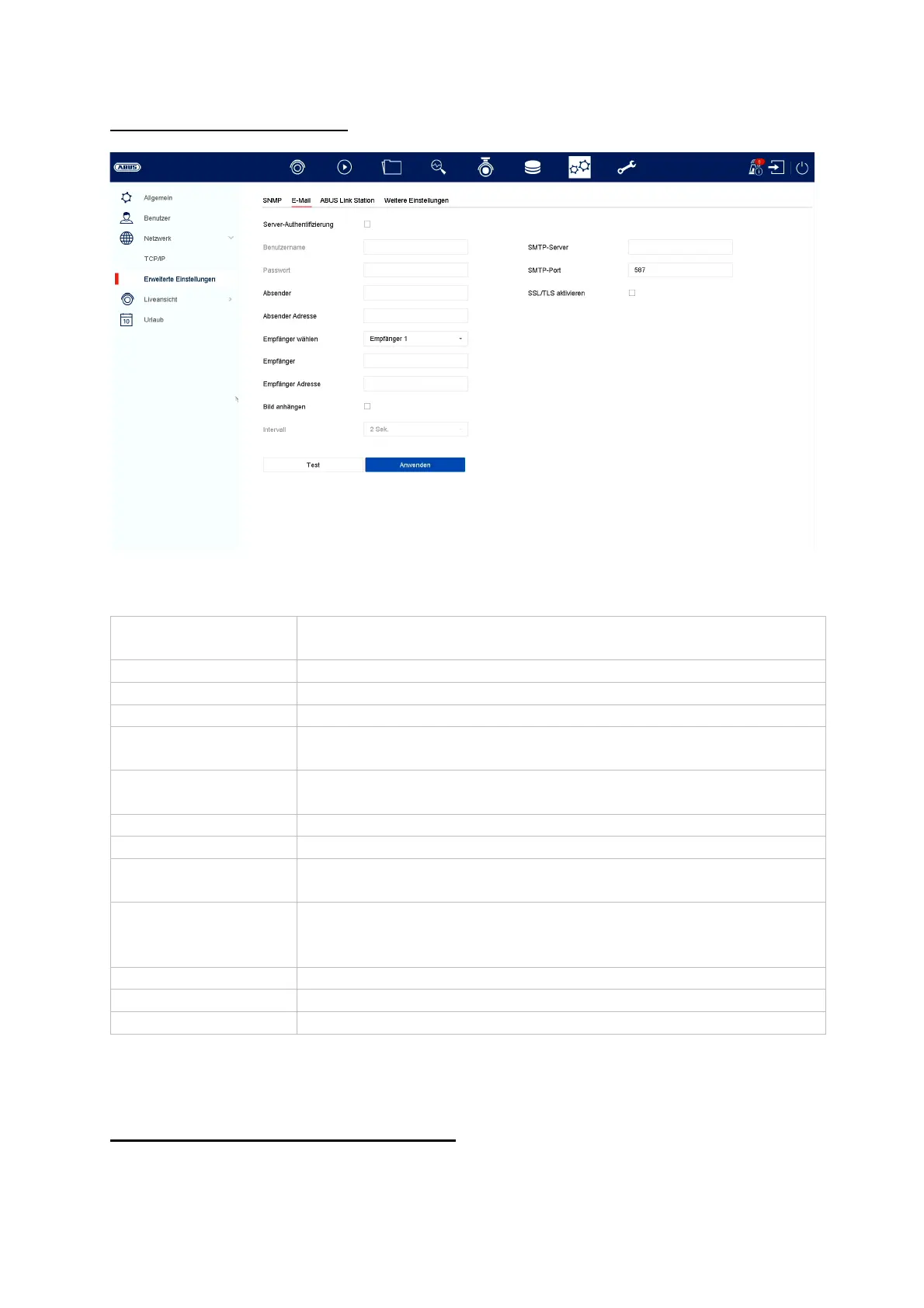
Advanced settings - E-mail
In the event of an alarm, the unit can send a message by email. Enter the email
configuration here.
Advanced settings - ABUS Link Station
Server
authentication
Activate the checkbox if authentication on the server should/is
necessar
.
Username Enter the username of
our e-mail account here
Password Enter the password from
our e-mail account here
Sende
Enter the sender name here
Sender address Enter the e-mail address belonging to the e-mail account
here.
Select recipient Here you can select up to 3 different recipients and then enter
their e-mail addresses.
Receive
Enter the name of the recipient here
Recipient address Enter the e-mail address of the recipient here
Attach picture Activate the checkbox if, in addition to the e-mail, recordings
of the camera are to be sent as photo files.
Interval Select a trigger time between 2 and 5 seconds here. The
images are only sent when movement has been detected
over the defined period.
SMTP Serve
Enter the SMTP server address of the e-mail provider here.
SMTP Port Enter the SMTP port of the e-mail provider here.
Enable SSL/TLS
ctivate 'Checkbox' to enable email encr
ption



 To Next Page