- 106 -
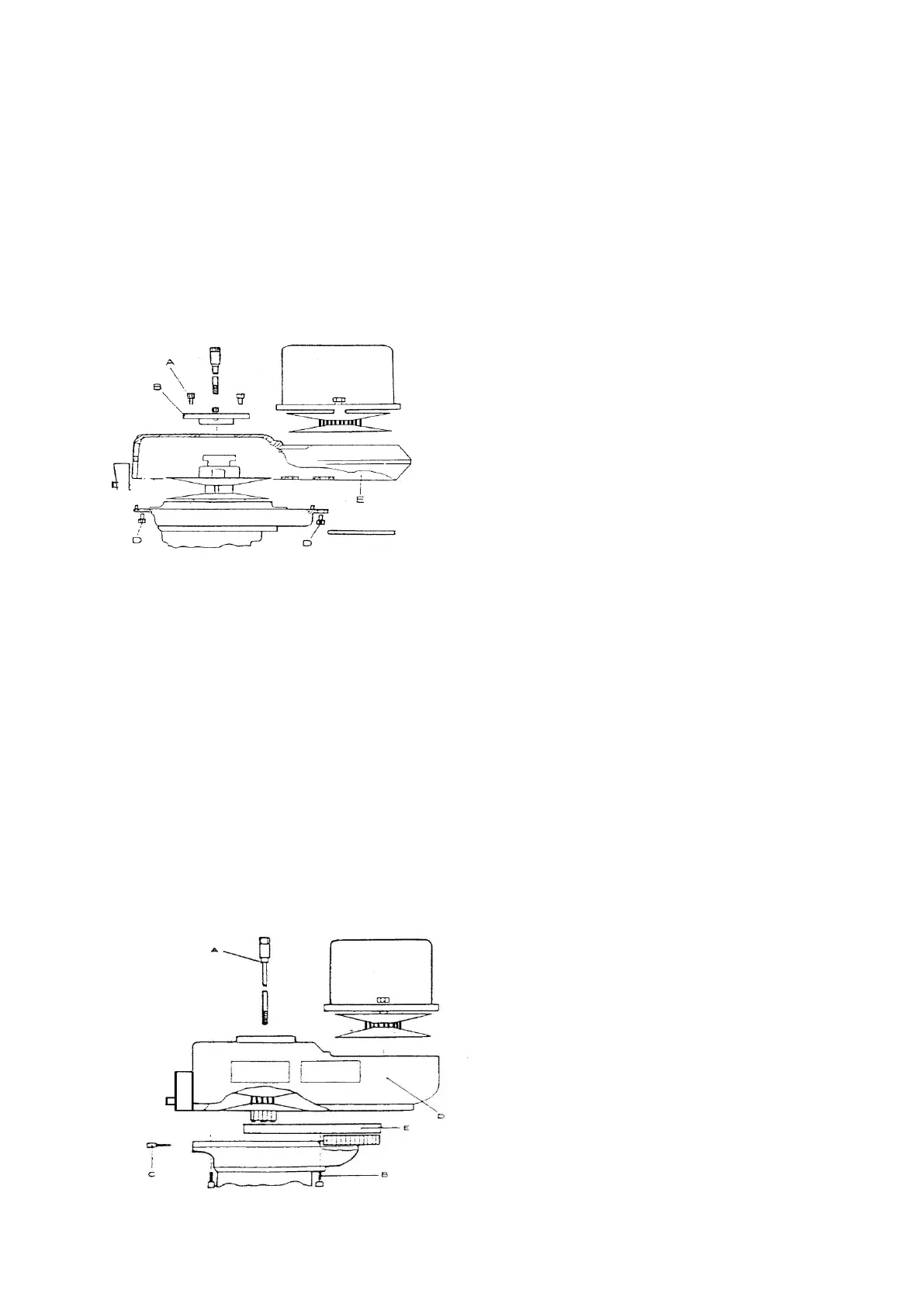
7-6 Changing the Vari-drive Belt—the V Belt
Complete the previous procedures for removing the motor then remove the three
screws (A) and lift out the top bearing cap (B). Next remove the six screws (D),
then holding the belt housing (E) to the base.
Remove the old belt and replace it with a new belt. Do use a same specification V
belt from other manufacturers, otherwise vibration and heat could result from the
use of the wrong belt.
Changing vari-speed V belt
7-7 Changing Timing Belt
Complete the operation for removing the motor, then put the HI-NEUTRAL-LO
lever in the “LO” position. Remove the drawbar (A) and lower the spindle.
Remove the six screws holding the upper and lower belt housings together
including the two lower screws (C) in speed changer housing just below the
switches.
A slight blow under the speed change housing may be needed to separate the upper
belt housing (D) from its base.
As the housings are being separated the timing belt (E) will still be connected to
both, resisting the separating movement. The separation can be assisted by gently
pushing the belt off the large pulley as the upper housing is being raised.
Remove the old belt and replace with a new belt.



 To Next Page