- 98 -
6-15 Ram Position
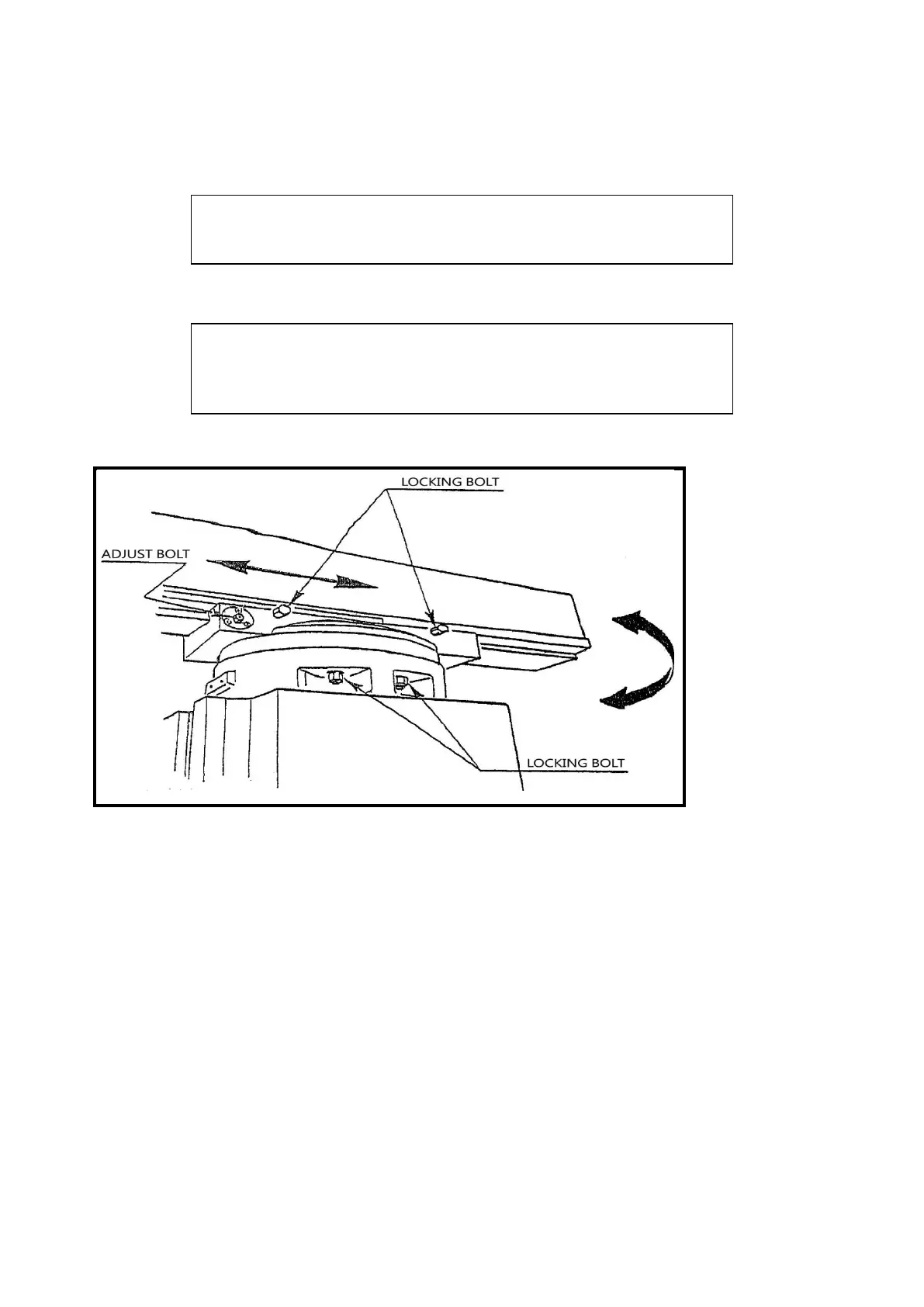
A. Ram can be moved by loosening three ram lock studs on turret and moving to
desired position.
CAUTION
CARE SHOULD BE TAKEN TO LOCK RAM SECURELY
AFTER SETTING.
NOTE
It is recommended that on heavy milling work, head should
be kept as close to column as possible, where maximum
rigidity is obtained.
B. Swiveling Turret and Moving Ram on 6VK
SWIVELING TURRET:
1. USE SPANNER WRENCH TO UNLOCK THE FOUR
LOCKING BOLTS.
2. ROTATE TO THE REQUIRED ANGLE SETTING.
3. LOCK THE FOUR BOLTS.
MOVING RAM:
1. USE SPANNER WRENCH TO UNLOCK THE TWO BOLTS.
2. TURN THE ADJUSTMENT BOLT TO MOVE THE RAM TO
THE REQUIRED POSITION.
3. LOCK AND TIGHTEN THE REAR BOLT FIRST, THEN THE
FRONT ONE.
6-16 Clamping Table, Saddle and Knee:
When milling with longitudinal table feed only it is advisable to clamp the knee to
the column and the saddle to the knee to add rigidity to these members and provide



 To Next Page