13
6.1
How to create a Mesh network
with routers from two of 1-packs
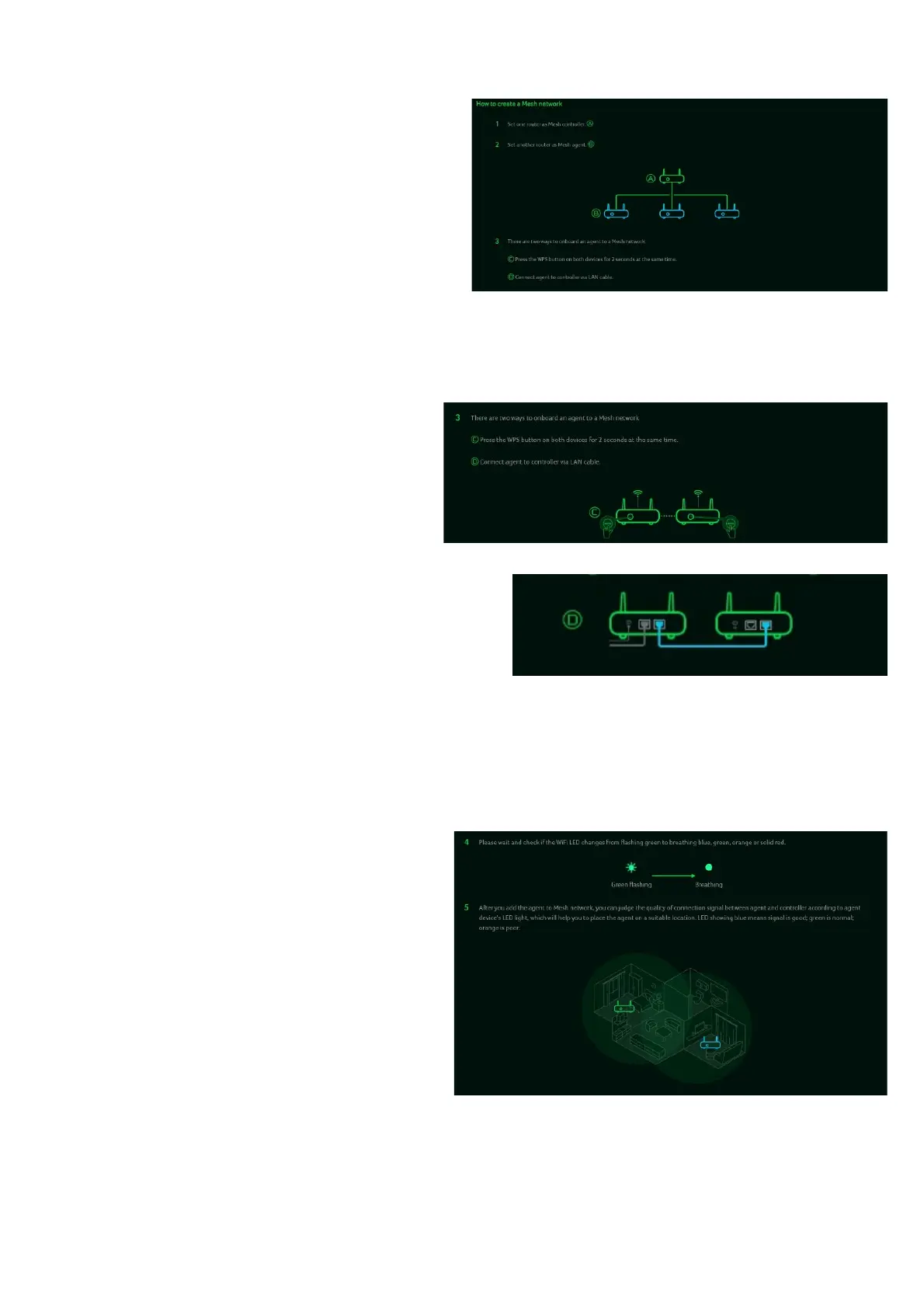
To create a mesh network, set one
router as the Mesh Controller Mode(A) and
another router as the Agent Mode (B).
To avoid impacting performance, it is
recommended not to wirelessly chain more
than three layers of agents.
However, you
can connect multiple agents behind the
controller.
Alternatively, you can use LAN cables to
connect more than two agents in series.
Here are the steps to create a Mesh
network.
1. Go to Quick Setup and configure the
main router as the Mesh Controller.
2. Power on the other Acer WAVE 7
router and set it as the Mesh Agent.
3. Place both routers close to each other.
4.There are two methods to add an agent to a
Mesh network.
I.
Press the WPS button on both devices
simultaneously for 2 seconds.
II.
Connect the agent to the controller using
a LAN cable.
If the agent successfully connects to the controller, the LED will blink blue. If the
connection fails, the LED will remain solid red.
5. Power off the agent device, relocate it,
and then power it back on. Observe the
LED color of the agent, which indicates
the RSSI (signal strength) between the
controller and the agent.
The Blue color means RSSI is good,
Green color means RSSI is normal,
Orange color means RSSI is poor,
Red color means disconnected.



 To Next Page