19
8.
Wi-Fi
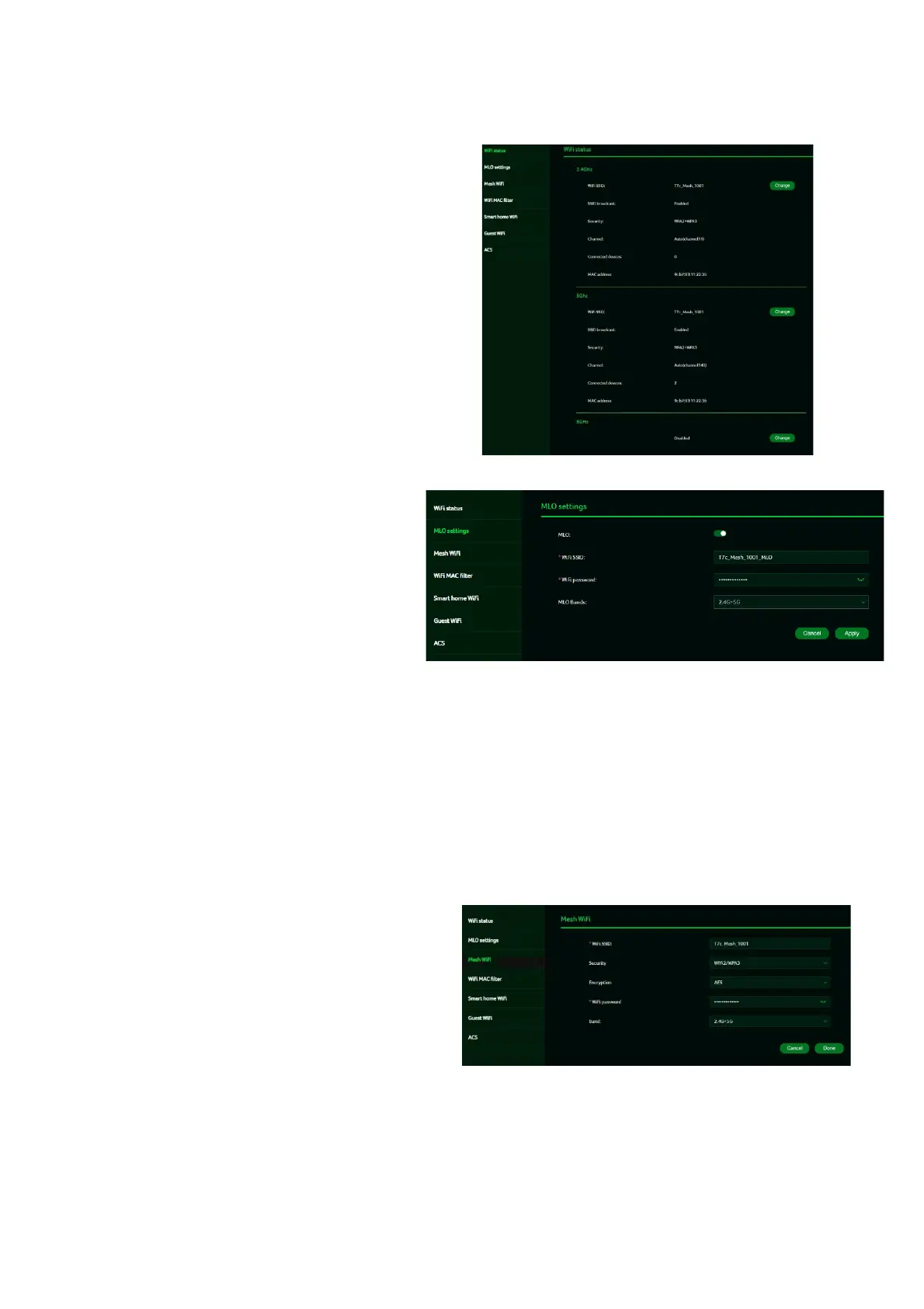
8.1 Wi-Fi Status
Displays key information such as:
• Wi-Fi SSID
• SSID Broadcast
• Security
• Channel
• Connected devices
• Gateway address
• Mac address of 2.4GHz, 5GHz
& 6GHz bands
8.2 MLO Settings
Wi-Fi 7’s MLO (Multi-Link Operation) is
a significant technological
breakthrough. It allows devices to
simultaneously transmit and receive
data across various frequency bands
and channels. This capability enables
the new standard to achieve and
maintain 1ms latency, even for the
most data-intensive real-time
applications.
Connecting to an MLO network
enhances throughput and improves
network efficiency. When the mesh
network is activated, the backhaul
settings between the controller and
the agent default to MLO’s 5G and
6G bands.
8.3 Mesh Wi-Fi (In Mesh Mode)
This tab displays information about the
Mesh Wi-Fi SSID and password.
Band steering is enabled by default,
automatically connecting your devices to
the optimal Wi-Fi frequency in your
environment.



 To Next Page